

Coats: Paint Scan Calculator
SpaceFrog Games, Inc. · Utilities
Independent analytics for this App Store listing. AppTracker is not affiliated with SpaceFrog Games, Inc.
Chart standing · US
In-app purchases · US
What this app sells inside itself, grouped by kind and priced for this storefront.
Screenshots



About
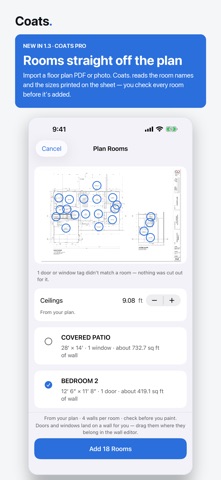
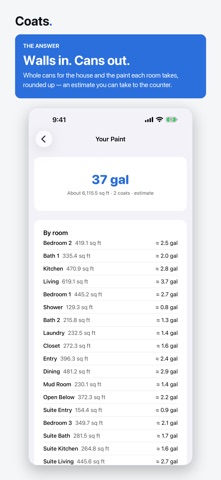
Coats. answers the question that sends you back to the paint counter: how much paint to buy. START FROM THE PLAN New in 1.3: import a floor plan PDF or photo. Coats. reads the room names and the sizes printed on the sheet, marks each one on the plan, and lists them for review — you check every room before it's added. The rooms you keep land in the job as four walls per room, sized by the plan, with doors and windows placed from the plan's own schedule tags. A room the sheet never sized asks you for the size instead of guessing one. The plan is read on your iPhone. Plan import is part of Coats Pro. SCAN INSTEAD OF MEASURE On LiDAR-equipped iPhone Pro models, scan the room instead of typing it in. The scan lands in an editable wall list you review and correct before any quantity is worked out. A scan is a starting point, not the last word — and on any iPhone, entering a wall by hand takes a few taps. Set coats, surface and application method, and Coats. turns the room into a shopping list in whole cans: gallons and quarts you can put in the cart, not a decimal nobody sells. ROOMS, THEN THE WHOLE HOUSE - Group walls into named rooms and estimate the whole job in one pass - Paint and area per room, plus the house total - Every room gets its own line on the client quote THE ANSWER IS THE HEADLINE - A wall list with doors and windows deducted from the paintable area - A to-scale elevation of every wall: drag doors and windows where they actually sit. Placement is visual — it never changes the estimate, which comes from areas alone. - Steppers for coats, a slider for the waste margin, 10% by default - Cans first, set big enough to read across the room BUILT ON PUBLISHED COVERAGE RULES - Spread rate comes off your paint can label, with a conservative default - Surface factors for previously painted walls, primed and bare drywall, texture, bare wood and masonry - Method factors for roller, brush and sprayer - Every factor is documented with its source. They are industry rules of thumb, which is why Coats. calls the number an estimate and rounds toward having enough paint. WHAT'S FREE The calculator is free: unlimited rooms, every surface and method factor, the whole-can shopping list, and the scan. COATS PRO Coats Pro is an auto-renewing subscription that adds the saved job library, the client-ready quote PDF, plan import, and photos, videos and notes on rooms and walls. Offered monthly or annually; the current price is shown in the app before you buy. Payment is charged to your Apple Account at confirmation of purchase, and it renews automatically unless turned off at least 24 hours before the end of the current period. Manage or cancel any time in your Apple Account settings. PRIVATE BY DESIGN - Your measurements, jobs and quotes stay on your device - Job photos, videos and notes stay on your device too - Plans you import are read on your iPhone and stay there - No account. Nothing to sign up for. - No ads. No tracking across apps or websites. Terms of Use: https://www.apple.com/legal/internet-services/itunes/dev/stdeula/ Privacy Policy: https://spacefro.gg/coats/privacy.html Made for advanced DIY painters, working painters, and home designers.
What's new · 1.3
Coats. 1.3 — the fourth coat. - Import a floor plan PDF or photo: Coats. reads the room names and the sizes printed on the sheet and lists them for review — you check every room before it's added - The rooms you keep land as four walls per room, with doors and windows placed from the plan's own schedule tags - A room the plan never sized asks you for the size; a size that looks off is flagged before you commit it - Pick up to five pages out of a drawing set, and the ceiling height printed on the sheet sizes the walls - The plan is read on your iPhone. Plan import is part of Coats Pro. - Walk the walls: step from one wall to the next inside the editor, and clear a job in one action
Details