

JMB Golf Swing Camera
Jeffery Buttitta · Sports
Independent analytics for this App Store listing. AppTracker is not affiliated with Jeffery Buttitta.
Chart standing · US
What changed · US
Listing changes AppTracker has observed for this app in this storefront — new versions, price moves, rating shifts, and store copy.
This update makes swing review and coaching faster and clearer: • Compare two swings with synchronized side-by-side playback • Use Ghost overlay and opacity controls to spot differences • Review swings frame by frame and mark P1–P10 positions • Receive focused AI Coach feedback • Share marked frames, videos, and student analysis • Includes performance and reliability improvements
Ratings breakdown · US
The star breakdown behind this app's rating in this storefront.
Screenshots




About
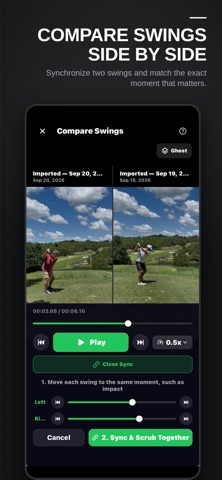
Turn every swing into a better practice session. JMB Golf Swing Camera gives golfers and coaches the tools to capture, review, compare, and share golf swings from one easy-to-use app. Built by a PGA professional, JMB Swing Lab helps you study the moments that matter—from address through impact and finish. CAPTURE SWINGS HANDS-FREE Set up your phone, step into position, and swing. Hands-free capture makes it easier to record practice sessions without repeatedly walking back to the camera. REVIEW EVERY FRAME Slow down your swing, scrub through the video, and move frame by frame to examine the exact moment you want to study. MARK P1–P10 POSITIONS Save the key positions of your swing from address through the complete finish. Return to those positions anytime for faster, more consistent analysis. COMPARE TWO SWINGS Place two swings side by side and synchronize them at the same moment. Scrub both videos together to compare movement, timing, and positions. USE GHOST OVERLAY Overlay one swing on another, adjust the opacity, and align the videos to reveal differences that may be difficult to see in a traditional side-by-side comparison. DRAW AND ANALYZE Add lines, angles, and visual references directly to the swing video. Use slow motion and precise playback controls to make every detail easier to understand. GET FOCUSED AI FEEDBACK AI Coach identifies one visible swing issue and provides a practical correction to help focus your next practice session. AI Coach is a premium feature. CREATE AND SHARE FEEDBACK Share marked frames, save videos to Photos, and send swing analysis to students. Coaches can also create narrated video lessons with visual feedback. BUILT FOR GOLFERS AND COACHES Whether you are working on your own swing or helping a student improve, JMB Golf Swing Camera keeps recording, analysis, comparison, and feedback together in one place. Record. Analyze. Compare. Improve.
What's new · 1.0.9
This update makes swing review and coaching faster and clearer: • Compare two swings with synchronized side-by-side playback • Use Ghost overlay and opacity controls to spot differences • Review swings frame by frame and mark P1–P10 positions • Receive focused AI Coach feedback • Share marked frames, videos, and student analysis • Includes performance and reliability improvements
Details