

Homelore: Home Inventory
JOSHUA JOHN · Lifestyle
Independent analytics for this App Store listing. AppTracker is not affiliated with JOSHUA JOHN.
Chart standing · US
What changed · US
Listing changes AppTracker has observed for this app in this storefront — new versions, price moves, rating shifts, and store copy.
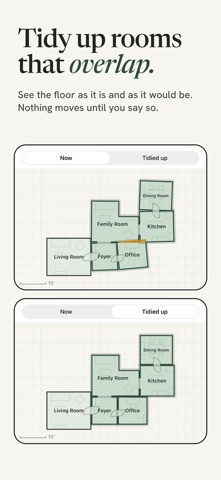
Scan a whole floor in one go. Walk from room to room with the doors open, and Homelore now finds the rooms in the scan and names them. You check the names, tap once, and each room is saved on its own. It also works for a floor you already saved as one room: open it and tap Find Rooms. Rooms that overlap after you connect them can be tidied up. You see the floor as it is and as it would be, and nothing moves until you say so. New rooms you connect are set straight for you. Fixed: Export My Record could stop with a message about the format, and from then on changes to your rooms were not being saved. Export no longer stops there: it gives you everything it can and says plainly if a part is missing. And if Homelore ever can't save, it tells you right away and keeps trying. Also fixed: buttons can be read in dark mode, a room's width and depth are measured along its own walls, and a lookup that fails no longer uses up one of your free identifications. If you scanned or changed rooms shortly before an export failed, check that they are still there after updating. Anything missing was never saved by the earlier version and needs scanning again. We're sorry about that.
In-app purchases · US
What this app sells inside itself, grouped by kind and priced for this storefront.
Screenshots



About
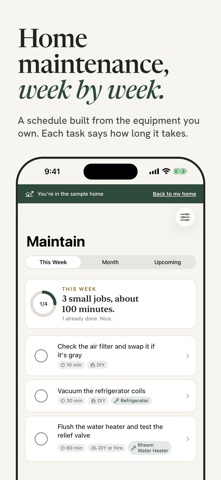
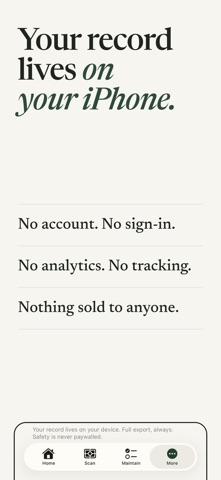
Water is coming through the kitchen ceiling. Where is the shutoff? Almost everything you know about your house lives in your head, a junk drawer, and a folder from the sellers that nobody opened. Homelore turns one walk through your home into a record of it: rooms scanned in 3D, appliances identified from their labels, a maintenance schedule built from the equipment you own, and an emergency mode that knows where your shutoffs are. Walk your house once. Know it forever. THE WALK Scan a room with an iPhone that has LiDAR (iPhone 12 Pro and later Pro models) and it becomes a 3D dollhouse of your house that you can turn with a finger, with floor plans that carry real measurements. Scan a whole floor in one go and Homelore finds the rooms in the scan and names them for you to confirm. Rooms scanned on different visits connect through their doorways. Floors scanned separately can be lined up, and rooms that overlap can be tidied up from a before-and-after picture. No LiDAR on your iPhone? Everything else still works. THE LABEL Point the camera at the label on your water heater or furnace. Homelore reads the brand, model and serial number, then fills in what it can find: when it was made, typical lifespan, the maintenance it needs, a link to the manual, and a check against the federal CPSC recall list. Nothing is written to your record until you confirm it. If the label is scratched, you can type it in by hand. THE SCHEDULE Your equipment becomes a home maintenance schedule, tuned to your climate. Flush the water heater. Check the furnace filter while the heat is running. Each task says how long it takes and whether it is a job for you or for a professional. WHEN IT GOES WRONG Emergency mode is one pull down from the top of any tab and works with no signal at all. Burst pipe, no heat, power out, water in the basement, gas smell: it shows where the shutoffs you marked are, what to do first, and who to call. It is not a substitute for emergency services. If you smell gas, leave first, then call your utility or 911. ALSO • A documents vault for receipts, manuals, warranties and inspection reports • Ask Homelore: ages, filters, parts and what is due, answered from your record and general guidance • A sample house with a guided tour, so you can try everything before you scan anything The recall check, ZIP code lookup and 911 advice are for the United States. WHAT YOU GET FOR FREE • The full 3D scan, dollhouse and floor plans • 5 AI appliance identifications • This week's maintenance, always • Emergency mode and shutoffs • Your documents vault • Full export of everything, any time: JSON, CSV and your original files HOMELORE PREMIUM • Unlimited AI identifications • The whole calendar: the month ahead and everything upcoming • Your insurance inventory report, a room-by-room PDF for your insurer THE HOME DEED A one-time purchase. Everything in Premium, with 200 AI identifications a year. THE COVENANT Your record, your export and your safety features are free forever, no matter what. There is no account and no sign-in. Your record lives on your device. No analytics, no tracking, no third-party SDKs, and nothing sold to anyone. Three optional features talk to one service we run, and only at the moment you use them: appliance identification, Ask Homelore, and the ZIP code lookup of local utility numbers. A home remembers nothing. Homelore does it for you. SUBSCRIPTION TERMS Homelore Premium is $99.99 per year and starts with a one-month free trial. Payment is charged to your Apple Account when the trial ends. The subscription renews automatically each year unless auto-renew is turned off at least 24 hours before the current period ends. Manage or cancel any time in Settings > Apple Account > Subscriptions. The Home Deed is a one-time purchase of $299.99 and does not renew. Terms of Use (EULA): https://www.apple.com/legal/internet-services/itunes/dev/stdeula/ Privacy Policy: https://homelore.app/privacy
What's new · 1.0.3
Scan a whole floor in one go. Walk from room to room with the doors open, and Homelore now finds the rooms in the scan and names them. You check the names, tap once, and each room is saved on its own. It also works for a floor you already saved as one room: open it and tap Find Rooms. Rooms that overlap after you connect them can be tidied up. You see the floor as it is and as it would be, and nothing moves until you say so. New rooms you connect are set straight for you. Fixed: Export My Record could stop with a message about the format, and from then on changes to your rooms were not being saved. Export no longer stops there: it gives you everything it can and says plainly if a part is missing. And if Homelore ever can't save, it tells you right away and keeps trying. Also fixed: buttons can be read in dark mode, a room's width and depth are measured along its own walls, and a lookup that fails no longer uses up one of your free identifications. If you scanned or changed rooms shortly before an export failed, check that they are still there after updating. Anything missing was never saved by the earlier version and needs scanning again. We're sorry about that.
Details