

RoomTape: AR Tape Measure
Alec Bogdan · Utilities
Independent analytics for this App Store listing. AppTracker is not affiliated with Alec Bogdan.
Chart standing · US
What changed · US
Listing changes AppTracker has observed for this app in this storefront — new versions, price moves, rating shifts, and store copy.
YOU CAN FINISH A ROOM SCAN NOW A LiDAR scan had no way to end. The room was detected, the model built as you walked, and the only button was Cancel, so the scan could never be saved. Thank you to the person who wrote in about it. There is now a Done button across the bottom of the scanning screen. Tap it when you are back where you started, name the room, and it saves. The tab bar gets out of the way while you scan, so you can see the model being built. TURN THE PLAN A scan comes back on whatever axis your phone was pointing when you started, so plans often drew on the diagonal. Drag to move, twist to rotate, pinch to zoom, and Straighten squares the longest wall to the screen in one tap. Dimensions stay upright and readable at every angle. SEE THE ROOM IN 3D A 3D tab on every plan, including ones you already saved and ones you traced by hand. Walls at your ceiling height, with the doors and windows cut through them. Drag to turn it, pinch to zoom. WALL BY WALL Every wall on its own row: length, wall area, paintable area, and the doors and windows in it. Tap a row and that wall lights up on the drawing. A room total cannot be split evenly between its walls, because the openings are not spread evenly. Diagonals are there too, with a warning when they disagree and the room is out of square. FURNITURE ON THE PLAN Scans now keep the beds, sofas, refrigerators, sinks and bathtubs RoomPlan recognizes, drawn as footprints on the plan and as blocks in 3D. One switch hides them all, and anything recognized wrongly can be deleted. Furniture changes no measurement: floor area, wall area and the material quantities are the room itself. MORE TOOLS A screen ruler you calibrate once with any bank card, an angle finder for corners and slopes, and an estimator that now covers twelve materials instead of six. Anything sold by thickness takes a depth, so insulation and concrete come out by volume. LANGUAGES RoomTape now speaks Dutch, German and French, with British spelling and units in the UK and Ireland. FIXED Saved plans could disappear when the app updated. They cannot now, and a file the app fails to read is kept rather than replaced. Wall area and floor area were both labelled wall area on the plan screen. Two different numbers under one name. The onboarding animation showed feet everywhere, including in countries that use metres. The subscription screen had a duplicated word in its button and one untranslated word on the plan cards.
In-app purchases · US
What this app sells inside itself, grouped by kind and priced for this storefront.
Screenshots


About
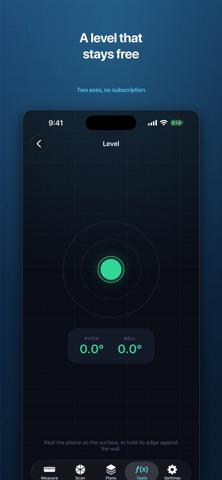
Point your iPhone at a wall and get the number. Walk a room and get its floor plan. RoomTape is a tape measure that draws. Tap two points for a distance, trace a room to get its floor area, or, on an iPhone Pro, scan the whole room with LiDAR and let RoomTape find the walls, doors, windows and ceiling height on its own. Then it does the part other measuring apps stop before: it tells you what to buy. MEASURE ANYTHING • Distance: aim, tap, aim, tap • Room: walk the corners, get the floor area and perimeter • Height: walls, worktops, doorways, shelves • Live readout that updates as you move, with a tracking indicator that tells you when the number can be trusted SCAN A ROOM IN ABOUT A MINUTE On a LiDAR device, hold the phone up and walk the walls. RoomTape captures the room and turns it into a real floor plan: walls with thickness, doors with their swing, windows, and the ceiling height. No tapping corner by corner. No LiDAR? Everything else works on any ARKit iPhone, and Room mode traces a plan by hand. A PLAN THAT LOOKS LIKE A PLAN • Dimensions on every wall • Doors and windows drawn into the walls • Multiple rooms in one plan, with a running square-foot total • Floor area, perimeter, volume, and wall area with the doors and windows already subtracted WHAT TO ORDER, NOT JUST WHAT IT MEASURES Paint, drywall, flooring, tile, wallpaper, baseboard, primer, insulation, studs, underlay, grout and concrete. RoomTape works the quantity out from the walls you just measured, paint over the paintable area, baseboard minus the doorways, and shows the arithmetic so you can check it before you spend money. FEET AND INCHES, PROPERLY Meters, decimal feet, or feet with real fractional inches down to sixteenths. 8' 0 1/8", not 8.01 ft. Rounding is yours to set. FREE TOOLS, NO CATCH A two-axis bubble level, a screen ruler you calibrate once with any bank card, an angle finder, and a converter that speaks fractional inches. All free, always. SEND IT ON • PDF of the dimensioned drawing with the numbers underneath • DXF for CAD, opens at true scale in AutoCAD, SketchUp and Fusion • CSV of every wall, opening and reading NOTHING LEAVES YOUR PHONE No account. No sign-up. No server. Your plans are stored on your iPhone and nowhere else, and the app works with no signal at all. WHAT'S FREE Measuring, room scanning, the level, the ruler, the angle finder, the converter and your first five saved plans cost nothing. Plans you have already saved stay open and editable whether or not you ever subscribe. We don't hold your own work hostage. ROOMTAPE PRO Pro adds PDF, DXF and CSV export, the material calculators, and unlimited saved plans. • Monthly, billed every month • Yearly, billed once a year, with a 3-day free trial for eligible new subscribers • Lifetime, a single payment, no renewal Payment is charged to your Apple Account when you confirm the purchase. Subscriptions renew automatically unless cancelled at least 24 hours before the end of the current period. Manage or cancel any time in your Apple Account settings. The Lifetime option is a one-time purchase and does not renew. Prices vary by country or region. A NOTE ON ACCURACY AR and LiDAR measurements are close, not exact. Lighting, glass, mirrors and featureless walls all reduce accuracy. Check any critical dimension with a physical tape before you cut material or commit to a price. Privacy Policy: https://trainpaw-six.vercel.app/legal/roomtape/privacy/ Terms of Use: https://trainpaw-six.vercel.app/legal/roomtape/terms/
What's new · 1.0.4
YOU CAN FINISH A ROOM SCAN NOW A LiDAR scan had no way to end. The room was detected, the model built as you walked, and the only button was Cancel, so the scan could never be saved. Thank you to the person who wrote in about it. There is now a Done button across the bottom of the scanning screen. Tap it when you are back where you started, name the room, and it saves. The tab bar gets out of the way while you scan, so you can see the model being built. TURN THE PLAN A scan comes back on whatever axis your phone was pointing when you started, so plans often drew on the diagonal. Drag to move, twist to rotate, pinch to zoom, and Straighten squares the longest wall to the screen in one tap. Dimensions stay upright and readable at every angle. SEE THE ROOM IN 3D A 3D tab on every plan, including ones you already saved and ones you traced by hand. Walls at your ceiling height, with the doors and windows cut through them. Drag to turn it, pinch to zoom. WALL BY WALL Every wall on its own row: length, wall area, paintable area, and the doors and windows in it. Tap a row and that wall lights up on the drawing. A room total cannot be split evenly between its walls, because the openings are not spread evenly. Diagonals are there too, with a warning when they disagree and the room is out of square. FURNITURE ON THE PLAN Scans now keep the beds, sofas, refrigerators, sinks and bathtubs RoomPlan recognizes, drawn as footprints on the plan and as blocks in 3D. One switch hides them all, and anything recognized wrongly can be deleted. Furniture changes no measurement: floor area, wall area and the material quantities are the room itself. MORE TOOLS A screen ruler you calibrate once with any bank card, an angle finder for corners and slopes, and an estimator that now covers twelve materials instead of six. Anything sold by thickness takes a depth, so insulation and concrete come out by volume. LANGUAGES RoomTape now speaks Dutch, German and French, with British spelling and units in the UK and Ireland. FIXED Saved plans could disappear when the app updated. They cannot now, and a file the app fails to read is kept rather than replaced. Wall area and floor area were both labelled wall area on the plan screen. Two different numbers under one name. The onboarding animation showed feet everywhere, including in countries that use metres. The subscription screen had a duplicated word in its button and one untranslated word on the plan cards.
Details