

Accelerating Metronome
Steve Ball · Music
Independent analytics for this App Store listing. AppTracker is not affiliated with Steve Ball.
Chart standing · US
What changed · US
Listing changes AppTracker has observed for this app in this storefront — new versions, price moves, rating shifts, and store copy.
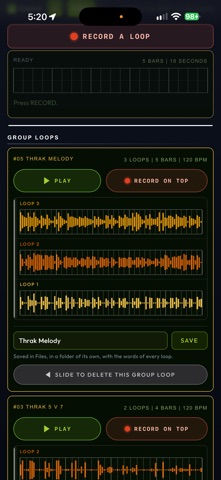
This is v1.5 of Accelerating Metronome. 'Group Loops' is the heart of it. GROUP LOOPS Group Loops is a flexible audio scratch pad for recording and layering parts you are working on, like Playlists in Pro Tools, in increments known as Loops. Press RECORD A LOOP and play or sing a part. Every time the bar comes round you can record another Loop. Each one lasts precisely the bars and time signature you specify, and is auto-saved to your iPhone Files the moment it is complete. Lyrics (or spoken words) are also transcribed as you go so you'll never lose a vocal idea as it flies by. Keep playing and the Loops keep building, as many as you want, up to 10 total. It records Loops until you press STOP. Any Loop short of its full length is abandoned. FLEXIBLE TIME SIGNATURE, FLEXIBLE NUMBER OF BARS The Time Sig buttons are 2 through 9, and the # button at the end lets you select any meter from 2 to 16 beats per measure. The Bars buttons are 4, 8, 16, 24 and 32, and its # button lets you choose any number from 2 to 40. Both settings are used during Group Loops recording, and they are separate from the TIME SIGNATURE on the Metronome body. These are more flexible in Group Loops so you can practice in 4 or build a Loop in 7. Or 13. Or 19. Together they enable a max of 3 minutes per Loop. While a Loop is being recorded, the click follows the Loop's Time Sig. Example: you can setup a Group Loop for THRAK with 5 bars of 7 (and 7 bars of 5) and record both parts in different loops to practice timing, arrangements, voicing, solos. Or even vocals. Any combination of Bars and Time Sig that goes past three minutes per Loop is dimmed in the drop down lists. BUILDING a GROUP LOOP After you've recorded a Loop, you can press RECORD ON TOP and the next one is recorded in sync, with everything already in the Group Loop playing underneath. With each new Loop, you can add new parts, counterpoint, harmony, octaves, or whatever you wish on top. Up to ten Loops play back together per Group Loop. Tap any Loop to MUTE it, press and hold to SOLO it, slide any of them left to delete. Every Loop can be slid away now, not just the newest. AUDITION An Audition button is next to the Input volume slider. Press it and you hear exactly what RECORD A LOOP is about to play when you hit Record: your Tempo, your Time Sig, your Sound Bank, Variations and Beat Map. You can adjust or practice with any of them before you commit to record your first Loop. SETTING UP Loop Playback is the last setting box, and you can choose there whether to hear the Metronome click with a Loop while it's playing. Or you can hear only your Loop. Tap the Tempo box and type a Tempo instead of stepping the BPM with the arrow buttons. If no Variation is set you can SPIN to let Variations Roulette deliver a surprising texture to record with. You can audition, keep or discard a Variation without leaving Group Loops. You can Turn ON or Turn OFF Variations and Beat Map at any time while you are recording. The Count In checkbox gives you a customizable way to know when to begin playing. If you Delete a Loop or a Group Loop, you can Undo it with a button at the end of the page. THE TUNER now TRANSPOSES for Orchestral Instruments Chromatic setting opens a new row called "MY INSTRUMENT IS IN" with C, Bb, Eb and F, so Brass and Wind players can tune while honoring their instruments' inherent transposition. It changes the names of the notes and nothing else: the pitch, the needle and the cents stay concert pitch. A trumpet player tuning to Bb now sees Bb. And, mostly: have fun. I'm experimenting with tools to deepen your engagement AND to enable easier writing, composing, learning, improvising, singing, playing in time and playing with others, with way more than just a box that makes a click. As always, your feedback, feature ideas, bugs and observations are most welcome.
Price & rating history · US
Reconstructed from the listing changes AppTracker has observed in this storefront. A field is charted once it has changed more than once, and each line starts at the value it moved from.
Average rating · ★ 5.00 now · 3 changes on record
Ratings breakdown · US
The star breakdown behind this app's rating in this storefront.
In-app purchases · US
No in-app purchases.
Screenshots





Keywords this app targets
Search terms AppTracker associates with this app — estimates, not search volume. ❝ = in the app's title; a highlighted number is its current position for that term.
Similar apps
Competitors and close alternatives, as estimated by AppTracker.





About
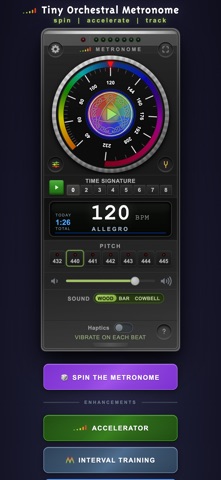
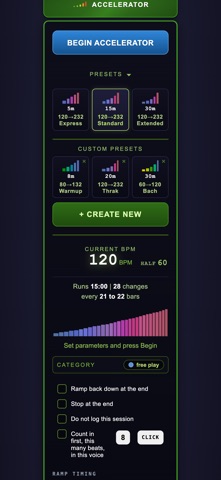
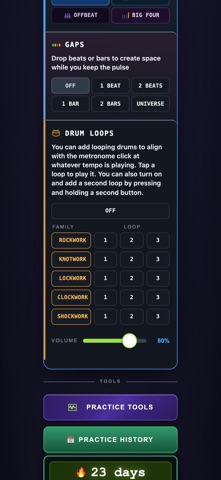
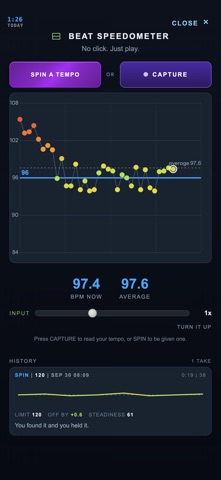
Most metronomes only keep a tempo. This one accelerates gradually while you play, and remembers every minute you practice. Accelerating Metronome is a practice instrument, made by a working musician in Seattle over forty years of daily practice. This is not what a product committee would have asked for. It is a cross between a Stairmaster and Duolingo. Designed to motivate you to keep going and growing in your practice. ACCELERATOR Choose a beginning tempo, a target, and how long you want to practice. It climbs the Ramp in steps, so you invest your time playing rather than reaching for the Dial. When it reaches the target it keeps going at that tempo, and extra time is counted separately as Play Time. Practice and playing are not the same thing. And are not counted as if they were. Save and name your own Custom Ramps. PEAK SPEED Mark the tempo where you hit a wall so you have a visual record of your limits. We graph your Peak Speed(s) so you can see your progress. SPIN THE METRONOME Press this and let the Universe choose a tempo for you. Practicing only at the tempos you like is how blind spots appear. And this is the cure. Spin the Metronome before a Group Rehearsal to bring everyone into listening and warming up together beginning with a cue from the Muse. PRACTICE HISTORY: YOUR PRACTICE, VISUALIZED OVER TIME Every session is documented: when, how long, which tempos, and what you were working on. Name your own Categories and each one has its own color. The Calendar shows a month at a glance, with Celebrations and Gold after you have completed a full hour of practice. STREAKS + CELEBRATIONS A Streak counts the days in a row you practiced. Momentum may motivate you to pick up the instrument on an evening you had decided not to. And practice more than an hour every day from Sunday to Saturday and the whole week is celebrated in Gold. A ROCK SOLID METRONOME Tempo is set from a rotary dial you drag with your thumb, the way a hardware tempo wheel works. Three default voices with ten alt Sound Banks deliver a wide variety of sounds. Select a Time Signature, and the downbeat gets its own sound. An integrated Tuner and Tuning references from 432 to 445. TAP TEMPO + TYPE TEMPO Tap the BPM Window, and the tempo changes to what you tap. Press and hold to type in a tempo. MIXING The click plays over (or under) your other app's sound, music, podcasts, or a backing track without interruption. The Metronome keeps going when you switch apps or the screen locks. Beats align with the audio hardware's clock rather than a timer, so nothing drifts while you are not looking. Optional Haptics let you feel the Beat, the screen stays awake while it plays, and a Loudness Booster doubles the click volume. UNIQUE PRACTICE TOOLS Beat Map is a grid where you choose 1, 2 or 3 sounds per beat, and save your Maps by name. Group Loops captures and layers what you play, cut at the bar lines, as WAVs. Beat Oscilloscope lets you see where you play relative to the click. Beat Speedometer tells you the tempo you are actually keeping, worked out from the gaps between your sounds. Or press SPIN, let the Universe name a tempo, and find it from memory with nothing to hear. FLEXIBLE SETTINGS Display Size with three choices, for easier reading. High and Low Pass filters shape the click. YOURS, PRIVATE No account, no login, no shared analytics, no advertising, no tracking, no subscription. You buy it once. Your Practice History is only on your phone. Only two features send data, and both are OFF unless you turn them on: 1. Leaderboard, where you choose the name that appears, and 2. Find Quotes online, which sends a musician or artist name you type to Wikiquote. You can back up your practice history to your own Files or iCloud Drive whenever you like, in a plain file you can read, and import it onto a new device. It works offline. Portrait or landscape. In English, Spanish, Italian. An accelerating practice tool, to grow and visualize your work over time.
What's new · 1.5
This is v1.5 of Accelerating Metronome. 'Group Loops' is the heart of it. GROUP LOOPS Group Loops is a flexible audio scratch pad for recording and layering parts you are working on, like Playlists in Pro Tools, in increments known as Loops. Press RECORD A LOOP and play or sing a part. Every time the bar comes round you can record another Loop. Each one lasts precisely the bars and time signature you specify, and is auto-saved to your iPhone Files the moment it is complete. Lyrics (or spoken words) are also transcribed as you go so you'll never lose a vocal idea as it flies by. Keep playing and the Loops keep building, as many as you want, up to 10 total. It records Loops until you press STOP. Any Loop short of its full length is abandoned. FLEXIBLE TIME SIGNATURE, FLEXIBLE NUMBER OF BARS The Time Sig buttons are 2 through 9, and the # button at the end lets you select any meter from 2 to 16 beats per measure. The Bars buttons are 4, 8, 16, 24 and 32, and its # button lets you choose any number from 2 to 40. Both settings are used during Group Loops recording, and they are separate from the TIME SIGNATURE on the Metronome body. These are more flexible in Group Loops so you can practice in 4 or build a Loop in 7. Or 13. Or 19. Together they enable a max of 3 minutes per Loop. While a Loop is being recorded, the click follows the Loop's Time Sig. Example: you can setup a Group Loop for THRAK with 5 bars of 7 (and 7 bars of 5) and record both parts in different loops to practice timing, arrangements, voicing, solos. Or even vocals. Any combination of Bars and Time Sig that goes past three minutes per Loop is dimmed in the drop down lists. BUILDING a GROUP LOOP After you've recorded a Loop, you can press RECORD ON TOP and the next one is recorded in sync, with everything already in the Group Loop playing underneath. With each new Loop, you can add new parts, counterpoint, harmony, octaves, or whatever you wish on top. Up to ten Loops play back together per Group Loop. Tap any Loop to MUTE it, press and hold to SOLO it, slide any of them left to delete. Every Loop can be slid away now, not just the newest. AUDITION An Audition button is next to the Input volume slider. Press it and you hear exactly what RECORD A LOOP is about to play when you hit Record: your Tempo, your Time Sig, your Sound Bank, Variations and Beat Map. You can adjust or practice with any of them before you commit to record your first Loop. SETTING UP Loop Playback is the last setting box, and you can choose there whether to hear the Metronome click with a Loop while it's playing. Or you can hear only your Loop. Tap the Tempo box and type a Tempo instead of stepping the BPM with the arrow buttons. If no Variation is set you can SPIN to let Variations Roulette deliver a surprising texture to record with. You can audition, keep or discard a Variation without leaving Group Loops. You can Turn ON or Turn OFF Variations and Beat Map at any time while you are recording. The Count In checkbox gives you a customizable way to know when to begin playing. If you Delete a Loop or a Group Loop, you can Undo it with a button at the end of the page. THE TUNER now TRANSPOSES for Orchestral Instruments Chromatic setting opens a new row called "MY INSTRUMENT IS IN" with C, Bb, Eb and F, so Brass and Wind players can tune while honoring their instruments' inherent transposition. It changes the names of the notes and nothing else: the pitch, the needle and the cents stay concert pitch. A trumpet player tuning to Bb now sees Bb. And, mostly: have fun. I'm experimenting with tools to deepen your engagement AND to enable easier writing, composing, learning, improvising, singing, playing in time and playing with others, with way more than just a box that makes a click. As always, your feedback, feature ideas, bugs and observations are most welcome.
Details