

Milky Way Scout
Steven smith · Photo & Video
Independent analytics for this App Store listing. AppTracker is not affiliated with Steven smith.
Chart standing · US
What changed · US
Listing changes AppTracker has observed for this app in this storefront — new versions, price moves, rating shifts, and store copy.
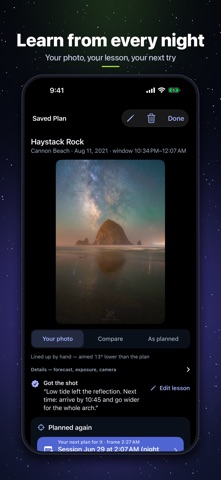
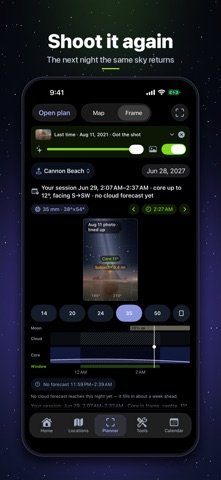
Plan the exact frame — then keep what you shot, and shoot it again. • Frame planner. See your composition before you go: the Milky Way, the core and the stars inside your lens's frame, over your skyline. Drag to aim, pinch to zoom, pick 14–50 mm, full frame or crop, portrait or landscape. • Subject pin. Drop a pin on a peak, an arch or a sea stack and see the minute the core stands over it. • The night on one strip. Moon, cloud, the core's height and your shooting window on one timeline — scrub to any minute. • Sessions. Plan just the part of the night you will shoot, like the hour before dawn; the score, forecast and reminders follow that session. • Saved plans keep the frame. Camera spot, minute, aim and lens come back exactly, even offline. Save variations of the same night. • How did it go? Log the night in one tap, write what you learned, and add your photo. You choose it with Apple's photo picker — the app never reads your library, and your photo stays on your device. Panoramas and large TIFF or HEIC originals are welcome. • Your photo over the plan. Compare lays your photograph over the planned sky by camera geometry. Line it up by hand to see how your aim differed, like "aimed 13° lower than the plan." • Shoot it again. "When it lines up next" finds the next night the same sky returns over your frame, in full darkness with the Moon out of the way — and brings your last photo and lesson with it. • Reminders for a plan: the afternoon of the night and 90 minutes before your frame. Each plan shows exactly which reminders are waiting. • Next Plan widget: your next plan on the Home Screen and Lock Screen, with its session start and frame time. • Trips and Compare: find the best nights in a row across your places, or see three places side by side for the next seven nights. • Field brief: the whole plan as plain text, to share or keep at the trailhead. • iPad: map and frame side by side. Larger text, small phones and VoiceOver reworked throughout. As always: no account, no ads, no tracking. The sky, the Moon and your plans are worked out on your device.
In-app purchases · US
What this app sells inside itself, grouped by kind and priced for this storefront.
Screenshots






About
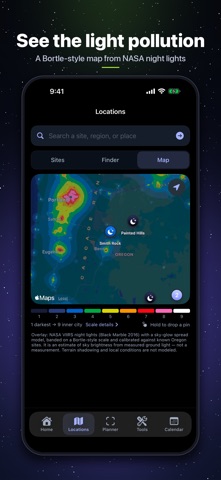
Is tonight worth the drive? Milky Way Scout gives you a plain Go, Marginal or Stay-home call for the galactic core, with the exact shooting window, the Moon and the cloud forecast. Then it helps you frame the shot, find darker skies, and learn from every night you shoot. Free for 7 days, then one optional one-time unlock. No subscription, no account, no ads, no tracking. TONIGHT'S CALL • A Go / Marginal / Stay-home verdict from the core's height, true darkness, the Moon and cloud cover • The exact shooting window where you are, with a countdown and which way to face • Cloud cover sampled across your window, not a nightly average, and cross-checked by a second forecast in the U.S. • Dew risk, cloud layers and fog, and the next good night when tonight isn't it FRAME THE SHOT See your composition before you go: the Milky Way, the core and the stars inside your lens's frame, over your skyline. Drag to aim, pinch to zoom, choose 14–50 mm, full frame or crop, portrait or landscape. Drop a subject pin on a peak or a sea stack to see the minute the core stands over it, and plan just the session you'll shoot. KEEP WHAT YOU SHOT Log how each night went, write the lesson, and add your photo. Compare lays it over the planned sky by camera geometry, and Line it up records how your real aim differed. You pick it with Apple's photo picker; the app never reads your library. SHOOT IT AGAIN "When it lines up next" finds the next night the same sky returns over your saved frame, in full darkness with the Moon out of the way, and brings your last photo and lesson with it. Plan reminders arrive the afternoon of the night and 90 minutes before your frame. 7-NIGHT OUTLOOK AND TRIPS Every night of the week scored the same way, three places side by side, and the best nights in a row across your places, saved as one trip. VISIBILITY CALENDAR Every night of the year graded for your exact location, with new Moons marked. Save nights and plans with names and field notes. DARK SKY FINDER Darker ground within 30 to 150 miles, ranked by darkness, tonight's clouds and distance, with driving and leave-by times. 131 DarkSky International places are starred. LIGHT POLLUTION MAP A Bortle-style map built from NASA VIIRS night lights with a sky-glow model. Touch and hold anywhere to read a spot and save it. MAP PLANNER, SKY VIEW AR + CORE ALIGNMENT Drag a camera pin over satellite imagery and scrub through the night. Point your phone at the foreground to see where the core, planets and constellations will be, and find the nights the core stands over a ridge. WIDGETS AND ALERTS Home Screen and Lock Screen widgets for tonight's call and your next plan. Optional good-night alerts on Good and Excellent nights. ALL YEAR, NOT JUST CORE SEASON When the core is away, plan Andromeda, the Pleiades and Orion. An all-sky dome shows what's up at any hour. FIELD TOOLS An NPF and pixel-drift exposure calculator for 74 camera bodies, red night mode, a gear checklist, guides and a shareable field brief. FREE TO TRY, ONE UNLOCK Everything is unlocked for your first 7 days. After that the verdict, outlook, calendars, frame planner, photo journal, reminders, light-pollution map, sky dome, widgets and tools stay free. One purchase unlocks the Dark Sky Finder, the map planner and Sky View AR with core alignment, forever. If you bought Milky Way Scout when it was a paid app, everything stays unlocked. HONEST BY DESIGN Darkness values are estimates and say so. Cached forecasts show their age. The AR overlay is a planning aid, not a pointing instrument. Your locations, plans and photos stay on your device. The in-app Privacy page lists every request and what it sends. Works on iPhone and iPad. Darkness, Moon and core timing are calculated on your device. Forecasts: NOAA/NWS in the U.S., MET Norway (CC BY 4.0) worldwide, and NOAA/SWPC for space weather. Always check smoke, roads and hazards before you travel.
What's new · 1.5
Plan the exact frame — then keep what you shot, and shoot it again. • Frame planner. See your composition before you go: the Milky Way, the core and the stars inside your lens's frame, over your skyline. Drag to aim, pinch to zoom, pick 14–50 mm, full frame or crop, portrait or landscape. • Subject pin. Drop a pin on a peak, an arch or a sea stack and see the minute the core stands over it. • The night on one strip. Moon, cloud, the core's height and your shooting window on one timeline — scrub to any minute. • Sessions. Plan just the part of the night you will shoot, like the hour before dawn; the score, forecast and reminders follow that session. • Saved plans keep the frame. Camera spot, minute, aim and lens come back exactly, even offline. Save variations of the same night. • How did it go? Log the night in one tap, write what you learned, and add your photo. You choose it with Apple's photo picker — the app never reads your library, and your photo stays on your device. Panoramas and large TIFF or HEIC originals are welcome. • Your photo over the plan. Compare lays your photograph over the planned sky by camera geometry. Line it up by hand to see how your aim differed, like "aimed 13° lower than the plan." • Shoot it again. "When it lines up next" finds the next night the same sky returns over your frame, in full darkness with the Moon out of the way — and brings your last photo and lesson with it. • Reminders for a plan: the afternoon of the night and 90 minutes before your frame. Each plan shows exactly which reminders are waiting. • Next Plan widget: your next plan on the Home Screen and Lock Screen, with its session start and frame time. • Trips and Compare: find the best nights in a row across your places, or see three places side by side for the next seven nights. • Field brief: the whole plan as plain text, to share or keep at the trailhead. • iPad: map and frame side by side. Larger text, small phones and VoiceOver reworked throughout. As always: no account, no ads, no tracking. The sky, the Moon and your plans are worked out on your device.
Details