

Contour — Ambient Morph Synth
Chih Han Lin · Music
Independent analytics for this App Store listing. AppTracker is not affiliated with Chih Han Lin.
Chart standing · US
What changed · US
Listing changes AppTracker has observed for this app in this storefront — new versions, price moves, rating shifts, and store copy.
Exports from your DAW come out clean, and a MIDI keyboard plugged into the app finally plays it. In the app • A MIDI keyboard plays Contour. It never did: every message from an external controller was misread and dropped. • Recordings play back at the speed and pitch you played them. On most iPhones they came out about three times slower and more than an octave and a half low. • Sound comes back after a phone call, Siri, an alarm, or plugging in headphones. Before, the instrument stayed silent until you quit and reopened it. • Stopping a recording no longer freezes the screen, and a recording that fails says so instead of doing nothing. • One damaged sheet file no longer hides every sheet you have baked. • Previewing and baking a sheet takes about half the time. • With nothing playing, nothing recording and no keyboard connected, Contour no longer keeps running in the background. With a keyboard connected it plays on as before. • VoiceOver can buy Pro, restore a purchase, and close the Pro and Settings panels. None of their buttons could be reached before. With a keyboard, in the app and in a host • Playing legato no longer cuts off the note you are holding when you lift the one before it. • Pitch bend returns to the note when the wheel comes back. In the app it used to climb further with every message. • In the plug-in, the sustain pedal, pitch bend and aftertouch all work, and stopping the transport releases every held note. In a host • Exports and bounces are clean. A host renders an export much faster than real time and Contour could not keep up, so most of the file was silence broken by fragments of sound. It now renders at whatever speed the host asks, and the same project exports the same way every time. • Exports keep the release and the reverb tail instead of cutting them off where the region ends. • Notes land where the host places them. They were moved to the start of each buffer — up to 85 ms early in a large one. • Automation ramps sweep instead of jumping straight to the end. • Latency stays the same from the moment the plug-in loads, and long sessions over Bluetooth or USB audio no longer start to drop out. • Deleting a sheet you baked no longer silences the one that is playing, and a saved project always reopens on the sheet it was saved with. Thank you to the player who wrote in about exports.
Ratings breakdown · US
The star breakdown behind this app's rating in this storefront.
Screenshots

About
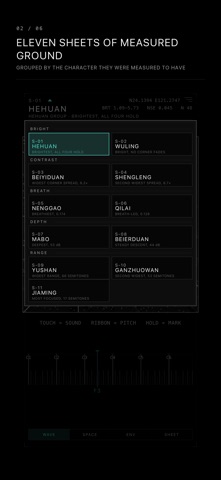
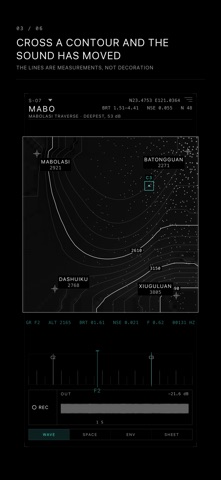
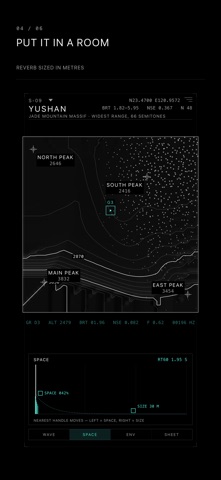
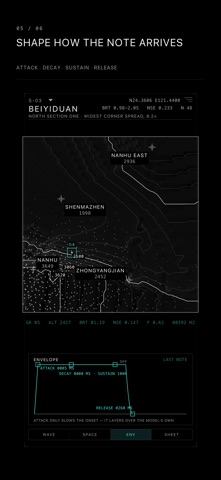
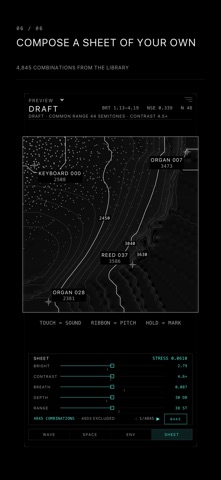
Contour is an instrument you play by walking. Four neural decoders sit at the corners of a square. Your finger somewhere in the middle is a blend of all four, and the square is drawn as a survey sheet. The contour lines are not decoration. They come from what those four decoders actually produce, laid out so that equal distances on screen are equal perceptual distances in sound. Cross a line and the sound has changed by a measured amount. THE SHEETS Eleven of them, each a different set of four corners, each chosen by measuring the whole library rather than by ear. They are grouped by what the measurement found: BRIGHT — HEHUAN, the brightest, where all four corners hold their own. CONTRAST — BEIYIDUAN, the widest corner spread at 8.2 times. BREATH — NENGGAO, the breathiest. DEPTH — MABO, the deepest at 53 dB. RANGE — YUSHAN, the widest at 66 semitones; JIAMING, the most focused at 17. They are named after Taiwan's high mountain traverses. PLAYING IT Touch the sheet to sound it. The ribbon underneath sets pitch, or send MIDI and play it from a keyboard. Press harder and the note opens up — the contact patch of your finger is the dynamic. Hold on empty ground to drop a mark you can come back to. The readout above the ribbon tells you where you are while you are there: brightness, noise, the grid reference, the frequency. IN A HOST Contour is also an AUv3 plug-in. It runs in AUM, GarageBand, Cubasis, Logic for iPad and anything else that hosts Audio Units, with the position automatable as two parameters and the sheet recallable with your session. The plug-in draws the same map the app does, laid out for the window a host gives it. WHAT IS FREE Three sheets — BEIYIDUAN, NENGGAO and YUSHAN — with the whole instrument: the map, the ribbon, MIDI, reverb, marks, and the plug-in. No time limit and no account. CONTOUR PRO A single purchase, once, unlocks: • All eleven sheets • Recording, straight to a file • The envelope panel — attack, decay, sustain, release • Composing sheets of your own from the library, 4,845 combinations of four corners, with the map baked for the pitches they share Requires iOS 16 or later. iPhone and iPad.
What's new · 1.0.4
Exports from your DAW come out clean, and a MIDI keyboard plugged into the app finally plays it. In the app • A MIDI keyboard plays Contour. It never did: every message from an external controller was misread and dropped. • Recordings play back at the speed and pitch you played them. On most iPhones they came out about three times slower and more than an octave and a half low. • Sound comes back after a phone call, Siri, an alarm, or plugging in headphones. Before, the instrument stayed silent until you quit and reopened it. • Stopping a recording no longer freezes the screen, and a recording that fails says so instead of doing nothing. • One damaged sheet file no longer hides every sheet you have baked. • Previewing and baking a sheet takes about half the time. • With nothing playing, nothing recording and no keyboard connected, Contour no longer keeps running in the background. With a keyboard connected it plays on as before. • VoiceOver can buy Pro, restore a purchase, and close the Pro and Settings panels. None of their buttons could be reached before. With a keyboard, in the app and in a host • Playing legato no longer cuts off the note you are holding when you lift the one before it. • Pitch bend returns to the note when the wheel comes back. In the app it used to climb further with every message. • In the plug-in, the sustain pedal, pitch bend and aftertouch all work, and stopping the transport releases every held note. In a host • Exports and bounces are clean. A host renders an export much faster than real time and Contour could not keep up, so most of the file was silence broken by fragments of sound. It now renders at whatever speed the host asks, and the same project exports the same way every time. • Exports keep the release and the reverb tail instead of cutting them off where the region ends. • Notes land where the host places them. They were moved to the start of each buffer — up to 85 ms early in a large one. • Automation ramps sweep instead of jumping straight to the end. • Latency stays the same from the moment the plug-in loads, and long sessions over Bluetooth or USB audio no longer start to drop out. • Deleting a sheet you baked no longer silences the one that is playing, and a saved project always reopens on the sheet it was saved with. Thank you to the player who wrote in about exports.
Details