

Nudgy: reminder
梓豪 成 · Utilities
Independent analytics for this App Store listing. AppTracker is not affiliated with 梓豪 成.
Chart standing · US
What changed · US
Listing changes AppTracker has observed for this app in this storefront — new versions, price moves, rating shifts, and store copy.
• New “After completion” option in custom repeat settings: schedule the next reminder a set number of days or weeks from the day you confirm completion, keeping the original time of day. • Customize your three go-to snooze durations in Settings. • Search history by title to find past tasks faster. • Review an individual reminder’s last 7 or 30 days, including scheduled times, confirmed completion times, and missed occurrences. • Improved Smart Capture recognition of dates, times, and repeat rules, with more responsive voice input. • Fixed cases where recurring reminders could be incorrectly marked complete, and improved reliability when stopping, snoozing, and restoring reminders. To use “After completion,” update every device on the same iCloud account to version 1.2.13 or later.
Ratings breakdown · US
The star breakdown behind this app's rating in this storefront.
In-app purchases · US
What this app sells inside itself, grouped by kind and priced for this storefront.
Screenshots




About
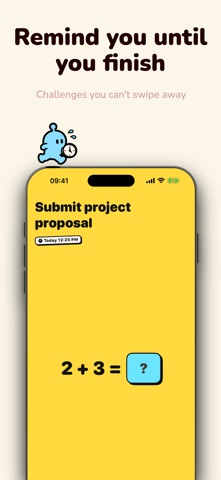
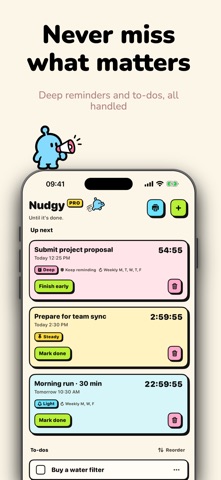
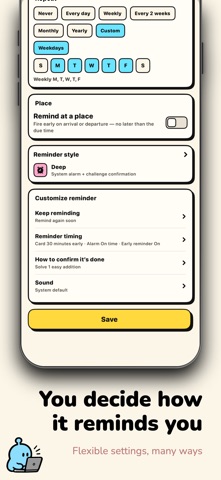
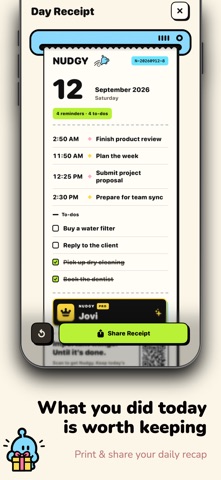
The problem with most reminder apps isn't accuracy—it's how easy they are to swipe away. You tap dismiss, get busy, and completely forget. Nudgy's logic is simple: pressing Stop isn't done. You're only done when it's actually finished. Pick the right level for each task: • Light: a simple notification. Great for quick replies or picking up groceries. • Steady: notification + a persistent countdown on the Lock Screen and Dynamic Island. Perfect for upcoming meetings or heading out the door. • Deep: rings like a system alarm and cuts through Silent mode. Built for medication, deadlines, and the things you can't afford to put off. Pressed Stop? It's coming back. When a Deep reminder rings, Stop only silences it for now. You have to open the app and complete a quick confirmation (hold for 3 seconds, or solve a simple sum). If you haven't actually finished, it rings again after a quiet moment—until you do. Your history shows how many times it had to chase you. Say it once, it's captured. • Smart Capture: say "hand in the proposal tomorrow at 3pm, every Friday" and Nudgy parses the time, duration, and repeat rule, with a preview before saving. • To-do list: anything without a time becomes a to-do. Drag to reorder, tick when done. • Place reminders: get notified when you arrive at or leave a place—Deep works here too. • Widgets & Lock Screen: see your next reminder and to-dos on the Home Screen and Lock Screen. • Import from Apple Reminders in one tap. Create with Siri Shortcuts. Finish a task, grow your planet. Every confirmed finish adds mass to the little planet in Stats—from dust and clumps to planetesimals and full planets. Misses never subtract mass. No broken streaks, no guilt—just steady proof of getting things done. At the end of the day, print a receipt of everything you finished and save or share it. Free and Nudgy PRO • Free, forever: to-dos, Light, Steady, and up to 2 active Deep reminders. • Nudgy PRO unlocks: unlimited Deep reminders, unlimited Smart Capture, place reminders, and every alarm tone. • Monthly, Yearly (7-day free trial), or Lifetime. Prices shown in the App Store. • No ads, no third-party tracking • Reminders and history sync via private iCloud by default • Privacy Policy: https://www.nudgy.one/privacy • Terms of Use: https://www.apple.com/legal/internet-services/itunes/dev/stdeula/ Until it's done.
What's new · 1.2.13
• New “After completion” option in custom repeat settings: schedule the next reminder a set number of days or weeks from the day you confirm completion, keeping the original time of day. • Customize your three go-to snooze durations in Settings. • Search history by title to find past tasks faster. • Review an individual reminder’s last 7 or 30 days, including scheduled times, confirmed completion times, and missed occurrences. • Improved Smart Capture recognition of dates, times, and repeat rules, with more responsive voice input. • Fixed cases where recurring reminders could be incorrectly marked complete, and improved reliability when stopping, snoozing, and restoring reminders. To use “After completion,” update every device on the same iCloud account to version 1.2.13 or later.
Details