

Eclipse Navigator
Marcel Kalse · Travel
Independent analytics for this App Store listing. AppTracker is not affiliated with Marcel Kalse.
Chart standing · US
What changed · US
Listing changes AppTracker has observed for this app in this storefront — new versions, price moves, rating shifts, and store copy.
New in Eclipse Navigator 4.0 Eclipse Navigator is now free to download. Unlock all features for your selected eclipse with an Eclipse Pass. A single one-time purchase, no subscription.
In-app purchases · US
No in-app purchases.
Screenshots



Keywords this app targets
Search terms AppTracker associates with this app — estimates, not search volume. ❝ = in the app's title; a highlighted number is its current position for that term.
Similar apps
Competitors and close alternatives, as estimated by AppTracker.
 The Eclipse App
The Eclipse Company
2 shared topics · 1 shared title word
The Eclipse App
The Eclipse Company
2 shared topics · 1 shared title word
 Ecliptic
mark david
2 shared topics
Ecliptic
mark david
2 shared topics
 Solar Eclipse Guide 2024
United Soft Media Verlag GmbH
2 shared topics · 1 shared title word
Solar Eclipse Guide 2024
United Soft Media Verlag GmbH
2 shared topics · 1 shared title word
 Umbra Eclipse
Jerome Fuss
1 shared topic · 1 shared title word
Umbra Eclipse
Jerome Fuss
1 shared topic · 1 shared title word
 Eclipse Companion
Bogdan Cateriniuc
1 shared topic · 1 shared title word
Eclipse Companion
Bogdan Cateriniuc
1 shared topic · 1 shared title word
 My Eclipse
Federation des Astronomes Amateurs du Quebec
2 shared topics · 1 shared title word
My Eclipse
Federation des Astronomes Amateurs du Quebec
2 shared topics · 1 shared title word
 Totality: Eclipse AR Guide
Gundeep Bhamra
2 shared topics · 1 shared title word
Totality: Eclipse AR Guide
Gundeep Bhamra
2 shared topics · 1 shared title word
 EclipseGo: Eclipse Solar 2026
ARCHIVADOS NETWORK SOCIEDAD LIMITADA
2 shared topics · 1 shared title word
EclipseGo: Eclipse Solar 2026
ARCHIVADOS NETWORK SOCIEDAD LIMITADA
2 shared topics · 1 shared title word
About
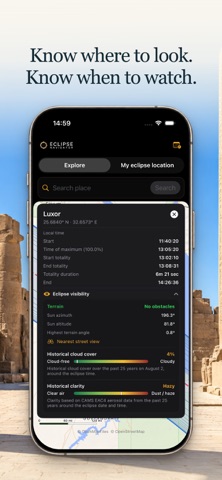
Eclipse Navigator helps you prepare to watch and photograph a solar eclipse. Find a suitable viewing spot, check the local conditions and see how the eclipse will unfold there. Plan your photos and rehearse with spoken alerts, so you can focus on what you want to see and capture during the eclipse. CHOOSE YOUR VIEWING SPOT Explore the eclipse path and see where totality lasts longest. For each location, find out when the eclipse begins, how long it lasts and how much of the Sun will be obscured. You can also check the Sun’s position and whether hills will block your view. COMPARE YOUR CHANCES OF A CLEAR VIEW What are conditions usually like at your viewing spot around the time of the eclipse? Eclipse Navigator combines 25 years of cloud cover and aerosol data, including dust and air pollution, to show average conditions for the date and time of the eclipse. This lets you compare locations based on the conditions you would typically expect. You can also view current cloud cover and aerosols on the map. FOCUS ON YOUR PHOTOGRAPHY Use the countdown to set spoken alerts for your photography session. For example, set reminders for when you want to remove your camera’s solar filter and put it back on. You choose when each alert sounds and what it says. That way, you can concentrate on taking photos without constantly checking the time. REHEARSE YOUR PHOTOGRAPHY SESSION Simulate the entire solar eclipse at your chosen location, including all your spoken countdown alerts. Practise your sequence, check the timing and adjust your alerts as needed. You can speed up or slow down the simulation. On eclipse day, you’ll know what to do and when. AR PHOTO MODE Use augmented reality photo mode on location to see where the Sun will be in the sky during the eclipse. Point your phone at your surroundings: the app overlays the Sun’s positions on the live camera view. Move around to find the right spot, for example where the Sun will sit directly above a church tower during totality. View the five eclipse phases or play through the entire solar eclipse to see how your composition changes as it unfolds. FOLLOW THE ECLIPSE LIVE During the eclipse, follow the current phase and the moving Moon’s shadow in the live view, with information for your chosen location. THE ECLIPSE PASS Unlock all features for your selected eclipse with a single one-time purchase. No subscription.
What's new · 4.0
New in Eclipse Navigator 4.0 Eclipse Navigator is now free to download. Unlock all features for your selected eclipse with an Eclipse Pass. A single one-time purchase, no subscription.
Details