

Tenvora: Wi-Fi Device Scanner
CodePioneer Technologies Limited · Utilities
Independent analytics for this App Store listing. AppTracker is not affiliated with CodePioneer Technologies Limited.
Chart standing · US
What changed · US
Listing changes AppTracker has observed for this app in this storefront — new versions, price moves, rating shifts, and store copy.
This release includes general improvements and bug fixes to keep your everyday experience running smoothly.Thank you for your continued support!
Price & rating history · US
Reconstructed from the listing changes AppTracker has observed in this storefront. A field is charted once it has changed more than once, and each line starts at the value it moved from.
Average rating · ★ 3.91 now · 16 changes on record
Ratings breakdown · US
The star breakdown behind this app's rating in this storefront.
Screenshots



About
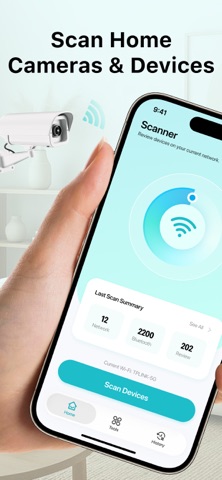
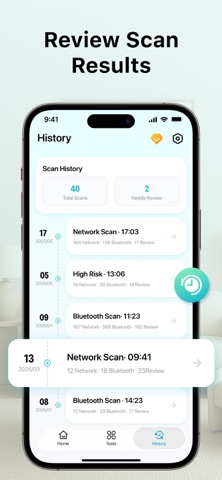
Home Security: Camera Scanner helps you review cameras and other devices visible on your Wi-Fi network, explore nearby Bluetooth signals, and check connection performance—all from your iPhone. Whether you're checking your home network, reviewing office Wi-Fi, or settling into a hotel or rental, bring your device checks together with clear results and practical tools. KEY FEATURES SCAN YOUR WI-FI NETWORK Explore devices visible on your current local network. Review available device and connection details to better understand what shares your Wi-Fi. DISCOVER NEARBY BLUETOOTH DEVICES Scan for discoverable Bluetooth Low Energy signals. Review available device details and signal information to support a closer inspection of your surroundings. REVIEW UNFAMILIAR DEVICES Take a closer look at devices you don't recognize. Explore individual scan results and mark items for further attention, so you can keep your checks focused and organized. TEST YOUR CONNECTION Check download speed, upload speed, and latency to see how your connection performs. Run ping tests on a supported domain or IP address to review response times and connection availability. VIEW MAGNETIC FIELD CHANGES Use your iPhone's magnetic sensor to observe changes near objects. Readings offer an additional reference for manual checks and may be affected by metal, wiring, speakers, and other electronics. EXPLORE DEVICE & NETWORK DETAILS Find useful information about your iPhone and its current network connection in one convenient place. REVISIT YOUR SCAN HISTORY Return to previous scan summaries, review network and Bluetooth results, and follow up on items saved for further inspection. PREMIUM ACCESS Choose the option that suits you: Weekly Subscription: $8.99 per week Monthly Subscription: $12.99 per month Annual Subscription: $24.99 per year Lifetime Access: $39.99 one-time purchase Payment will be charged to your Apple ID account at confirmation of purchase. Subscriptions automatically renew unless canceled at least 24 hours before the end of the current period. Your account will be charged for renewal within 24 hours before the current period ends. Manage or cancel your subscription in your App Store account settings. Lifetime Access is a one-time purchase and does not renew. IMPORTANT INFORMATION Network scans show only devices visible on your current local network. Bluetooth scans show only signals discoverable during the scan. Results and available information depend on permissions, iPhone model, network settings, and surrounding conditions. The app supports manual checks. It cannot confirm a device's purpose, determine whether recording is taking place, or guarantee that every nearby device will be found. Terms of Use: https://www.codepioneertech.com/terms.html Privacy Policy: https://www.codepioneertech.com/privacy.html
What's new · 1.6
This release includes general improvements and bug fixes to keep your everyday experience running smoothly.Thank you for your continued support!
Details