

Scribe AI: Notes & Minutes
andrea machetti · Productivity
Independent analytics for this App Store listing. AppTracker is not affiliated with andrea machetti.
Chart standing · US
What changed · US
Listing changes AppTracker has observed for this app in this storefront — new versions, price moves, rating shifts, and store copy.
Ready for iPhone Duo! This update brings full support for foldable displays. The interface now adapts smartly and responsively, giving you a seamless experience whether your device is closed or you're making the most of the large inner screen. • More accurate transcription: a custom vocabulary for names and terms, plus a full-audio re-pass for recordings up to 30 minutes. • Long imports are far faster and more stable: a new turbo model kicks in automatically for long files — no more freezes on multi-hour files. • Better minutes: richer, smoother summaries for long meetings, action items pulled from the minutes, and automatic transcript cleanup. • Recorded-audio tools: export and share your recording; new copy and clear buttons for the transcript and the minutes. • Download either model from Settings (best quality or turbo), plus a heads-up before very long imports. • More stability: no more processing stuck after you close the app, plus various fixes.
Screenshots




About
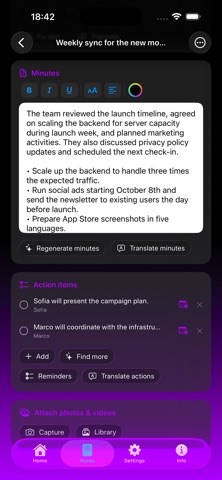
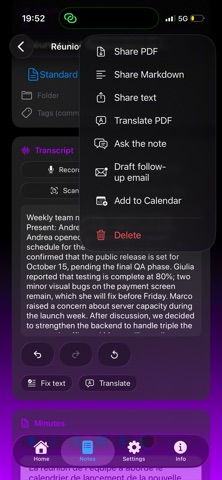
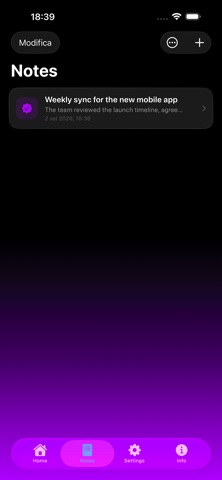
Scribe AI is your private AI scribe: it turns voice, photos and documents into professional transcripts and minutes, privacy-first because everything runs on your device. FILL A NOTE ANY WAY YOU LIKE • App and Siri in 10 languages (EN, IT, ES, FR, DE, PT, JA, ZH, RU, HI) - Note: Siri isn't available in Russian or Hindi. • Record from the mic with live transcription • Import audio or video • Scan documents with the camera (multi-page OCR) • Capture text from photos in your library • Import documents: PDF, Word, txt, md and more • Type or paste by hand FROM VOICE TO MINUTES • On-device transcription with WhisperKit • Minutes with Apple Intelligence: summary, decisions and actions • Automatic chapters and important moments • One-tap text correction ASK & AUTOMATE • Ask your notes: on-device AI chat that searches across your notes • Siri & Shortcuts: open, create and find notes by voice TRANSLATE & EXPORT • Translate minutes and transcript into several languages • Export to PDF or Markdown, enriched with photos and videos • Send action items to Reminders, get titles from Calendar • Siri & Shortcuts: open, create and find notes by voice OTHER FUNCTIONS • Ask your notes: the AI chat now searches across all your notes • Text capture: scan documents (OCR), import photos and documents (PDF, Word, txt, md) • Light/dark theme and app language selectable in-app PRIVACY • Transcription and minutes run entirely on your device • No data sent to external servers • Private sync via iCloud FREE & PREMIUM Free: recording, OCR scanning, minutes and transcript, a number of free notes. Premium (one-time): import audio/video, photos and documents, translation, rich formatting, attached photos/videos, minutes templates, correction, unlimited notes and watermark-free export.
What's new · 1.2
Ready for iPhone Duo! This update brings full support for foldable displays. The interface now adapts smartly and responsively, giving you a seamless experience whether your device is closed or you're making the most of the large inner screen. • More accurate transcription: a custom vocabulary for names and terms, plus a full-audio re-pass for recordings up to 30 minutes. • Long imports are far faster and more stable: a new turbo model kicks in automatically for long files — no more freezes on multi-hour files. • Better minutes: richer, smoother summaries for long meetings, action items pulled from the minutes, and automatic transcript cleanup. • Recorded-audio tools: export and share your recording; new copy and clear buttons for the transcript and the minutes. • Download either model from Settings (best quality or turbo), plus a heads-up before very long imports. • More stability: no more processing stuck after you close the app, plus various fixes.
Details