
Chart standing · US
Ratings breakdown · US
The star breakdown behind this app's rating in this storefront.
Screenshots




About
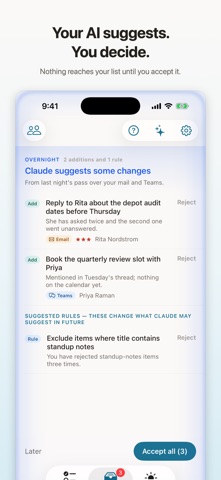
What Matters is a to-do list for the way work actually arrives. Some of it you owe someone. Some of it someone owes you. Some of it is just worth knowing. THREE SECTIONS, AND EVERY ITEM LIVES IN EXACTLY ONE Actions are what you owe. Waiting on is what is owed to you - the ball is in someone else's court, and it stays visible until it moves. Notes are what is worth knowing with nothing to do about it. Anything due today or earlier lifts to the top on its own, so there is no Today list to maintain. Every item can carry a note, a due date, a priority, up to three named links, and where it came from - an email, a Teams thread, Tuesday's standup. Months later that is what makes a one-line task legible again. Flag the ones you want your eye drawn to: a flag is not a deadline and not a priority, and it changes nothing about an item except that you will find it first. GETTING THINGS IN WITHOUT TYPING THEM OUT Paste a wall of text - a meeting note, a mail thread, a message somebody sent you - and it comes back as separate tasks, each one already in its section with the date, the person and the priority filled in. Read it, change what you want, keep it. Ask Siri and the same thing happens to a spoken sentence. "Remind me to chase Nadia about the lease by Friday" arrives as a waiting item, dated Friday, against Nadia's name - not as a sentence you have to tidy up later. Neither one needs an assistant connected. AN AI THAT WORKS ON YOUR LIST, NOT INSTEAD OF IT Connect Claude - or anything that speaks MCP - and it can read your list and work on it. It picks up action items out of a transcript or a mail thread and files them where they belong. Nothing an assistant does on a schedule reaches your list unopposed. An overnight pass arrives as a set of suggestions: swipe to reject the ones you do not want, then apply the rest with one press. Reject the same kind of thing three times and it offers you a standing rule so it stops asking. The daily briefing reads the whole list and tells you what is critical, who to chase, what to drop, and what it noticed - each one with the action it earns, right there on the card. SHARE ONE TASK, NOT YOUR WHOLE LIST Connect with someone else who uses What Matters and you can offer them a single task. Nothing is shared without their approval - an offered task waits for them to accept it exactly the way an assistant's overnight suggestions wait for you, and they can decline. Once accepted, your copy sits under Waiting on until they are done, and you hear about it when they finish. Nobody gets standing access to anybody's list - most apps share a list and grant permanent visibility with it. This offers one item, once, to one person who gets to say no. RULES THAT LEARN, AND STAY YOURS A rule is a standing filter you approved: never suggest standup notes, always keep anything from Nadia. They are enforced on the server, so they hold whether or not a given run feels like obeying them. You can see every rule, pause one, or delete it. BUILT TO BE READ ON A PHONE One quiet column, real typographic hierarchy, and a complete-with-one-tap gesture worth watching. Light and dark are both designed, not inverted. It works on iPhone, iPad, Mac and the web, and your list is the same list on all of them - sign in and it is there. WHAT IT COSTS Free: 25 open tasks, one AI connection, and enough AI to see whether you want more. Pro, 2.99 a month or 24.99 a year: 500 open tasks, ten AI connections, 500 AI requests a day, ten AI reviews a day, 50 rules, and urgent alerts that reach your phone. Pro+, 9.99 a month: everything in Pro with no daily cap on AI reviews, and the daily briefing run on a stronger model. Subscriptions renew automatically unless cancelled at least 24 hours before the period ends. Manage or cancel in your Apple Account settings. Privacy: https://matters.blackdogranch.com/privacy Terms: https://matters.blackdogranch.com/terms
What's new · 1.1
Ask Siri to add a task and it now lands sorted — the right section, the right date, the person it involves — instead of as a sentence you tidy up later. Flag what needs your attention. A flag is separate from priority and from a due date: it marks what you want your eye drawn to, and changes nothing else about the item. Send a task to someone else who uses What Matters. Nothing lands on their list until they accept it, your copy sits under Waiting on, and you hear back when they finish. Briefings now fall back to a faster model when Claude is busy, rather than failing silently. Fixes badges not appearing until the app was reopened.
Details