

Bucket Budget: What's Left
ELVIS CABREJA SERRATA · Finance
Independent analytics for this App Store listing. AppTracker is not affiliated with ELVIS CABREJA SERRATA.
Chart standing · US
Ratings breakdown · US
The star breakdown behind this app's rating in this storefront.
Screenshots




About
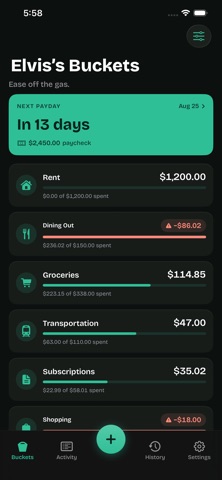
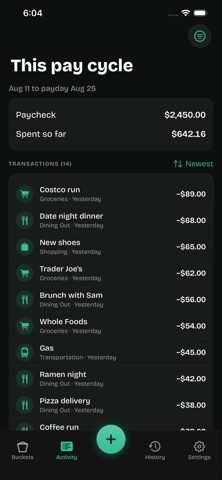
Your bank balance is not your money. It's a number with no memory. It doesn't know rent leaves on the first, that card charges are still pending, or that half of last night's bill is coming back to you. Checking it before you spend is guessing with extra steps. Bucket Budget starts from what you've already promised each dollar, so what's left is genuinely left. HOW IT WORKS Every payday, your paycheck fills your buckets. Rent, groceries, car, whatever you actually spend on. Each bucket knows what it holds, so before you spend, the answer is already there. Log an expense in about three seconds. Type what it was, tap the bucket, done. The app learns which bucket you mean and picks it for you. WHAT'S IN IT - Pay-cycle budgeting that matches how you're actually paid, weekly or biweekly, not forced into calendar months - A buffer bucket that absorbs overspending, so one bad week doesn't break the whole cycle - Savings goals counted in paydays, not percentages - Recurring charges logged automatically - Split one expense across several buckets - Home screen widgets, so logging never needs the app open - Works offline. Log now, it syncs when you're back. - Face ID lock - Export everything to CSV whenever you want WHAT'S NOT IN IT No bank connection. No ads. No analytics or tracking of any kind. Nothing sold, nothing shared. You type your budget in; it stays yours. Requires iPhone running iOS 17 or later.
What's new · 1.1
What's new in 1.1 Coming up • Recurring charges due before your next payday now show on each bucket, so you can see what's already spoken for. • If a bucket won't cover what's coming, it tells you how short it'll be and lets you move money in one tap. • Optional reminders at 9am on the day a recurring charge is logged. • Recurring charges now always log themselves. No more confirming each one. Insights, redesigned • Pick any bucket to see what you spent each pay cycle against what you budgeted. • When a bucket keeps running over or under, Insights suggests a better budget, and one tap applies it from your next payday. History • Pay cycles are grouped by month, with over or under shown at a glance. • Each pay cycle shows where the money went, bucket by bucket. Easier to use • Drag any bucket card to reorder your dashboard. • Move money starts from your buffer and shows both balances before you confirm. • Tap anywhere in an amount to edit it. • New "How it works" guide in Settings. Fixes • Face ID unlocks smoothly and no longer asks you to sign in again. • Larger, easier-to-read text on iPad.
Details