

MeshCentral
ShenHouZiShu · Developer Tools
Independent analytics for this App Store listing. AppTracker is not affiliated with ShenHouZiShu.
Chart standing · US
What changed · US
Listing changes AppTracker has observed for this app in this storefront — new versions, price moves, rating shifts, and store copy.
This update further improves remote management, file transfers, and the mobile control experience. • Added an in-app MeshCentral web entry with access to the full desktop management interface. • Fixed an issue where the embedded MeshCentral web page could appear blank. • The web interface now reuses the app’s saved authenticated session without requiring repeated sign-in. • Added web navigation controls, refresh, error reporting, and retry support. • Added support for renaming remote devices. • Added multi-selection and upload support for photos and videos from the device library. • Added support for uploading arbitrary files through the system file picker. • Photos, videos, and files are uploaded to the remote computer’s Downloads folder by default. • Photos, videos, and large files now use chunked transfers to reduce memory usage and improve upload reliability. • Improved automatic reconnection after mobile-network changes and temporary network interruptions. • Improved large-text input, remote clipboard handling, and keyboard mapping reliability. • Updated the built-in Chinese and English interface and help documentation. • Fixed known issues and improved overall performance and stability.
Price & rating history · US
Reconstructed from the listing changes AppTracker has observed in this storefront. A field is charted once it has changed more than once, and each line starts at the value it moved from.
Price · 1.99 USD now · 2 changes on record
In-app purchases · US
No in-app purchases.
Screenshots

Keywords this app targets
Search terms AppTracker associates with this app — estimates, not search volume. ❝ = in the app's title; a highlighted number is its current position for that term.
Similar apps
Competitors and close alternatives, as estimated by AppTracker.


About
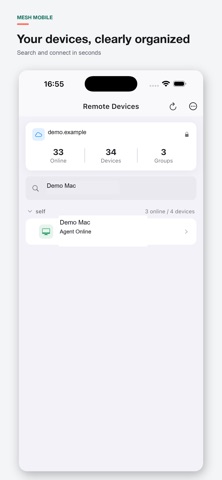
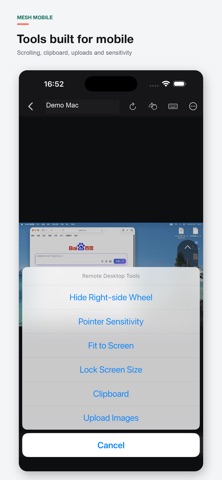
Mesh Mobile is a mobile remote desktop client designed for MeshCentral. Connect to your own MeshCentral server, browse device groups, find online computers, and start a remote desktop session from iPhone or iPad. Built for precise mobile control: • Single-finger left click and two-finger right click • Long-press window dragging and two-finger scrolling • A right-side wheel for vertical and horizontal page scrolling • Pinch zoom, viewport panning, and zoom locking at the current scale • Full keyboard mapping with Delete, arrow keys, and Command, Control, Option, and Shift combinations • Chinese text input and continuous bulk-text entry • Local and remote text clipboard tools • Direct upload of selected phone images to the remote computer's Downloads folder • Automatic recovery after temporary network loss and one-tap session refresh Enter a MeshCentral server address on first launch. The app remembers it for later use. Authentication takes place on the server's original web login page, and the authenticated session is stored in the device's secure system storage. A reachable MeshCentral server and an authorized account are required. Mesh Mobile is an independent client and does not provide a hosted MeshCentral service.
What's new · 1.0.5
This update further improves remote management, file transfers, and the mobile control experience. • Added an in-app MeshCentral web entry with access to the full desktop management interface. • Fixed an issue where the embedded MeshCentral web page could appear blank. • The web interface now reuses the app’s saved authenticated session without requiring repeated sign-in. • Added web navigation controls, refresh, error reporting, and retry support. • Added support for renaming remote devices. • Added multi-selection and upload support for photos and videos from the device library. • Added support for uploading arbitrary files through the system file picker. • Photos, videos, and files are uploaded to the remote computer’s Downloads folder by default. • Photos, videos, and large files now use chunked transfers to reduce memory usage and improve upload reliability. • Improved automatic reconnection after mobile-network changes and temporary network interruptions. • Improved large-text input, remote clipboard handling, and keyboard mapping reliability. • Updated the built-in Chinese and English interface and help documentation. • Fixed known issues and improved overall performance and stability.
Details