

Arari: Real Hourly Rate
YANGLI CHEN · Business
Independent analytics for this App Store listing. AppTracker is not affiliated with YANGLI CHEN.
Chart standing · US
What changed · US
Listing changes AppTracker has observed for this app in this storefront — new versions, price moves, rating shifts, and store copy.
• Swiping a sheet closed no longer discards what you typed or burns a free slot • Real hourly rate now appears per project, in the list and in a new project detail screen • Preview and share the PDF straight from a document — exporting keeps working after you cancel • Set the email and phone number printed on your invoices • Delete confirmations always show a Cancel button • Tapping anywhere in a row now opens it • A three-step first run walks you through your business details and your first project • Three-column layout on iPad and Mac; wider default Mac window and better dark-mode contrast • Reuse item name, unit price and tax rate from another document in the same project • Edit saved exchange rates
In-app purchases · US
What this app sells inside itself, grouped by kind and priced for this storefront.
Screenshots



About
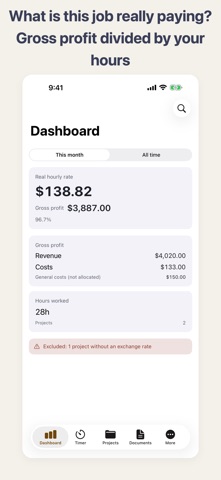
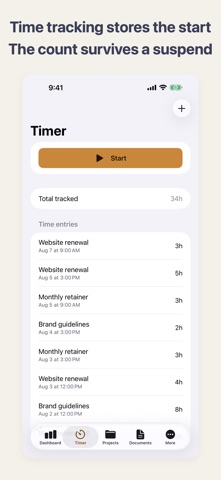
Know your real hourly rate. What you invoice and what you keep are two different numbers. The hours you spent, the stock images, the subcontractor — all of it comes out of the first one. Arari shows the gross profit and the real hourly rate of each project. Accounting software gives you profit for a period; it does not tell you what a particular job earned, or what that works out to per hour. Arari does only that part. ■ What it does ・Gross profit dashboard. Revenue − costs = gross profit, divided by the hours you tracked. Projects in the red are surfaced ・Time tracking. The start time is stored, so the count stays right even if the app is suspended. You can correct entries by hand afterwards ・Expenses, split between costs tied to a project and general costs that span several ・Estimates, delivery notes and invoices as PDFs, built from the project. Tax is broken down per rate, with withholding tax and the amount due after it ・A completeness check for the items a Japanese qualified invoice needs — free, never behind the paywall ・Multiple currencies. Each project can have its own; exchange rates you enter convert them into your base currency ・Documents in your client's language, set per client and independent of the app's own language ・Payment tracking with expected dates and an unpaid list ・Search across everything — clients, projects, documents (down to line item descriptions) and expenses ・Backup and restore. Export a file, keep it, and bring it back on a new device ・iCloud sync through your own account, so iPhone, iPad and Mac stay in step ■ You enter the exchange rates Arari never connects to the internet, so it does not fetch rates either — it uses the ones you type. Each rate is stored with the project and document that used it. Accounting practice records a transaction at the rate on the day it happened, so this matches how the books work anyway. Projects without a rate are excluded from the total and counted on the dashboard. They are never quietly added as zero. ■ About tax Arari calculates and prints the figures and fields you enter. It is not tax or legal advice. Japanese consumption tax is rounded once per tax rate per document, as the rules require, and you can choose rounding down, up or to nearest. Check the requirements that apply to you with a qualified professional. ■ What it does not do ・Tax filing or double-entry bookkeeping (export CSV or PDF into your accounting software instead) ・Shared editing or permissions for teams — it assumes one person ・Fetching exchange rates automatically, because it does not use the network ——— Arari Pro (auto-renewing subscription) • Yearly plan only. New subscribers get a 7-day free trial • Billing starts automatically when the trial ends. Cancel at least 24 hours before the period ends and you are not charged • Cancel any time in your Apple Account settings • There is no monthly plan, and Family Sharing is not supported • Your data stays on the device if the subscription ends. Viewing and exporting PDFs and CSV files keep working Terms of Use: https://freetokyo.github.io/web/arari/en/terms.html Privacy Policy: https://freetokyo.github.io/web/arari/en/privacy.html EULA: https://www.apple.com/legal/internet-services/itunes/dev/stdeula/
What's new · 1.1
• Swiping a sheet closed no longer discards what you typed or burns a free slot • Real hourly rate now appears per project, in the list and in a new project detail screen • Preview and share the PDF straight from a document — exporting keeps working after you cancel • Set the email and phone number printed on your invoices • Delete confirmations always show a Cancel button • Tapping anywhere in a row now opens it • A three-step first run walks you through your business details and your first project • Three-column layout on iPad and Mac; wider default Mac window and better dark-mode contrast • Reuse item name, unit price and tax rate from another document in the same project • Edit saved exchange rates
Details