

AfterSnap: AI Photo to Action
AI Notes, LLC · Productivity
Independent analytics for this App Store listing. AppTracker is not affiliated with AI Notes, LLC.
Chart standing · US
What changed · US
Listing changes AppTracker has observed for this app in this storefront — new versions, price moves, rating shifts, and store copy.
What's new in 1.3: • Map and trips: photos appear where you took them, grouped into trips you can look back on, with what you captured and spent each day. Locations stay on your phone • Deadline reminders: when a notice or bill says return, pay or renew by a date, set a reminder in one tap. Dated to-dos on whiteboards work too • Add a weekly class timetable to your calendar in one tap • Recognition starts right after you take the photo, one tap fewer • The same thing captured several times shows as one row on Home and counts once in Money • Photos that couldn't be read or were interrupted wait under Not finished, ready to retry, without using a capture • Foreign medicine boxes and price tags also show the name as printed • Fines get their own category; discounts and due dates are clearer • The app is now available in Thai, Vietnamese, Turkish and Ukrainian
Screenshots




About
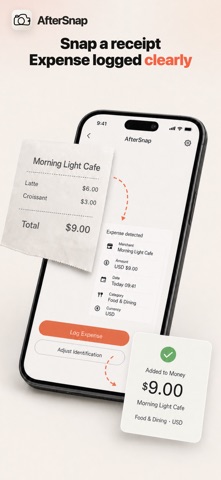
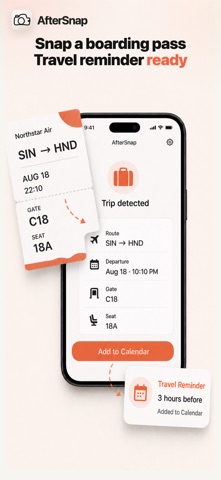
AfterSnap turns photos into action. Point your camera at business cards, receipts, posters, chat screenshots, boarding passes, menus, signs, medicine, documents or whiteboards. AfterSnap recognizes what it sees and suggests the right next step — add to Contacts, create a Calendar event or Reminder, log an Expense, save a Note, join Wi-Fi, or translate — all with a single tap. ## How it works 1. Snap or import a photo 2. AI extracts structured details 3. Review the result card (fields are inline-editable) 4. Tap a suggested action — it writes straight into the native iOS app 5. Or chat with the capture using voice for follow-ups No retyping. Minimal taps. Photo → action. ## Perfect for - Capturing business cards straight into Contacts - Receipt and expense logging without spreadsheets - Turning event posters, tickets and chat screenshots into Calendar & Reminders - Joining Wi-Fi from a photo of the router sticker or QR - Real-time translation of signs and menus - Saving whiteboard notes and documents as structured notes - Quick capture of prices, bookings and labels ## Free to start Process 15 captures each month at no cost. AfterSnap Plus unlocks unlimited captures for $12.99/month or $39.99/year. Subscriptions renew automatically unless canceled. ## Privacy Subject cutout happens on your device. Payment cards and identity documents that AfterSnap recognizes are stopped on your device before upload, and it asks you first when it is unsure. Detection is automatic and may miss some. Recognition is used only for the extraction you requested. We do not sell your data. Turn every photo into the next action. Terms of Use: https://www.apple.com/legal/internet-services/itunes/dev/stdeula/
What's new · 1.3
What's new in 1.3: • Map and trips: photos appear where you took them, grouped into trips you can look back on, with what you captured and spent each day. Locations stay on your phone • Deadline reminders: when a notice or bill says return, pay or renew by a date, set a reminder in one tap. Dated to-dos on whiteboards work too • Add a weekly class timetable to your calendar in one tap • Recognition starts right after you take the photo, one tap fewer • The same thing captured several times shows as one row on Home and counts once in Money • Photos that couldn't be read or were interrupted wait under Not finished, ready to retry, without using a capture • Foreign medicine boxes and price tags also show the name as printed • Fines get their own category; discounts and due dates are clearer • The app is now available in Thai, Vietnamese, Turkish and Ukrainian
Details