

Numline: Calculator Notepad
Zhiqi Pan · Productivity
Independent analytics for this App Store listing. AppTracker is not affiliated with Zhiqi Pan.
Chart standing · US
What changed · US
Listing changes AppTracker has observed for this app in this storefront — new versions, price moves, rating shifts, and store copy.
• Reordering the home list is steadier near the screen edges. Picking up a notepad at the bottom no longer scrolls the list away; the list scrolls only when you move it towards an edge • In Reorder mode, a long press keeps the notepad lifted instead of opening its menu • A notepad's menu now needs a slightly longer hold, so starting a drag no longer opens it by accident • The = key on Numline's pad now adds spaces around itself, just like + - x and /
In-app purchases · US
No in-app purchases.
Screenshots




About
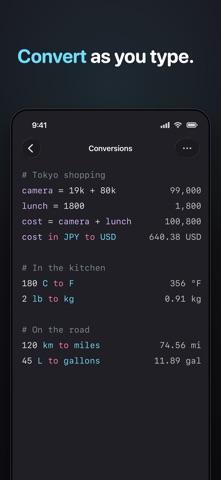
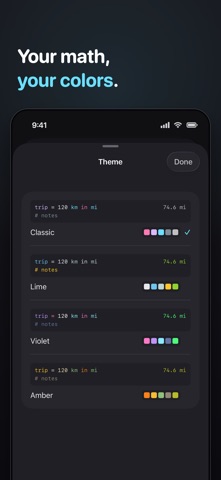
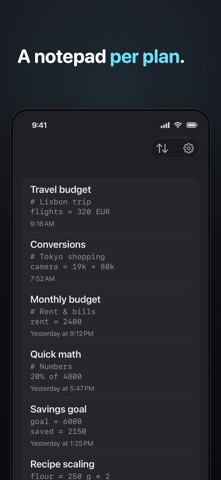
Numline is a calculator you type into like a notepad. Write your maths in plain words on the left, and answers appear instantly on the right. No buttons to hunt for. No equals key. Just type a line — "120 USD to EUR", "20% of 4800", "rent = 2400" — and Numline works it out as you go. WHAT YOU CAN DO • Plain-language maths — write "95 EUR * 4" and read the answer beside it • Currencies — convert between world currencies: "cost in JPY to USD". Rates update automatically; offline, the last ones stand in and results are approximate • Units — length, mass, volume, temperature and more: "120 km to miles", "356 F to C" • Percentages — tips, discounts and splits in words: "89 + 15%", "240 / 4 + 10%" • Variables — name a value once and reuse it: "rate = 85", "32 * rate" • Totals — "total" sums the block above; a blank line starts a fresh one • Dates — "trip - today", "trip + 2 weeks" and other quick date maths • Functions — sqrt, round, abs and friends when you need them • Shorthand — "19k + 80k" reads thousands the way you say them • Themes — Classic, Lime, Violet and Amber, each colouring your notation its own way • Many notepads — keep a separate sheet for every plan Every line is live. Change a number and everything below it updates. It reads back like a note you wrote to yourself, so you can always see how you reached an answer. Numline stays quiet and focused: a dark editor, syntax colours you choose, and nothing in your way. No account. No subscription. No ads. Your notepads stay on your device. Just type.
What's new · 1.7
• Reordering the home list is steadier near the screen edges. Picking up a notepad at the bottom no longer scrolls the list away; the list scrolls only when you move it towards an edge • In Reorder mode, a long press keeps the notepad lifted instead of opening its menu • A notepad's menu now needs a slightly longer hold, so starting a drag no longer opens it by accident • The = key on Numline's pad now adds spaces around itself, just like + - x and /
Details