

ネタ帳|話のネタとアイデアの記録
Kohei Ishikawa · Productivity
Independent analytics for this App Store listing. AppTracker is not affiliated with Kohei Ishikawa.
Chart standing · US
What changed · US
Listing changes AppTracker has observed for this app in this storefront — new versions, price moves, rating shifts, and store copy.
You can now export and import a backup. Save all your notes, including photos, to a single file and move them to a new iPhone when you switch devices. Find it under Settings > Backup. We also fixed an issue where exporting data could appear blank when you had many notes.
In-app purchases · US
No in-app purchases.
Screenshots


About
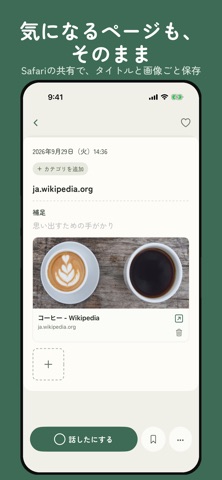
Netacho is a notebook for the things you want to talk about later and the ideas that pop into your head, saved in just a few words. Something funny happens, but when you finally see your friends, it's gone. A great idea comes to you, but it slips away while you're trying to write it all out. Netacho helps you hold on to those small moments. All you need is a short phrase that will jog your memory later. Like a comedian's notebook of material, you can slowly build up everyday stories, conversation topics, dreams, realizations, and pages worth keeping. JUST A FEW WORDS The input field sits at the bottom of the screen, so you can write with one hand and save with a single tap. You can also dictate by voice. ONE TAP WHEN YOU'VE TOLD IT Tap the circle next to any note to mark it as told. Untold topics and ones you've already shared stay clearly apart, so you're less likely to tell the same story twice. BROWSE BY CATEGORY Each category shows how many topics you haven't told yet, next to the total. Open one, and your untold notes are always at the top, with favorites first. Notes with photos can be viewed side by side in gallery view. FLIP THROUGH LIKE A NOTEBOOK Each note opens like a page in a notebook. Swipe left or right to move to the next one, and edit the text right where it is. Changes are saved automatically. ORGANIZE YOUR WAY Add your own categories and pick from eight colors to tell them apart. A note can belong to more than one category. You can even create your own statuses, like "In progress," to fit the way you work. RIGHT FROM YOUR HOME SCREEN Tap the widget to save a note by voice. The widget also shows how many untold topics you have. LINKS AND PHOTOS TOO Share any page from Safari to save it instantly, with its title and thumbnail captured automatically. You can attach up to five photos to a note. All your notes are stored on your iPhone. Every day is full of small moments that photos miss and thoughts that live only in your head. Save them in a few words before they fade.
What's new · 3.1
You can now export and import a backup. Save all your notes, including photos, to a single file and move them to a new iPhone when you switch devices. Find it under Settings > Backup. We also fixed an issue where exporting data could appear blank when you had many notes.
Details