

Inkday: Private Journal
ChienHsiang Yin · Lifestyle
Independent analytics for this App Store listing. AppTracker is not affiliated with ChienHsiang Yin.
Chart standing · US
What changed · US
Listing changes AppTracker has observed for this app in this storefront — new versions, price moves, rating shifts, and store copy.
v1.3.0 - Record the day's activity (iPhone and iPad): new entries can automatically save the day's active energy from Health. With Inkday Pro you also get steps, exercise minutes, and full workouts (type, duration, distance, pace, heart rate, and more). - Fill in the gaps: backfill older entries not yet captured on this device in one tap from Settings, and figures captured earlier in the day update automatically to the full-day numbers the next day. - Stays on this device: activity data doesn't sync with your entry through iCloud — capture it separately on your other devices (like an iPad) to see it there too. - Turn off "Record the day's activity when creating an entry" anytime in Settings. - Fixed the app name showing as "Inkday Dev" on the Home Screen. - Other fixes and stability improvements. Have feedback? Email kimiyin@gmail.com
In-app purchases · US
What this app sells inside itself, grouped by kind and priced for this storefront.
Screenshots




About
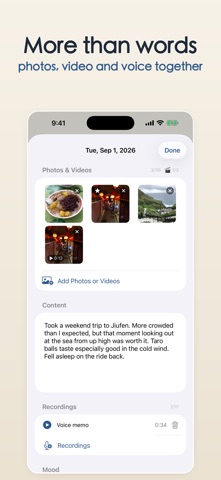
Inkday is a private journal that's yours alone. We believe something simple: your journal is yours. Inkday runs no servers and cannot see your content. Everything — your writing, photos, videos, audio, moods, tags, location, weather, and calendar snapshots — is stored only in your own iCloud, syncing quietly across iPhone, iPad, and Mac through your Apple ID (activity data is the exception: it stays only on the device that captured it, and isn't synced through iCloud). No account to create, no third-party sign-in, no ads, no cross-app tracking (only anonymous device and OS-version statistics and crash reports, to improve stability). ■ Capture every day - One clean, text-first entry a day, at a glance on the calendar - Add photos, short clips, and voice notes to any entry - Tap any photo or video for a full-screen view, swipe through the day's media, pick a daily cover to represent each day, or download photos and videos back to Photos or a file - Organize life with moods and tags; filter and revisit anytime - Auto-record where you were and the weather as you write (optional) - Snapshot that day's calendar events into the entry, so you can look back even after switching calendars or phones (choose which calendars to include) - On iPhone and iPad, automatically save that day's activity from Health into the entry: active energy is free, while Inkday Pro also records steps, exercise minutes, and full workouts (type, duration, distance, pace, heart rate, and more). This stays only on the device where it was captured, not synced with the entry (can be turned off anytime) ■ Look back, gently - Media calendar: browse a whole month as photo thumbnails and switch freely between List and Calendar, like an album; scroll all the way back to any past date to backfill older entries - "On This Day" brings back the same day in years past - See your writing streaks and most-used moods - A footprint map shows the places you've been ■ Built for privacy - Your data lives only in your own iCloud; the developer can't access it - No accounts, no ads, no cross-app tracking (only anonymous device and OS-version statistics and crash reports to improve stability) - Built-in App Lock: protect the whole app with a PIN and Face ID / Touch ID (free) ■ Your data, portable - Import from other journaling apps to move in easily - Export your entire journal to a file anytime for a full backup ■ Three platforms, one journal - Shared across iPhone, iPad, and Mac; syncs automatically with one Apple ID - Seven warm, papery themes, with dark mode (follow the system, or stay light or dark) The core is free forever. Inkday Pro unlocks extra themes, location & weather, calendar snapshots, full workout records, statistics, the footprint map, and export backups — available as a yearly plan, a monthly plan, or a one-time Lifetime purchase. Tired of renewing every year? Inkday lets you buy it once. Every day of yours deserves to be kept well. Privacy Policy: https://seanseanyin.github.io/inkday-site/privacy-policy.html Terms of Use (EULA): https://www.apple.com/legal/internet-services/itunes/dev/stdeula/
What's new · 1.4.0
v1.3.0 - Record the day's activity (iPhone and iPad): new entries can automatically save the day's active energy from Health. With Inkday Pro you also get steps, exercise minutes, and full workouts (type, duration, distance, pace, heart rate, and more). - Fill in the gaps: backfill older entries not yet captured on this device in one tap from Settings, and figures captured earlier in the day update automatically to the full-day numbers the next day. - Stays on this device: activity data doesn't sync with your entry through iCloud — capture it separately on your other devices (like an iPad) to see it there too. - Turn off "Record the day's activity when creating an entry" anytime in Settings. - Fixed the app name showing as "Inkday Dev" on the Home Screen. - Other fixes and stability improvements. Have feedback? Email kimiyin@gmail.com
Details