

Mado - Single App Remote
Shota Hori · Productivity
Independent analytics for this App Store listing. AppTracker is not affiliated with Shota Hori.
Chart standing · US
What changed · US
Listing changes AppTracker has observed for this app in this storefront — new versions, price moves, rating shifts, and store copy.
This update includes the following improvements. Many of them require updating "Mado Host" on your Mac as well. Please update Mado Host to 1.2 too (starting with 1.2, Mado Host also updates itself automatically). - Clipboard sharing with your Mac: text you copy on the Mac can be pasted on this device, and text you copy on this device can be pasted on the Mac with ⌘V - Automatically switches to new windows from other apps, such as files opened from Finder or password prompts - Improved window size switching (100%/75%/50%). Sizes that can't be applied because of an app's minimum window size are now grayed out in the menu - Windows that were maximized on the Mac are now fitted to your screen when you connect - Fixed an issue where the remote view sometimes didn't fit the screen right after connecting or returning to the app - Fixed horizontal scrolling moving in the opposite direction from vertical scrolling - You're now notified when a new version of Mado Host is available for your Mac
Screenshots


About
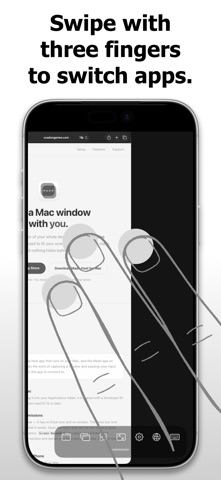
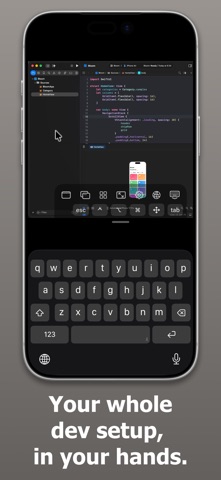
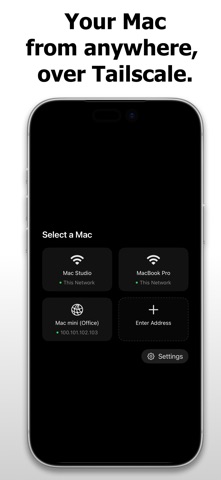
Take a Mac window with you. At a size you can actually use. Most remote desktop apps squeeze your whole Mac screen onto a smaller display. Text gets tiny, you pinch and pan constantly, and black bars eat the edges. Mado sends **one window at a time**, resized to fit your device exactly. So you can read it. **Two parts, one setup** Mado has two pieces: this app, and a free host app for your Mac. Install the host, open this app, and your Mac appears automatically on the same Wi-Fi. Download it at: https://unadongames.com/mado/en/ **One window, sized to your screen** The window you choose is treated like a monitor shaped exactly like your screen. If macOS moves or resizes it, Mado puts it back. Windows that can't be resized — dialogs, fixed panels — are shown at their natural size rather than stretched. **Switch windows and apps without touching your Mac** Swipe with three fingers to cycle through windows and apps, or open the switcher for a grid of everything running. A Dock-style launcher starts apps that aren't open yet. **Away from home, still your own network** On the same Wi-Fi, your Mac is found automatically. Away from home, Mado connects over your own Tailscale network: connect once at home and your Macs keep appearing in the list wherever you go, with nothing to type. Tailscale encrypts the traffic between your devices, and it never passes through our servers — not running a relay of our own is why there is no monthly fee. Tailscale is free for personal use. **Built for low latency** Hardware HEVC encoding over a QUIC connection, so video congestion never delays your taps. When bandwidth drops, frame rate gives way before resolution — text stays sharp. **Real input, not a workaround** Tap to click, long-press to drag, one finger to scroll, two fingers to zoom. A mouse or trackpad behaves as expected. Hardware and on-screen keyboards both work, and so do Japanese and other input methods: text is composed on your device, and only committed text is sent. **Spaces, multiple displays, full screen** Switch Spaces with a three-finger swipe. Windows on other displays and Spaces can be brought over. Full-screen and maximized windows are shown as they are. **Audio comes too** Sound from your Mac plays on your device, and your Mac's speakers are muted while connected so you don't hear it twice. **Free trial, then a one-time purchase** Everything is available during the 14-day free trial. After that, one purchase covers version 1 for good, every 1.x update included. Not a subscription: no monthly bill, and nothing stops working. When a major new version comes along, you can decide about it then. **Privacy** - No servers. Video, audio and input travel directly between your Mac and your device - No analytics, no tracking, no advertising - The host talks only to your device, and you can verify that yourself. It also contains no code from other companies - No account to create **What you need** - A Mac running macOS 15 or later, with the free Mado Host app installed - iPhone or iPad running iOS 26 or later - Both on the same network, or on your own Tailscale network **Please note** - The Mac host app is required. Mado cannot connect to Windows, Linux, or a Mac without it. - The host needs Screen Recording and Accessibility permission. Both are used only on that Mac. - The host is not on the Mac App Store: the permissions it needs are unavailable to sandboxed apps. It is signed with a Developer ID and notarized by Apple. - Your Mac must be awake to accept a connection. - Performance depends on your network. Wi-Fi 5 or better is recommended. Privacy Policy: https://unadongames.com/mado/en/privacy.html Support: https://unadongames.com/mado/en/support.html
What's new · 1.2
This update includes the following improvements. Many of them require updating "Mado Host" on your Mac as well. Please update Mado Host to 1.2 too (starting with 1.2, Mado Host also updates itself automatically). - Clipboard sharing with your Mac: text you copy on the Mac can be pasted on this device, and text you copy on this device can be pasted on the Mac with ⌘V - Automatically switches to new windows from other apps, such as files opened from Finder or password prompts - Improved window size switching (100%/75%/50%). Sizes that can't be applied because of an app's minimum window size are now grayed out in the menu - Windows that were maximized on the Mac are now fitted to your screen when you connect - Fixed an issue where the remote view sometimes didn't fit the screen right after connecting or returning to the app - Fixed horizontal scrolling moving in the opposite direction from vertical scrolling - You're now notified when a new version of Mado Host is available for your Mac
Details