

Bank Statement Converter Excel
AppsOverflow LLC · Finance
Independent analytics for this App Store listing. AppTracker is not affiliated with AppsOverflow LLC.
Chart standing · US
Screenshots



About
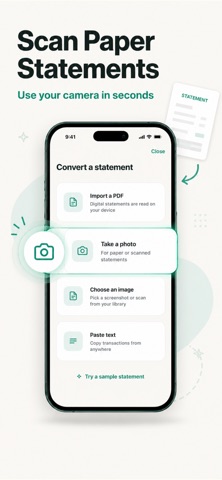
Stop retyping bank statements by hand. Bank Statement turns any PDF, scanned page, or photo of a statement into a ready-to-use spreadsheet in seconds. Whether you are reconciling accounts for a small business, preparing records for your accountant, or just trying to understand where your money went last month, Bank Statement removes the manual data entry and gets you straight to the numbers. HOW IT WORKS Import a PDF statement, take a photo of a printed page, or pick an image from your library. Bank Statement reads the transaction table, dates, and amounts automatically and builds a structured spreadsheet you can export and use anywhere. KEY FEATURES Import from anywhere Upload a PDF statement directly from your bank, snap a photo of a paper statement, or choose a screenshot or scan from your photo library. Accurate transaction parsing Dates, descriptions, debits, and credits are automatically detected and organized into rows and columns, even across multi-page statements. Export to Excel and CSV Download your converted statement as an XLSX or CSV file, ready to open in Excel, Numbers, Google Sheets, or your accounting software. Automatic reconciliation Running balances are checked against transaction totals so you can catch missing or misread entries before you rely on the data. Multi-currency and multi-language support Built for statements from banks around the world, with the app available in English, Japanese, Korean, German, French, Spanish, Portuguese, Italian, Chinese, Arabic, Turkish, and Ukrainian. Privacy by design You choose whether a photo is sent for processing, and it is never stored afterward. Your statements and financial data stay under your control. Built for real use cases Freelancers and small business owners reconciling monthly books. Anyone preparing documents for an accountant or tax filing. Individuals building a personal budget from paper or PDF statements. Bookkeepers converting client statements without manual retyping. WHY BANK STATEMENT Manually transcribing a bank statement is slow and error-prone. Bank Statement gives you an accurate, editable spreadsheet in the time it takes to take a photo, so you can spend your time on analysis and decisions instead of data entry. Download Bank Statement and turn your next statement into a spreadsheet in under a minute. Privacy Policy: https://www.termsfeed.com/live/2bd40302-707c-43fa-b8af-affe8dfeb4b1 Terms of Use: https://docs.google.com/document/d/1n1unFsupymXBjB8AvakjPLBs6fB9Dya_ppgOsRD5i1Y/edit?usp=sharing
Details