

Grid Camera - Collage Camera
Naveen Mathivanan · Photo & Video
Independent analytics for this App Store listing. AppTracker is not affiliated with Naveen Mathivanan.
Chart standing · US
What changed · US
Listing changes AppTracker has observed for this app in this storefront — new versions, price moves, rating shifts, and store copy.
New in 1.6: - Add text to your finished grid — 14 fonts, plain/fill/outline styles, and any color you want - Layer multiple captions, each with its own position, size, and rotation - Drag to reorder layers, double-tap any caption to edit it - Rotate, duplicate, or delete a layer from the toolbar right on the canvas
In-app purchases · US
What this app sells inside itself, grouped by kind and priced for this storefront.
Screenshots

About
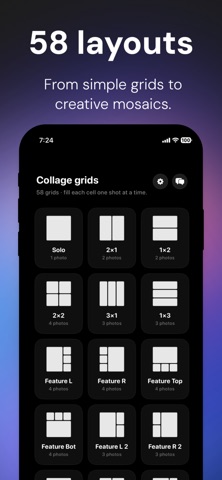
Grid Camera turns your camera into a collage machine. Pick a grid, fill each cell with a live shot, save the finished collage to Photos — no editing app, no importing, no waiting. HOW IT WORKS • Pick a layout — solo shots, 2x2, 3x1, asymmetric "feature" grids, and more • Tap the shutter to fill each cell, one photo at a time • Retake any cell, or drag to reorder shots in the grid • Save the finished collage straight to your Photos library WHY GRID CAMERA • Built for speed — no albums to dig through, no drag-and-drop from your camera roll • Every layout captures live, so what you see is what you get • Clean, distraction-free interface — just the grid and the shutter • No account, no sign-up, nothing to configure Perfect for outfit grids, trip recaps, before/afters, or just turning a handful of shots into one clean image for your feed. Grid Camera Pro unlocks HD exports, exclusive grid layouts, and watermark-free saves. Terms of Use: https://www.apple.com/legal/internet-services/itunes/dev/stdeula/
What's new · 1.6
New in 1.6: - Add text to your finished grid — 14 fonts, plain/fill/outline styles, and any color you want - Layer multiple captions, each with its own position, size, and rotation - Drag to reorder layers, double-tap any caption to edit it - Rotate, duplicate, or delete a layer from the toolbar right on the canvas
Details