

QuietCut: Silence Remover
BULPARA TEKNOLOJI LIMITED SIRKETI · Photo & Video
Independent analytics for this App Store listing. AppTracker is not affiliated with BULPARA TEKNOLOJI LIMITED SIRKETI.
Chart standing · US
In-app purchases · US
What this app sells inside itself, grouped by kind and priced for this storefront.
Screenshots




About
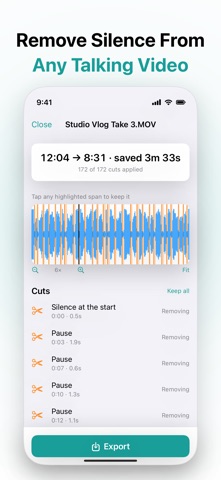
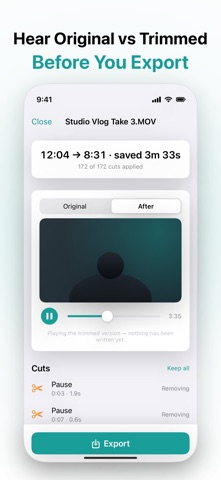
Scrubbing a talking video for dead air is the dullest hour of the edit. QuietCut takes it off your desk. Import a video or a recording and QuietCut proposes a cut for every silent gap worth removing. You review them all on a timeline, keep the ones you want, and export — entirely on your device. ▸ YOU APPROVE EVERY CUT Most silence removers cut first and let you find the damage afterwards. This one asks first. • Every proposed cut on a waveform timeline — pinch to zoom in on any of them • Tap a cut to keep it — that pause stays, and the new duration updates instantly • Hear the real result before you export — switch between Original and After at the same moment • Natural, Balanced or Tight — or set sensitivity, shortest pause and padding yourself ▸ BUILT NOT TO CUT INTO YOUR WORDS QuietCut measures your recording's own noise floor instead of using a fixed threshold — a level that means silence in a studio sits mid-sentence in a phone recording. • A cushion of speech is kept on each side of every cut between words • Short pauses are left alone — natural rhythm is not dead air • Long, deliberate beats are shortened rather than deleted, when you want them kept • On a difficult recording the cushion widens automatically, and QuietCut tells you it has • If the room is nearly as loud as the voice, QuietCut says so rather than guess ▸ YOUR VIDEO IS NOT RE-ENCODED Taking a few seconds out of a video usually means re-compressing all of it. Not here. • The video track is copied wherever the format allows — the picture that comes out is the picture that went in • Audio is re-encoded with a short fade at each join, so the cuts don't jump • Most exports finish in seconds — then save a video straight back to Photos, or share any result ▸ NOTHING LEAVES YOUR DEVICE No upload, no account, no queue. • Your recording never goes anywhere — there is nowhere for it to go • Trimming works in airplane mode, which matters while the footage is still unpublished ▸ MADE FOR • YouTube, Reels and Shorts — jump cuts without scrubbing a timeline by hand • Podcasts, interviews, lectures and voice memos • Anyone who records themselves talking and would rather not edit it Import video from Photos, or video and audio from Files — MP4, MOV, M4A, WAV, MP3. New here? Tap "Try a sample clip" on the home screen: no import, no permission, no account. QuietCut removes silence. It does not denoise, re-time, transcribe or add captions. ▸ FREE AND PREMIUM FREE: • Files up to 3 minutes • One export a day — and a failed export never costs you it • The whole review timeline and every control • No watermark PREMIUM: • Unlimited exports • Files up to 30 minutes PREMIUM SUBSCRIPTION QuietCut Premium is available with the following subscription options: Premium Monthly: $5.99/month Premium Annual: $29.99/year (Save 58%) — includes a 7-day free trial Payment will be charged to your Apple ID account at confirmation of purchase. Subscription automatically renews unless canceled at least 24 hours before the end of the current period. Your account will be charged for renewal within 24 hours prior to the end of the current period. You can manage and cancel your subscriptions by going to your App Store account settings after purchase. Any unused portion of a free trial is forfeited when you purchase a subscription. Terms of Service: https://quietcut.bulpara.com/terms Privacy Policy: https://quietcut.bulpara.com/privacy Questions? https://quietcut.bulpara.com/support
Details