
Chart standing · US
Screenshots


About
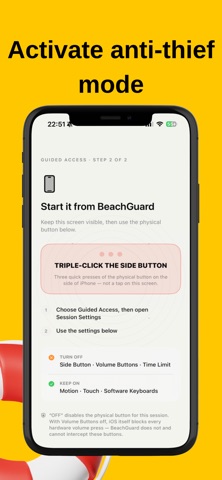
BeachGuard watches your iPhone while you step away — on a towel, a café table, a desk — and sounds an alarm the moment someone else picks it up. HOW IT WORKS Set a four-digit Trusted Code that belongs to BeachGuard alone, separate from your iPhone passcode. Turn on Apple's Guided Access, which restricts iPhone to BeachGuard until you release it. Set your phone down, and a short countdown lets it settle before motion monitoring begins. BeachGuard tells the difference between a real pickup and a passing bump — it looks for lift combined with rotation, not just a knock on the table. A confirmed pickup wakes the screen immediately. Outside Guided Access, a pickup asks iOS for Face ID. A match ends Guard Mode with no noise at all — iOS controls that authentication prompt entirely, and BeachGuard only ever receives the result. Anything else — a wrong face, a cancelled prompt, no attempt at all — sounds an audible, visual, and haptic alarm, and asks for your Trusted Code to stop it. Hand your phone to a friend while you swim; they can stand the alarm down with the code, without ever touching your passcode or your data. WHAT IT IS NOT BeachGuard cannot lock your iPhone — no third-party app can. It relies on Apple's own Guided Access for that restriction, and walks you through turning it on. It cannot track or recover a stolen phone (that's Find My — keep it on). It only works while the app is open and visible, because iOS does not grant continuous background motion access. It is not an emergency service, a medical alert, or a guarantee against theft — it makes theft loud and public, which is deterrence, not prevention. Emergency calls and Crash Detection are unavailable while Guided Access is active. This is how iOS behaves, not a BeachGuard choice — end Guided Access before you need either of them. PRIVACY BeachGuard has no account system, no advertising, no analytics, and no cloud service of any kind. Motion samples are processed on your iPhone during an active session and discarded the moment it ends — nothing is ever transmitted anywhere. Your Trusted Code is stored in the device-only Keychain, protected by the strongest passcode-locked class iOS offers. BeachGuard never sees your Face ID data or your iPhone passcode. It asks for exactly two permissions: motion, used only while a session runs, and optional notifications, used only to tell you if a session ended because the app stopped being available. It never asks for your camera, microphone, location, contacts, or photos. REQUIREMENTS iPhone with iOS 17 or later. Face ID or Touch ID recommended. Guided Access (Settings, then Accessibility, then Guided Access) must be turned on to arm Guard Mode.
Details