Chart standing · US
What changed · US
Listing changes AppTracker has observed for this app in this storefront — new versions, price moves, rating shifts, and store copy.
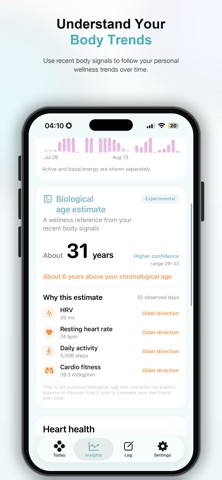
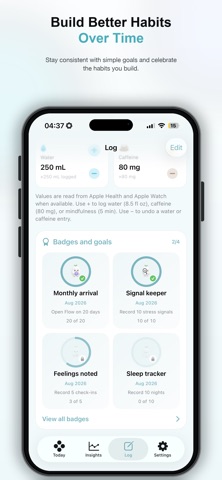
FlowWatch 1.1.3 makes it easier to understand and manage your daily stress and recovery patterns. • Apple Watch improvements - Check heart-rate and HRV-based stress estimates more easily on Apple Watch. - Added a simple guide explaining how to install the Apple Watch app from the iPhone Watch app. - Shows an installation guide card when the watch app is not installed. - Automatically hides the guide after installation. - Improved background health-signal updates and stress estimation reliability. • Today screen improvements - Browse Today’s Insights across multiple swipeable pages. - Standardized card sizes and alignment across insight pages. - Prevented insight cards from shifting vertically or being clipped. - Apple Intelligence-generated coaching is now shown under “Suggested next step.” - Removed unnecessary emotion-recording and personal-pattern sections. - Improved sleep-analysis placement and spacing. • Records and insights - Added an emotion record card at the top of Records. - Moved badges and goal cards to the Records tab. - Improved the stress-level distribution chart so the ring and legend no longer overlap. - Fixed overlapping or clipped dates in the recent valid records chart. - Personalized relief methods, sleep rhythm, and sleep difficulty trends now appear only when relevant data is available. • Settings improvements - Reorganized User Settings into clear Activity and More cards. - Added daily goals for sleep, exercise, daylight time, and steps. - Added controls for haptic feedback, first day of the week, language, and units. - Added Light, Dark, and System appearance modes. - Added unit choices for time, calories, water, distance, weight, and temperature. - Standardized the Support & Privacy and Health Data Permissions screens. - Added an option to view onboarding again. - Updated the app version to 1.1.3. • Localization and stability - Reviewed supported-language text, translations, badges, and notifications. - Improved localization of stress levels and achievement labels. - Fixed crashes and blank screens when opening notifications or Settings. - Unified the new mint-blue signature color across iPhone, iPad, Apple Watch, widgets, and complications. - Improved readability and layout consistency across devices.
Screenshots
About
Understand your stress. Follow your HRV. See how your body changes throughout the day. Flow Watch transforms health data from Apple Watch and Apple Health into simple, meaningful wellness insights. Instead of digging through raw health metrics, Flow Watch helps you understand your daily patterns at a glance. STRESS INSIGHTS See estimated stress patterns based on available health data and understand how your body changes throughout the day. HRV TRENDS Follow your heart rate variability (HRV) and see changes over time. HRV can provide useful context about recovery, fatigue, and your overall condition. DAILY WELLNESS Bring important health signals together into a simple daily view designed to make your data easier to understand. TRENDS Look beyond a single measurement. Follow your recent patterns and understand how your condition changes from day to day. BUILT FOR APPLE WATCH Flow Watch works with health information available through Apple Health, helping turn data collected by your Apple Watch into clear, useful insights. SIMPLE BY DESIGN No complicated dashboards. No overwhelming health metrics. Just the information that matters, presented clearly. MEASURE. UNDERSTAND. IMPROVE. Flow Watch is designed to help you understand your body—not diagnose medical conditions. Health insights and stress estimates provided by Flow Watch are intended for general wellness purposes only and are not medical advice or a substitute for professional medical diagnosis or treatment.
What's new · 1.1.3
FlowWatch 1.1.3 makes it easier to understand and manage your daily stress and recovery patterns. • Apple Watch improvements - Check heart-rate and HRV-based stress estimates more easily on Apple Watch. - Added a simple guide explaining how to install the Apple Watch app from the iPhone Watch app. - Shows an installation guide card when the watch app is not installed. - Automatically hides the guide after installation. - Improved background health-signal updates and stress estimation reliability. • Today screen improvements - Browse Today’s Insights across multiple swipeable pages. - Standardized card sizes and alignment across insight pages. - Prevented insight cards from shifting vertically or being clipped. - Apple Intelligence-generated coaching is now shown under “Suggested next step.” - Removed unnecessary emotion-recording and personal-pattern sections. - Improved sleep-analysis placement and spacing. • Records and insights - Added an emotion record card at the top of Records. - Moved badges and goal cards to the Records tab. - Improved the stress-level distribution chart so the ring and legend no longer overlap. - Fixed overlapping or clipped dates in the recent valid records chart. - Personalized relief methods, sleep rhythm, and sleep difficulty trends now appear only when relevant data is available. • Settings improvements - Reorganized User Settings into clear Activity and More cards. - Added daily goals for sleep, exercise, daylight time, and steps. - Added controls for haptic feedback, first day of the week, language, and units. - Added Light, Dark, and System appearance modes. - Added unit choices for time, calories, water, distance, weight, and temperature. - Standardized the Support & Privacy and Health Data Permissions screens. - Added an option to view onboarding again. - Updated the app version to 1.1.3. • Localization and stability - Reviewed supported-language text, translations, badges, and notifications. - Improved localization of stress levels and achievement labels. - Fixed crashes and blank screens when opening notifications or Settings. - Unified the new mint-blue signature color across iPhone, iPad, Apple Watch, widgets, and complications. - Improved readability and layout consistency across devices.
Details