

Take Note To Me
TTECH GLOBAL LTD · Productivity
Independent analytics for this App Store listing. AppTracker is not affiliated with TTECH GLOBAL LTD.
Chart standing · US
In-app purchases · US
No in-app purchases.
Screenshots

Keywords this app targets
Search terms AppTracker associates with this app — estimates, not search volume. ❝ = in the app's title; a highlighted number is its current position for that term.
Similar apps
Competitors and close alternatives, as estimated by AppTracker.
 Mental Note ๛
Zymbiotic Technologies
2 shared topics · 1 shared title word
Mental Note ๛
Zymbiotic Technologies
2 shared topics · 1 shared title word
 LockScreenNotes
Takumi Banjoya
2 shared topics
LockScreenNotes
Takumi Banjoya
2 shared topics
 Temp&Note
Ibrahim Sharaf
2 shared topics · 1 shared title word
Temp&Note
Ibrahim Sharaf
2 shared topics · 1 shared title word
 CraftNote: Smart AI Note Taker
Joyolabs dijital hizmetler anonim sirketi
2 shared topics · 1 shared title word
CraftNote: Smart AI Note Taker
Joyolabs dijital hizmetler anonim sirketi
2 shared topics · 1 shared title word
 Notes - Professional
LiveBird Technologies Private Limited
2 shared topics
Notes - Professional
LiveBird Technologies Private Limited
2 shared topics
 MetaMoJi Note
MetaMoJi Corporation
2 shared topics · 1 shared title word
MetaMoJi Note
MetaMoJi Corporation
2 shared topics · 1 shared title word
 Notepad - Simple Notes & Memo
Komorebi Inc.
2 shared topics
Notepad - Simple Notes & Memo
Komorebi Inc.
2 shared topics
 Kept Notes
Eric Gillis
2 shared topics
Kept Notes
Eric Gillis
2 shared topics
About
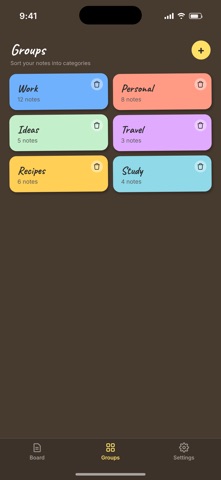
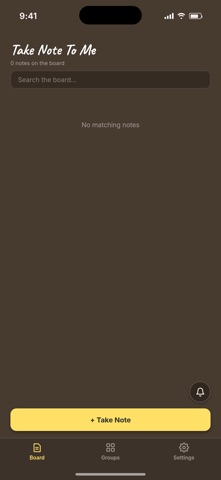
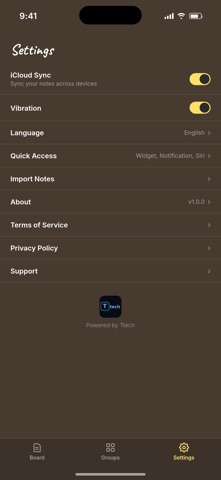
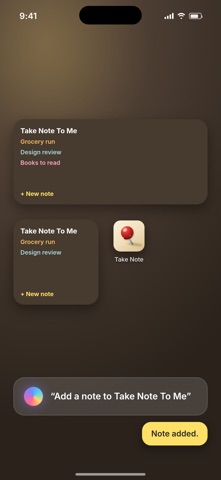
Take Note To Me turns your notes into sticky notes on a board, the way you would arrange them on a real pinboard. A BOARD, NOT A LIST Press and drag "Take Note" onto the board and a fresh note appears where you dropped it. Notes sit side by side as colored cards, each one slightly tilted, so you can see everything at a glance instead of scrolling through rows of text. MAKE IT YOURS Every note gets its own color from a palette of 32, or pick any shade you like with the color picker. Give notes a title, write as much as you need, and the note grows with you. PIN WHAT MATTERS Tap the pin on any note to fasten it to the top of the board. Pinned notes stay put while everything else moves around them. ARRANGE BY HAND Long-press any note and drag it wherever you want. Your order is your order, not a timestamp's. Drag a note down onto the "Take Note" area when you are done with it, confirm, and it is gone. GROUPS Create groups with their own names and colors, and file notes under them. A group shows how many notes it holds, and opening one gives you just those notes. Delete a group and the notes inside stay safe. WIDGETS FOR ANY NOTE Pick a note, tap the widget button, then place a widget on your Home Screen. The note appears there with its title, its text and its own color. Add as many widgets as you want, each one showing a different note, in small, medium or large size. SIRI AND SHORTCUTS Ask Siri to add a note and speak it out loud. The note lands on your board, no need to open the app. NOTIFICATIONS YOU CAN WRITE BACK TO Send yourself a quick-note notification from the board. Pull it down, type your thought straight into the notification, and it becomes a note. SHARE FROM ANYWHERE Found something worth keeping in another app? Share it to Take Note To Me and it turns into a note. BRING YOUR OLD NOTES Import notes you exported from another app or from your iCloud archive, and they land on your board as their own cards. ACROSS YOUR DEVICES Switch on iCloud sync and your notes, colors, groups and order follow you between your iPhone and iPad. Leave it off and everything simply stays on this device. SEARCH Type in the search bar and the board filters down to matching notes, titles and content alike. IN YOUR LANGUAGE Fully translated into 25 languages. Privacy Policy: https://ttech.company/takenotetome/privacy/ Terms of Service: https://ttech.company/takenotetome/terms/ Support: https://ttech.company/takenotetome/support/
Details