

SnapDo: Photo to Action
Michael Frankland · Productivity
Independent analytics for this App Store listing. AppTracker is not affiliated with Michael Frankland.
Chart standing · US
What changed · US
Listing changes AppTracker has observed for this app in this storefront — new versions, price moves, rating shifts, and store copy.
Screenshot Inbox: SnapDo can now find your recent screenshots and line them up on Today. Swipe right to turn one into an action, left to dismiss it. Turn on an optional reminder for when new screenshots are waiting. Start with your own screenshot: the first time you open SnapDo, try it on your latest screenshot. Faster capture: Control Center controls, Home Screen and Lock Screen widgets, and new Shortcuts for the Action Button. Better search: Library search now looks inside captured text, and saved actions appear in Spotlight. Everything still happens privately on your iPhone.
In-app purchases · US
What this app sells inside itself, grouped by kind and priced for this storefront.
Screenshots




About
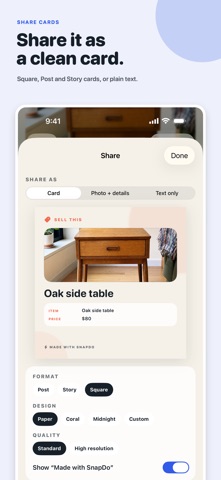
Your screenshots are full of things you meant to do. SnapDo turns them into clear, editable actions: reminders, calendar events, to-dos, recipes, receipts and more. SCREENSHOT INBOX Turn on Screenshot Inbox and SnapDo lines up your recent screenshots. Swipe right to turn one into an action, swipe left to dismiss it. An optional reminder tells you when new screenshots are waiting. CAPTURE ANYTHING Choose one or several screenshots, take a photo, import a PDF, paste text, or send something from another app’s Share Sheet. SnapDo reads the details and suggests one of 96 focused templates, from a calendar event or reminder to a sale listing, recipe, receipt, parcel, school notice, or travel stop. DO IT NOW Add events to Calendar and tasks to Reminders in a tap. Save, edit, and search everything, including the text inside your captures. Saved actions appear in Spotlight. Share clean text or Square, Post, and Story cards. ALWAYS AT HAND Control Center controls, Home Screen and Lock Screen widgets, Action Button support, and four Shortcuts actions. PRIVATE BY DESIGN Everything happens on your iPhone. No account, no cloud upload, no tracking. It works in Airplane Mode. On eligible devices, Apple Intelligence can optionally refine titles and summaries on device. NO SUBSCRIPTION Your first five saved actions are free. A one-time lifetime purchase unlocks an unlimited library, unlimited Shortcuts saves, custom templates, and every sharing option.
What's new · 1.0.2
Screenshot Inbox: SnapDo can now find your recent screenshots and line them up on Today. Swipe right to turn one into an action, left to dismiss it. Turn on an optional reminder for when new screenshots are waiting. Start with your own screenshot: the first time you open SnapDo, try it on your latest screenshot. Faster capture: Control Center controls, Home Screen and Lock Screen widgets, and new Shortcuts for the Action Button. Better search: Library search now looks inside captured text, and saved actions appear in Spotlight. Everything still happens privately on your iPhone.
Details