

WebPeek — Web Inspector
Zihua Huang · Developer Tools
Independent analytics for this App Store listing. AppTracker is not affiliated with Zihua Huang.
Chart standing · US
In-app purchases · US
No in-app purchases.
Screenshots


Keywords this app targets
Search terms AppTracker associates with this app — estimates, not search volume. ❝ = in the app's title; a highlighted number is its current position for that term.
Similar apps
Competitors and close alternatives, as estimated by AppTracker.
 Web Inspector
And a Dinosaur
Web Inspector
And a Dinosaur
 Web Inspector for Safari
Pierre Stanislas
Web Inspector for Safari
Pierre Stanislas
 Codeye - Web Inspector
Just4Work
Codeye - Web Inspector
Just4Work
 DevInspect Browser
Cederic Schmid
DevInspect Browser
Cederic Schmid
 Inspect Browser
Parallax Dynamics Inc.
Inspect Browser
Parallax Dynamics Inc.
 Web Inspector & Dev Tools
VISUAL MOBILE SOFTWARE S.R.L.
Web Inspector & Dev Tools
VISUAL MOBILE SOFTWARE S.R.L.
 Inspect Browser PRO
Francisco Espejo
Inspect Browser PRO
Francisco Espejo
 View Source Code
Polarity Labs Pte. Ltd.
View Source Code
Polarity Labs Pte. Ltd.
About
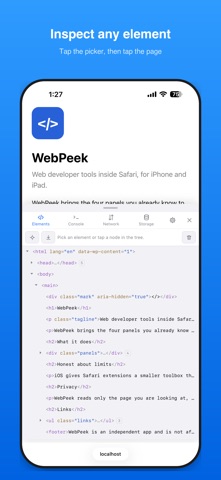
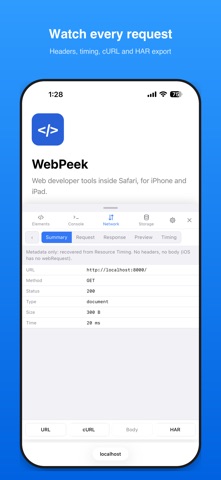
WebPeek brings the four panels you already know to Safari on iPhone and iPad. Turn it on once and every page gets a small floating button; tap it and the inspector slides up over the page you are already reading. ELEMENTS • Tap the picker, then tap anything on the page to select it • A real DOM tree with syntax colouring and a breadcrumb • Edit attributes, text and outerHTML; delete nodes — all applied live • Matched CSS rules, every computed property, and a box-model diagram CONSOLE • Every console.* call captured from the very first line of the page • Uncaught errors, unhandled rejections and CSP violations, with stack traces • Expandable object trees — arrays, Maps, Sets, typed arrays, DOM nodes • An input line for running expressions, with history NETWORK • fetch, XMLHttpRequest, WebSocket, sendBeacon and EventSource, captured as they happen • Status, method, size, and a timing breakdown per request • Request and response headers, request body, response preview • Images, audio and video previewed inline • Copy as cURL, or export the whole session as a HAR file STORAGE • localStorage, sessionStorage and cookies — read, edit, add, delete • IndexedDB browser with paging, including what type each value is • Cache Storage, including what a Service Worker has cached • A usage bar for the origin BUILT FOR A PHONE • The panel lives inside the page — nothing to connect, nothing to install on a computer • Three heights, drag to resize, or a side dock on iPad • Light and dark, English, 简体中文 and 繁體中文 • Every destructive action asks first HONEST ABOUT LIMITS iOS gives Safari extensions a smaller toolbox than a desktop browser, and WebPeek says so instead of pretending. HttpOnly cookies stay invisible, pages with a strict Content-Security-Policy cannot run expressions, static files arrive without headers, and cross-origin responses only show the headers the server chose to expose. The in-app Tips screen explains each one and why. PRIVACY WebPeek reads only the page you are looking at, keeps everything on the device, and has no account, no analytics and no network calls of its own.
What's new · 1.1
A full pass on editing with the phone keyboard up: • The editor now takes over the panel while you type — the keyboard no longer hides the input box, and the cursor is ready the moment it opens. • Undo for every edit: text, attributes, HTML replacement and deletion share one Undo banner. • Tree search in Elements: jump to any tag, attribute or text, even inside collapsed branches. • Renaming an attribute now truly renames it. • Unsaved edits, console history, open request details and filters survive switching panels. • console.assert now matches desktop behavior, and Copy as cURL no longer includes the response body.
Details