

FlockYou
ZY MGMT CO · Navigation
Independent analytics for this App Store listing. AppTracker is not affiliated with ZY MGMT CO.
Chart standing · US
Screenshots

About
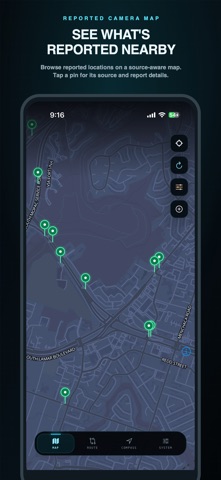
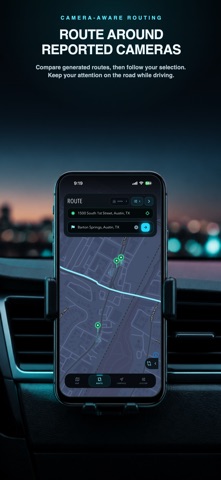
FlockYou turns public camera reporting into a practical map for understanding automated license plate reader coverage near you and along routes you plan. CURRENT COVERAGE The current snapshot includes 113,520 reported locations and 87 normalized manufacturer or company identities. These public reports are not a count of active or verified cameras and change with source data. EXPLORE THE MAP Browse reported ALPR, public-agency, and private-company camera locations on a dark, source-aware map. New community reports appear as yellow pins and require an ALPR, Public Agency Camera, or Private Company category. A Community Approved badge requires an accepted confirmation from a second app installation. Tap a pin to see its reported operator or manufacturer, confidence level, distance, observation date, and source update. Filter camera categories and supported official public-camera providers to focus the map. If live sources and usable cache are unavailable, FlockYou shows an unavailable state instead of inventing pins. VIEW PUBLIC TRAFFIC CAMERAS Supported transportation agencies appear as a separate public-camera layer. Open the latest agency-hosted image, stream, or official camera page in a temporary in-app viewer, or continue in your browser. Public traffic cameras are kept separate from license plate reader alerts and route scoring unless you choose to include them. USE THE COMPASS The live compass points toward nearby reported cameras and shows bearing, distance, category, confidence, and source timing. Choose a radar range from one-quarter mile to five miles and open a selected report on the map. COMPARE AND FOLLOW ROUTES An account and active Premium entitlement are required before route search. Enter a route from your current location or another starting point, then compare eligible alternatives by reported camera exposure, closest approach, travel time, and detour. Build Avoid Cameras routes around selected reported locations where routing coverage supports it. Choose the camera sources that count, plus toll, highway, and ferry preferences. Premium also unlocks a heading-aware follow view, upcoming-turn instructions, optional spoken prompts, remaining distance and ETA, arrival handling, and automatic rerouting after sustained off-route movement. Choose a car, truck, or bike marker in red, white, purple, or silver, or hand the destination to Google Maps. Routing does not promise a camera-free trip. SAVE DATA FOR OFFLINE USE Premium lets you store up to five city or nearby-area camera packs on your device for 30 days. Each pack includes camera pins and source metadata that remain available when live sources cannot be reached. You can also save up to ten selected route results with their map geometry, exposure details, and preferences until you delete them. Street map tiles are not included and may be unavailable offline. GET OPTIONAL PROXIMITY ALERTS Choose quarter-mile, half-mile, or one-mile alerts. Distance checks, cooldowns, and monitored regions stay on your device. Background location is optional and used only for enabled proximity alerts. PRIVACY FIRST FlockYou does not build trip history, sell your location, use cross-app tracking, or include advertising. Mapping, routing, subscription, and public-data providers receive only limited requests needed for features you choose. Public datasets may be incomplete, stale, duplicated, mislabeled, or geographically imprecise. FlockYou is an awareness and foreground route-guidance tool, not a detector, safety guarantee, lane-guidance system, or emergency service. Do not interact with the app while driving. Premium subscriptions renew automatically unless canceled through your App Store account. Lifetime access is a one-time purchase and does not renew. Restore Purchases and Manage Purchase are available in the app. FlockYou is not affiliated with or endorsed by Flock Safety, Inc. Terms of Use (EULA): https://www.apple.com/legal/internet-services/itunes/dev/stdeula/
Details