

Scatto: Manual RAW Camera
Spruzzo Labs Inc. · Photo & Video
Independent analytics for this App Store listing. AppTracker is not affiliated with Spruzzo Labs Inc.
Chart standing · US
What changed · US
Listing changes AppTracker has observed for this app in this storefront — new versions, price moves, rating shifts, and store copy.
New in 1.2, for the second shoot and the tenth: - Setups. Save the camera as it stands, by name: lens, zoom, file format, exposure, white balance and overlays. One tap brings it back, and Scatto tells you when the camera has drifted from it. - Looks. Save the light and colour of a develop and set it down on other photos. White balance travels as a shift from each photo's own neutral, and the crop stays with its frame. - A first-photo guide. Five hints that walk one photo from the shutter to the share sheet. It waits in Settings if you skip it. - Capture settings redrawn as dark cards. Scatto is now completely free. Every dial, every monitoring overlay and every file format come with the download, with no purchase and no trial clock. Questions? hello@spruzzolabs.com. We read every message.
Price & rating history · US
Reconstructed from the listing changes AppTracker has observed in this storefront. A field is charted once it has changed more than once, and each line starts at the value it moved from.
Price · Free now · 4 changes on record
In-app purchases · US
What this app sells inside itself, grouped by kind and priced for this storefront.
Screenshots




About
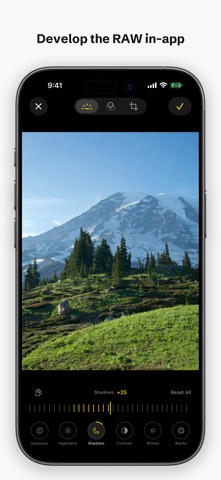
Scatto is a manual camera with real controls and a darkroom, and all of it is free. A real RAW file that grades like a camera file, a histogram that tells you the truth, and a processing switch that asks the camera for a faster, lighter render when you want the sensor's version of the scene. EVERYTHING, FREE - RAW, Apple ProRAW, RAW+JPEG, HEIF and JPEG, at full sensor resolution. RAW formats depend on the phone and the lens; Scatto shows what each lens can write. - Manual shutter, ISO, focus and white balance on wheels that snap to real stops, all within one thumb of the shutter. - Live RGB histogram, highlight zebras, focus peaking. - Setups: save the camera as it stands, by name. Lens, zoom, file format, exposure, white balance and overlays come back in one tap. - Minimal processing mode, which prioritizes speed over Apple's heavier multi-frame passes. - Every lens, tap to focus, drag the sun to set exposure, long-press for AE/AF lock. - Camera Control slides to set shutter and ISO by hand, on the phones that have one. - Manual settings that survive a lens swap and a zoom. - Grid, level, self-timer, hardware-button shutter. - A roll that keeps every shot you took in the app, so this morning's work is one swipe away instead of somewhere in a library of ten thousand photos. THE DARKROOM Open a shot and develop it: exposure, highlights, shadows, contrast, whites and blacks; warmth in Kelvin, tint, vibrance, saturation; crop, straighten and rotate. On a RAW frame these run through the RAW pipeline instead of over a finished JPEG, so white balance moves the way Kelvin moves on a camera file and a recovered highlight brings back detail the sensor actually recorded. Hold the picture to see it the way it came out of the camera. Nothing is baked. An edit is a recipe stored with the shot, the original file never changes, and exporting writes a new one beside it. LOOKS Save the light and colour of a develop by name and set it down on the next photo. White balance travels as a shift from each photo's own neutral, so a look made in shade still holds in daylight. The crop stays with the frame it was made for. THE CONTROLS Every setting lives on a wheel that snaps to real stops: the shutter speeds and ISO values a camera actually has. An A/M switch hands control back to the camera whenever you want it. THE READOUTS A live RGB histogram, highlight zebras and focus peaking, drawn only while you are watching them so the phone stays cool on a long shoot. What you see before the shutter is what lands in the file. YOUR FIRST PHOTO A five-hint guide walks one photo from the shutter to the share sheet: shoot it, open it, develop it, compare, share. Skip it whenever you like; it waits in Settings. PRIVACY Nothing leaves your device. Scatto has no analytics and no account, and makes no network calls. Location, if you allow it, writes the standard EXIF geotag into your own photos and goes nowhere else. Free. No subscription. No ads. No account. Made by Spruzzo Labs — a creative lab. Questions or ideas? hello@spruzzolabs.com
What's new · 1.2.0
New in 1.2, for the second shoot and the tenth: - Setups. Save the camera as it stands, by name: lens, zoom, file format, exposure, white balance and overlays. One tap brings it back, and Scatto tells you when the camera has drifted from it. - Looks. Save the light and colour of a develop and set it down on other photos. White balance travels as a shift from each photo's own neutral, and the crop stays with its frame. - A first-photo guide. Five hints that walk one photo from the shutter to the share sheet. It waits in Settings if you skip it. - Capture settings redrawn as dark cards. Scatto is now completely free. Every dial, every monitoring overlay and every file format come with the download, with no purchase and no trial clock. Questions? hello@spruzzolabs.com. We read every message.
Details