

Breakr: Map Your Panel
Jesse Haynes · Utilities
Independent analytics for this App Store listing. AppTracker is not affiliated with Jesse Haynes.
Chart standing · US
What changed · US
Listing changes AppTracker has observed for this app in this storefront — new versions, price moves, rating shifts, and store copy.
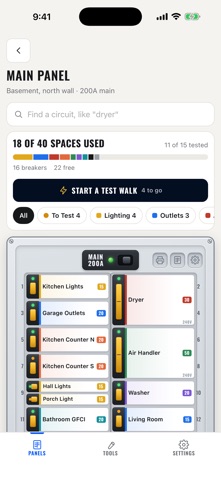
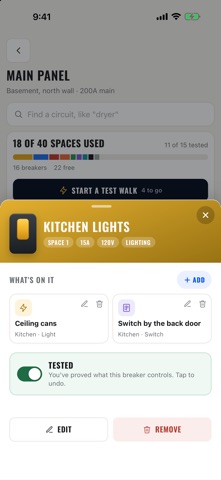
Test Walk is here. Breakr walks you through your panel one breaker at a time: flip it off, check what went dark, and mark it tested. A label says what someone thought a breaker fed. A test proves it. Also new: - A tested ring on your panels shows how much of your map is proven - Find a circuit: search "dryer" and it lights up on the panel - Filter by circuit type, or show only what's left to test - A status light on every breaker: green once tested, amber until then - Each breaker sheet now wears its circuit's color - Fixes for the iPad layout under the status bar
In-app purchases · US
No in-app purchases.
Screenshots




About
Stop guessing which breaker is which. Breakr draws your electrical panel the way it actually is: odd numbers down the left, even down the right, tandems and 240V breakers in their proper places. Tap any breaker and see exactly what is on it, room by room, outlet by outlet. MAP IT ONCE, IN ONE PHOTO Photograph the breakers, the directory card on the door, or both, and Breakr reads them into a panel for you. You check the result before anything is saved, because a photo tells you what the label says, not what the circuit does. The photo is read and then discarded. CONFIRMED, NOT GUESSED Every circuit is either confirmed or it is not, and Breakr keeps them apart. A label somebody wrote in 1994 is a guess. A circuit you have actually tested with the breaker off is a fact. Mark one confirmed and you will still know, a year later, which is which. TEST WALK Breakr walks your panel with you, one breaker at a time. Flip it off, walk the house, and say what went dark: right first time, something else, or skip it for now. A ring on your panels shows how much of your map is proven, and every breaker carries a status light, green once tested. FIND IT IN TWO TAPS Search "dryer" and it lights up on the panel. Filter by circuit type, or show only what is left to test. Nothing moves: a breaker is always where it is on the real panel. BUILT FOR THE PANEL, NOT THE DESK It is used standing in front of an open panel, on a phone, usually one-handed. So the rows are big enough to hit, labels wrap instead of truncating to nothing, and adding a run of breakers is one continuous pass rather than a form you reopen twenty times. PRINT IT FOR THE DOOR Two printouts, both on plain letter paper. A one-page reference sheet to fold into the panel door, and stick-on labels printed at real size, so you can cut them out and put them beside the actual breakers. Because the app is on your phone and the panel is in the basement. MORE THAN ONE PANEL Main panel, sub-panel, the one in the detached garage. Say which panel feeds which, and each keeps its own layout. ONE PRICE, ONCE $1.99, and that is the whole transaction. No subscription, no ads, and nothing held back for a paid tier. Your panel is yours: sign in with Apple or Google, and delete your account and everything on it whenever you want.
What's new · 1.1
Test Walk is here. Breakr walks you through your panel one breaker at a time: flip it off, check what went dark, and mark it tested. A label says what someone thought a breaker fed. A test proves it. Also new: - A tested ring on your panels shows how much of your map is proven - Find a circuit: search "dryer" and it lights up on the panel - Filter by circuit type, or show only what's left to test - A status light on every breaker: green once tested, amber until then - Each breaker sheet now wears its circuit's color - Fixes for the iPad layout under the status bar
Details