

My Best Document Scanner
OANA RINALDI · Productivity
Independent analytics for this App Store listing. AppTracker is not affiliated with OANA RINALDI.
Chart standing · US
What changed · US
Listing changes AppTracker has observed for this app in this storefront — new versions, price moves, rating shifts, and store copy.
Meet Scanner Pro: turn scans into searchable text, sign and annotate pages, organize folders and tags, merge documents, protect PDFs with passwords, and add watermarks or page numbers. Optional library lock keeps your documents behind device authentication. All existing scanning, filters, photo imports, local storage, sharing and Small / Medium / Large PDF exports remain free. Monthly and yearly Pro plans are optional. Try the sample documents in Settings to explore the app.
In-app purchases · US
No in-app purchases.
Screenshots



About
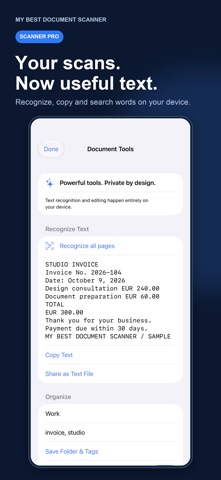
Turn paperwork into something you can use. My Best Document Scanner makes crisp PDFs from documents, receipts, invoices, agreements and notes. Scan a stack or import photos, clean the pages and share in seconds. YOUR EVERYDAY SCANNER STAYS FREE • Automatic edge detection and perspective correction • Multi-page scanning and photo imports • Color, Enhanced, Grayscale and Black & White filters • Reorder and remove pages before saving • Unlimited local document storage • Rename documents and search by name • Small, Medium and Large PDF exports • Share through Mail, Messages, AirDrop, Files and more DO MORE WITH OPTIONAL SCANNER PRO • Recognize text on your device, copy it or export a text file • Create searchable PDFs with selectable text • Find words inside recognized documents • Draw signatures and handwritten notes on scanned pages • Organize scans with custom folders, tags and favorites • Merge saved documents while keeping the originals • Add PDF passwords, watermarks and page numbers • Protect app access with Face ID, Touch ID or device passcode PRIVATE BY DESIGN Document processing happens on your device using Apple frameworks. No app account, advertising or analytics. We do not upload your scans to our servers. Scan and edit offline; buying and restoring Pro requires a connection to Apple. Your documents remain accessible if your subscription ends. Choose Scanner Pro Monthly or Scanner Pro Yearly for the same complete Pro toolkit. Prices and billing periods are displayed before purchase. Subscriptions are charged to your Apple Account and renew automatically unless cancelled at least 24 hours before the current period ends. Manage or cancel in your Apple Account settings. Restore purchases in the app's Settings. Privacy Policy: https://oanarinaldi.com/mybestdocumentscannerprivacy.html Terms of Use: https://www.apple.com/legal/internet-services/itunes/dev/stdeula/ Support: oanaunciuleanu@gmail.com
What's new · 1.1
Meet Scanner Pro: turn scans into searchable text, sign and annotate pages, organize folders and tags, merge documents, protect PDFs with passwords, and add watermarks or page numbers. Optional library lock keeps your documents behind device authentication. All existing scanning, filters, photo imports, local storage, sharing and Small / Medium / Large PDF exports remain free. Monthly and yearly Pro plans are optional. Try the sample documents in Settings to explore the app.
Details