

CadenceLoft: Training Timers
BEE2.IO LLC · Health & Fitness
Independent analytics for this App Store listing. AppTracker is not affiliated with BEE2.IO LLC.
Chart standing · US
What changed · US
Listing changes AppTracker has observed for this app in this storefront — new versions, price moves, rating shifts, and store copy.
A complete redesign: a calmer layout, larger type, clay artwork and a 3D home scene across all seven tools. Also in this update: - Headline figures stay readable on every card. - CupCairn Trends: the day labels under the bars no longer wrap. - StepSpan: the action button sits directly above the tab bar. - iPad: every tool sits in one centred column, and the JumpScout trend chart stays inside its card.
Screenshots


About
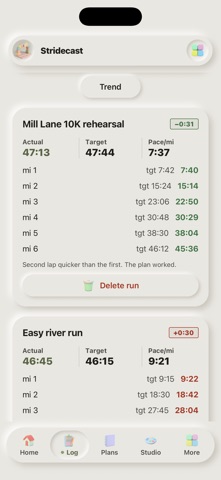
CadenceLoft puts seven offline training tools in one app: JumpScout jump and reaction tests, Stridecast pace planning, StepSpan step and stride logs, FallLab stopwatch and reaction drills, StepTempo cadence coaching, SetRest workout timers, and CupCairn daily tally tracking. Every tool is usable free, including its core calculator, timer, or live mode. Small saved libraries let you try real workflows before buying. Optional one-time module unlocks add unlimited histories, trend charts, sensor modes, hands-free playback, richer training plans, and CSV or printable exports. CadenceLoft All Access unlocks every paid feature. There are no subscriptions. No account or sign-in is required, and there is no bee2.io analytics or advertising SDK. CadenceLoft shows no ads. Optional one-time purchases unlock additional features only. Everything you save stays on your device and the core tools work offline. CadenceLoft is a general fitness and training aid, not medical, diagnostic, therapy, fall-prevention, or injury-prevention advice.
What's new · 1.1.0
A complete redesign: a calmer layout, larger type, clay artwork and a 3D home scene across all seven tools. Also in this update: - Headline figures stay readable on every card. - CupCairn Trends: the day labels under the bars no longer wrap. - StepSpan: the action button sits directly above the tab bar. - iPad: every tool sits in one centred column, and the JumpScout trend chart stays inside its card.
Details