

Braces Progress Photos - Soroe
Mitsuhiro Ogata · Health & Fitness
Independent analytics for this App Store listing. AppTracker is not affiliated with Mitsuhiro Ogata.
Chart standing · US
What changed · US
Listing changes AppTracker has observed for this app in this storefront — new versions, price moves, rating shifts, and store copy.
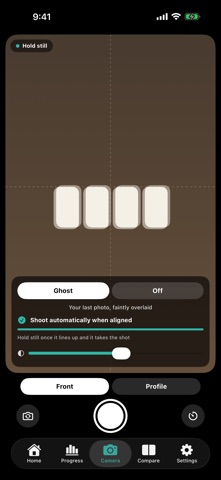
Added automatic shutter. Line your camera up with your previous photo, hold still, and it takes the shot on its own. No more reaching for the button and losing the framing you just set up. It waits until the fine detail matches, not just the outline of your face, so how far your mouth is open lines up too. Turn it on from the overlay settings on the camera tab.
In-app purchases · US
What this app sells inside itself, grouped by kind and priced for this storefront.
Screenshots



About
Orthodontic treatment is a long journey before you see results. Looking in the mirror every day, it's easy to wonder: "Are my teeth actually moving?" Soroe turns that doubt into confidence. It's a progress-tracking app for orthodontic treatment that keeps your photos and meals on a single timeline. Works with both braces and aligners. ■ Shoot with your previous photo overlaid Your last photo appears as a translucent overlay, so every shot has the same framing and distance. Guide outlines help with your first shot, for both the front view and the profile. Adjust the overlay strength or turn it off, and use the 3-second timer or volume-button shutter. ■ Compare before and now with a slider Swipe between two photos with your finger. Export comparison images with the date and day count baked in — ready to share. ■ Timelapse Turn your photo series into a short video and watch your teeth move. Months of treatment become a few seconds of film. ■ Three meals a day Log breakfast, lunch, and dinner with a photo, a note, and a 1-5 rating for how easy it was to eat. Sort by "easiest first" and you can find something you managed before, on the days when chewing hurts. ■ Moments worth keeping Wire adjustments, gear you bought, the bracket that came off. A photo and a note now says more than memory will later. ■ Scrub through your progress Slide the ruler and the day count moves under your finger, bringing up that day's photo and moments. The whole journey, one swipe away. ■ Home Screen widgets Your day count and a before-vs-latest comparison, right on your Home Screen. The change is there without opening the app. ■ Privacy first Your photos and data are stored only on your device and in your own iCloud. There are no developer servers — photos are never sent anywhere. No account needed. Note: This app is not a medical device. It is intended for recording and organizing progress photos only, and does not provide diagnosis, treatment, or medical advice. Always consult your orthodontist or dentist for treatment decisions.
What's new · 1.1.1
Added automatic shutter. Line your camera up with your previous photo, hold still, and it takes the shot on its own. No more reaching for the button and losing the framing you just set up. It waits until the fine detail matches, not just the outline of your face, so how far your mouth is open lines up too. Turn it on from the overlay settings on the camera tab.
Details