

Plate Blur AI: Cars & Homes
Igor Bidenko · Photo & Video
Independent analytics for this App Store listing. AppTracker is not affiliated with Igor Bidenko.
Chart standing · US
In-app purchases · US
What this app sells inside itself, grouped by kind and priced for this storefront.
Screenshots






About
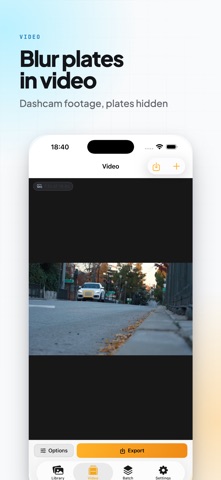
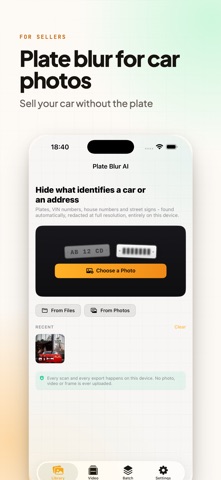
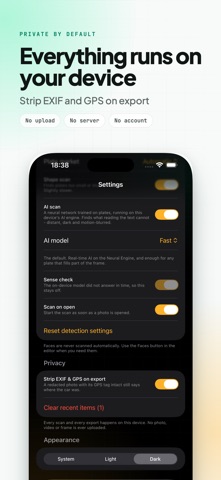
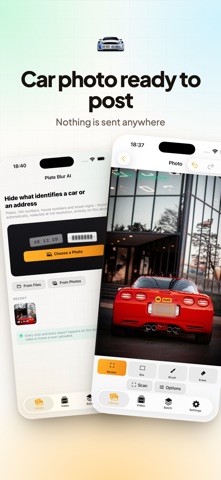
Sell a car, list a flat, post a dashcam clip. The photo is fine. The plate, the VIN and the number on the door are not. Plate Blur AI finds those details and covers them before the picture leaves your device. Open a photo and the app reads it. Plates, VIN numbers, house numbers and street signs come back as a list, each one showing what was read and how confident the app is. Tap any of them to keep it or drop it. Nothing gets covered behind your back, and nothing gets sent anywhere. HOW IT WORKS The scan runs on your iPhone, iPad or Mac. No account, no upload, no server, no queue. Put the device in Airplane Mode and everything still works, which is the point. WHAT IT FINDS - License plates, front or rear, straight on or at an angle - VIN numbers, including the ones on windscreen and door stickers - House numbers and street signs - Dealer and inspection stickers (Pro) - Any other readable text in the frame (Pro) THREE LEVELS OF SCANNING Strict takes only what it is sure about. Balanced is the default and catches most plates without covering unrelated text. Thorough digs for small, distant and half blurred plates, and will occasionally cover a sign you did not care about. Switch and rescan without reopening the photo. PRESETS Selling a car covers plates and VIN. Street and property adds house numbers and street signs. Dashcam frame is tuned for footage. Full anonymise takes everything it can see. Pro users can save their own. NINE WAYS TO COVER SOMETHING Blur, pixels and a solid bar are free. Pro adds hex mosaic, crystal, motion, bokeh, noise, and a stamped label that writes REDACTED across the area instead of smudging it. Strength is a slider, so a plate can be softened or erased completely. WHEN THE SCAN MISSES Brush over anything by hand, and erase where the app went too far. Both are free, no strings. Pro adds a box tool for straight rectangles and a manual face cover for people in the background. Faces are never touched automatically, only when you ask. VIDEO AND BATCH Pro covers plates across a whole clip, frame by frame, and keeps the original length and track. Batch runs a folder of photos through the same preset in one pass. EXPORT JPEG, PNG or HEIC, with a quality slider. Pro removes the watermark, unlocks PNG and HEIC, and adds the option to strip EXIF and GPS so a shared photo cannot be traced back to where it was taken. ON MAC Right click a file in Finder and pick Redact with Plate Blur AI, or Hide Plates and VIN, and it is done without opening a window. Two Shortcuts actions are included, one for images and one for a whole folder, so redaction can sit inside a larger automation. FREE AND PRO Free covers one photo at a time, three styles, brush and erase, and exports a watermarked JPEG. Pro removes the watermark and adds video, batch, the extra styles, the box and face tools, PNG and HEIC, saved presets and EXIF stripping. Monthly, yearly or one time purchase. No subscription is required to use the app. WHO USES IT People selling a car on classifieds. Landlords and estate agents photographing a front door. Dashcam owners posting an incident. Anyone sharing a driveway or a parking dispute who would rather not publish a plate and a street address at once. Subscription Terms: Payment charged to iTunes Account. Auto-renews unless disabled 24 hours before period ends. Manage in Account Settings. https://www.apple.com/legal/internet-services/itunes/dev/stdeula/ Your photos stay yours. They are never uploaded, never analysed on a server, and never used to train anything.
Details