

PDF Office: Edit, Sign & Scan
ARTEVUS TECHNOLOGIES (PRIVATE) LIMITED · Productivity
Independent analytics for this App Store listing. AppTracker is not affiliated with ARTEVUS TECHNOLOGIES (PRIVATE) LIMITED.
Chart standing · US
What changed · US
Listing changes AppTracker has observed for this app in this storefront — new versions, price moves, rating shifts, and store copy.
Screenshots




About
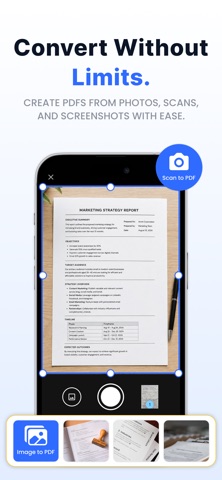
PDF Office is an advanced PDF editor for iPhone designed to help you work with documents in one place. Edit PDF content, review files, sign forms, scan paper documents, convert files, create PDFs, and organize your pages without switching between multiple apps. KEY FEATURES • Edit PDF text and content directly in your documents • Read and review PDFs with a clear PDF reader • Markup and annotate with highlights and notes • Sign PDF and fill forms with a drawn or typed signature • Scan documents and photos to PDF with your iPhone camera • Convert PDF to Word and Word to PDF • Create PDFs from images with photo to PDF and JPG to PDF • Merge PDF and combine pages into one file • Split PDF to extract selected pages • Compress PDF to reduce file size for sharing • Organize pages — reorder, rotate, or delete • Protect PDF with a password, or unlock protected files • Extract text from PDF for quick copy and reuse EDIT YOUR PDF DOCUMENTS With PDF Office, you can edit existing PDF content, correct mistakes, update information, and make changes directly in your document. The PDF file editor is built for practical document work, while PDF markup and PDF annotate tools let you highlight content, add notes, and review important details. When you only need to read a file, the PDF reader makes it easy to open and review documents. The free PDF reader experience is useful for reports, contracts, assignments, forms, and other files you keep on your iPhone. Students and professionals can also rely on the free PDF editor for everyday edits without jumping between apps. SIGN AND FILL FORMS Complete digital paperwork without printing it first. Use the signing app to draw or type your signature, then place it where it is needed. The free document signer helps you sign supported documents from your iPhone. You can sign PDF free when you need to finish something quickly, and signature app free features keep the process simple. For forms, free PDF fill and sign tools let you complete fields and add your signature digitally. SCAN PAPER DOCUMENTS Turn physical paperwork into digital files with the document scanner. The PDF scanner captures paper pages with your iPhone camera, and the scanner app free experience makes everyday scanning simple. Use the photo scanner for receipts, notes, and forms, or a free document scanner when you need to digitize paperwork on the go. Scan document free when you want a quick capture, then save with scan to PDF so your pages stay together in one file. CONVERT AND CREATE FILES The PDF converter helps you change supported documents into other formats. With PDF to Word, you can convert a PDF into an editable Word document when you need Word format. The free PDF converter option is available for supported conversion tasks, and the document converter brings those tools together in one place. Create documents with the PDF maker, or use PDF creator free tools when you need a new PDF. IMAGE TO PDF Turn photos into documents with photo to PDF, or use the photo to PDF converter and image to PDF when working from pictures. Use JPG to PDF for JPG files and pictures to PDF to combine images. The image converter helps with supported image formats. ORGANIZE YOUR DOCUMENTS Use combine PDF to bring multiple PDF files or pages together. PDF Office also includes a PDF writer for creating and working with PDF content and a document editor for managing your documents. Looking for a PDF editor, PDF reader, and PDF converter in one place? PDF Office keeps edit, sign, scan, convert, and organize tools together — so you spend less time switching apps. Whether you are a student, freelancer, or professional, PDF Office gives you practical tools for editing, reading, signing, scanning, converting, creating, and organizing documents on iPhone. PRIVACY & TERMS Privacy Policy: https://artevus.com/privacy Terms of Service: https://artevus.com/terms EULA (Apple Standard): https://www.apple.com/legal/internet-services/itunes/dev/stdeula/
Details