

Memory Tin – Photo Cleanup
Peidus Products OU · Photo & Video
Independent analytics for this App Store listing. AppTracker is not affiliated with Peidus Products OU.
Chart standing · US
What changed · US
Listing changes AppTracker has observed for this app in this storefront — new versions, price moves, rating shifts, and store copy.
This update brings a free Screenshots deck and a whole first day of unlimited chapters, plus the usual fixes and improvements. Enjoy!
Screenshots




About
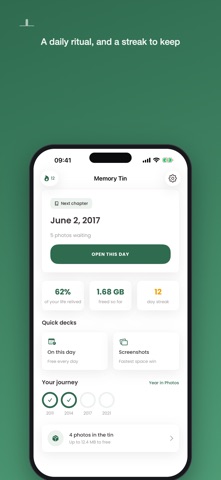
Your camera roll started somewhere. So does Memory Tin. Instead of dumping thousands of pictures into a scary grid, Memory Tin opens at the oldest photo you own and walks forward through your life, one day at a time. Swipe right to keep it. Swipe left to drop it in the tin. Swipe down to decide later. HOW IT WORKS Every chapter is a single day from your past. Clear it and you get a small summary: what you kept, what went in the tin, and how much room you just made. A journey meter fills as you go, showing how much of your life you have relived so far. Nothing disappears behind your back. Photos you swipe left sit in the tin until you deliberately empty it: one batch, one confirmation, and you can pull anything back out before you do. • Oldest-first chapters, so tidying feels like remembering • Keep, tin, or decide later with one swipe • Daily streaks, badges and year milestones • An On This Day deck from every year you own • A screenshot deck for the fastest space win • A Year in Photos card you can share • File the keepers straight into albums FREE AND PREMIUM One chapter a day, On This Day, streaks and badges are free forever. Premium unlocks unlimited chapters, Year in Photos and multi-album filing. Yearly and lifetime, plus monthly and weekly if you want them. Emptying the tin is never premium. Deleting your own photos should not cost money, and here it never will. PRIVATE BY DESIGN Everything happens on your iPhone. No account, no sign-up, no upload, no cloud. Your photos never leave the device, so we could not look at them even if we wanted to. One honest note on storage: iOS keeps deleted photos in Recently Deleted for 30 days, which is why we say "up to X MB freed". Empty that album in Photos and the space is really yours again. Terms of Use: https://memorytin.app/terms Privacy Policy: https://memorytin.app/privacy
What's new · 1.0.2
This update brings a free Screenshots deck and a whole first day of unlimited chapters, plus the usual fixes and improvements. Enjoy!
Details