

Working Out Timer
Hooman Shahidi · Health & Fitness
Independent analytics for this App Store listing. AppTracker is not affiliated with Hooman Shahidi.
Chart standing · US
Screenshots




About
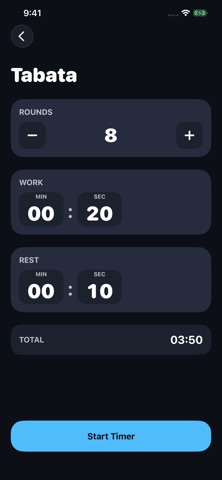
Working Out Timer helps you start a workout quickly and stay focused on it. Choose a timer, set it with touch-friendly controls, and follow the time from across the room on iPhone or iPad. FOUR WAYS TO TRAIN AMRAP: Set a duration, count down, and get a distinct halfway cue. For Time: Count up until you finish. Add an optional soft cap that alerts you without stopping the timer. Intervals: Set a number of equal-length intervals and hear each transition. Tabata: Set your work time, rest time, and rounds. The final round finishes after work, with no extra rest. BUILT FOR THE MIDDLE OF A WORKOUT A five-second countdown gives you time to get ready. Large numbers, clear phase labels, and simple controls help you see what is happening at a glance. Pause or resume with a tap; protected hold actions help prevent accidental restarts or endings. Your timer keeps its place when you lock your device or switch apps, using session timestamps to restore the right time when you return. Local notifications can alert you to scheduled milestones when notification sounds are allowed by your device settings. Background sounds follow iOS silent-mode and Focus settings. Completed workouts are saved to an on-device history. Your last-used setup for each timer type is ready the next time you train. No account is required. Your workout history stays on your device.
Details