

Solo Invoice: Quote & Receipt
Daisuke Yamaguchi · Business
Independent analytics for this App Store listing. AppTracker is not affiliated with Daisuke Yamaguchi.
Chart standing · US
What changed · US
Listing changes AppTracker has observed for this app in this storefront — new versions, price moves, rating shifts, and store copy.
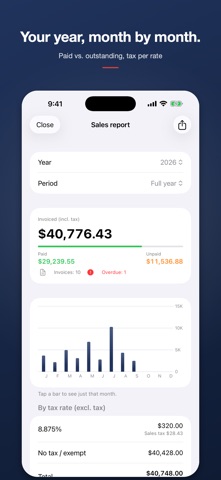
- New: Sales summary. Tap the chart button in the documents list to see what you billed by year or month, what has been paid and what is outstanding, overdue invoices, sales tax per rate and your top clients – and export it as CSV. Only invoices are counted, and everything is calculated on your device. - New invoice formats: Netherlands, Sweden, Finland and Hong Kong. The app is now also available in Dutch, Swedish, Finnish and Traditional Chinese. - A card in the documents list now shows what's new, just once. - To see where setup gets confusing, the app now anonymously counts which setup steps are completed. What you type is never sent.
In-app purchases · US
No in-app purchases.
Screenshots


Keywords this app targets
Search terms AppTracker associates with this app — estimates, not search volume. ❝ = in the app's title; a highlighted number is its current position for that term.
Similar apps
Competitors and close alternatives, as estimated by AppTracker.
 Simply Invoice: Invoice Maker
Stephen Mooney
2 shared topics · 1 shared title word
Simply Invoice: Invoice Maker
Stephen Mooney
2 shared topics · 1 shared title word
 Invoice Generator: Instant PDF
Charles Dapaah-Siakwan
3 shared topics · 1 shared title word
Invoice Generator: Instant PDF
Charles Dapaah-Siakwan
3 shared topics · 1 shared title word
 Simple Invoice Maker - App
BIVIS SERVICOS EM TECNOLOGIA LTDA ME
2 shared topics · 1 shared title word
Simple Invoice Maker - App
BIVIS SERVICOS EM TECNOLOGIA LTDA ME
2 shared topics · 1 shared title word
 Free Invoice Maker & Receipt
Eli Bitton
1 shared topic · 2 shared title words
Free Invoice Maker & Receipt
Eli Bitton
1 shared topic · 2 shared title words
 Invoice Maker・Billing App
Saldo Apps Inc.
1 shared topic · 1 shared title word
Invoice Maker・Billing App
Saldo Apps Inc.
1 shared topic · 1 shared title word
 QUOTE-PRO:Quotes & Invoices
MARCOS FIRE CORP
1 shared topic · 1 shared title word
QUOTE-PRO:Quotes & Invoices
MARCOS FIRE CORP
1 shared topic · 1 shared title word
 Invoice Maker Simple
B TO J PTY LTD
1 shared topic · 1 shared title word
Invoice Maker Simple
B TO J PTY LTD
1 shared topic · 1 shared title word
 Seikyu: Invoice & Quote Maker
Yoshiaki Hirokawa
2 shared title words
Seikyu: Invoice & Quote Maker
Yoshiaki Hirokawa
2 shared title words
About
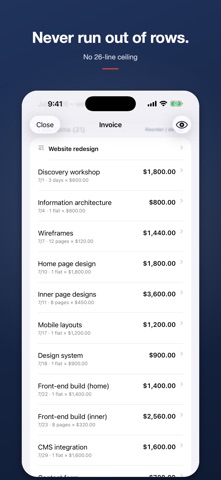
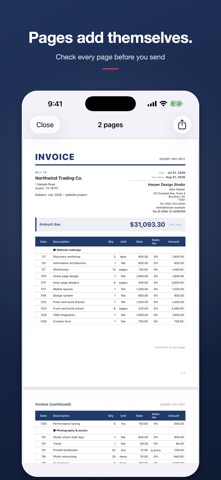
There is no cap on line items. Nothing stops at 26 rows, and nothing gets cut off on page two. Estimate, delivery note, invoice and receipt are all made from the same rows in a single tap. Solo Invoice is an invoicing app for one-person businesses – freelancers, contractors and side-hustlers who do their own paperwork. No account, no cloud. What you type stays on your device. NEVER RUN OUT OF ROWS - Unlimited line items; A4 pages are added automatically - The date column is free text: leave it blank or write a period - Units such as hrs, days or pcs - Heading rows to group work into sections - Drag to reorder FOUR DOCUMENTS, ONE SET OF ROWS - Invoice / Estimate / Packing slip / Receipt - Turn a estimate into an invoice, or an invoice into a receipt, in one tap SALES TAX, YOUR WAY - Sales tax differs by state and county, so you can enter any rate (e.g. 8.875%) - Per-line tax rates, with a summary per rate - Tax exclusive, tax inclusive, or no tax - You choose the rounding: down, up or half up SALES SUMMARY (NEW IN 1.4) - Open it from the chart button in the documents list - See a calendar year, then tap a month to drill down - Total billed (incl. tax), received vs outstanding, and how many invoices are overdue - A bar chart of every month - Taxable amount and sales tax for each rate – handy for your sales tax filings - Your top clients by amount billed - Grouped by currency if you invoice in more than one - Only invoices count; estimates, packing slips and receipts are left out - Export the summary as CSV. It is all worked out on your device and nothing is sent anywhere PICK A DESIGN (NEW IN 1.2) - Classic, Modern or Minimal - Six accent colors: ink, navy, green, crimson, orange, violet - The preview updates as you choose, and every PDF follows it KNOW WHAT HAS BEEN PAID (NEW IN 1.2) - Expected payment date and paid date on each invoice - "Paid", "Overdue" and "Due soon" at a glance in the list - Filter to unpaid invoices only - Payment records stay on the device and never print on the PDF ENTER IT ONCE - Business name, address, phone, email, and your EIN - Payment details: bank, routing number (ABA), account number and SWIFT - Logo and stamp/signature image - Automatic document numbers SEE IT BEFORE YOU SEND IT - Check every page of the PDF in the app before you share it - Share by Mail, Messages, AirDrop, Files or AirPrint ALSO FOR OTHER COUNTRIES - Switch any document to US, UK, Australian, German, French, Dutch, Swedish, Finnish, Hong Kong or Japanese format – currency, tax names and rates, IDs, payment fields and the language of the PDF change with it - It makes PDF invoices. It does not create e-invoices (such as Peppol) NO ADS - No ad SDK, no banner covering your buttons PRICING - A one-time purchase. Nothing more to pay afterwards - No in-app purchases and no subscription - Every feature is available from the start, with no caps on documents or line items YOUR DATA - What you enter never leaves your device. To improve the app, only anonymous usage data (such as which screens are opened) is counted with Google Analytics (you can turn this off in Settings). - No sign-up - Export a JSON backup before you change phones, and CSV for your bookkeeping Publisher: Sauna Inc. Support: https://tokyo357.com/support Privacy: https://tokyo357.com/privacy
What's new · 1.4
- New: Sales summary. Tap the chart button in the documents list to see what you billed by year or month, what has been paid and what is outstanding, overdue invoices, sales tax per rate and your top clients – and export it as CSV. Only invoices are counted, and everything is calculated on your device. - New invoice formats: Netherlands, Sweden, Finland and Hong Kong. The app is now also available in Dutch, Swedish, Finnish and Traditional Chinese. - A card in the documents list now shows what's new, just once. - To see where setup gets confusing, the app now anonymously counts which setup steps are completed. What you type is never sent.
Details