

ZoomFix: AI Zoom Enhancer
Fredy Soussou · Photo & Video
Independent analytics for this App Store listing. AppTracker is not affiliated with Fredy Soussou.
Chart standing · US
What changed · US
Listing changes AppTracker has observed for this app in this storefront — new versions, price moves, rating shifts, and store copy.
New in ZoomFix 1.1 • Torch: tap the flashlight at the top of the camera to light up close or dim subjects. • ZoomFix Pro can now be purchased in the app. • Zoom with the volume buttons: turn it on in Settings › Buttons. Tap to step in or out, or hold to zoom smoothly. • Camera Control support (iPhone 16 and later, iPhone Duo): slide to zoom and click to shoot. Pro users can switch shooting modes right from the button. • Quick lens buttons above the zoom slider, matched to your iPhone's cameras. • Haptic feedback as you pass each lens and reach max zoom. • New Fast capture option (Settings › Defaults) for less delay between shots. • Ready for iPhone Duo, including Split View on the large inner screen.
In-app purchases · US
No in-app purchases.
Screenshots



About
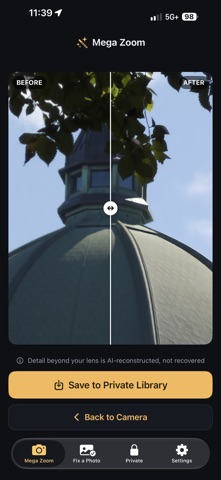
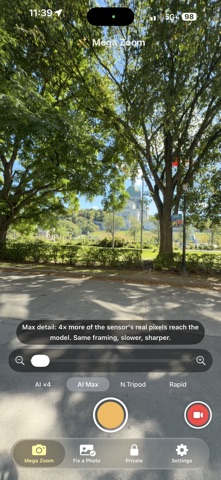
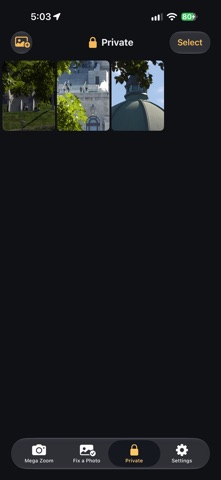
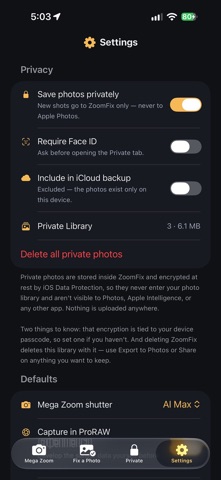
That photo you zoomed way in for — the recital, the wildlife, the game — came out a blurry mess. ZoomFix rebuilds it, right on your phone. And it tells you which detail is real. MEGA ZOOM CAMERA • Zoom to 25× free, or 50× with Pro — then ZoomFix runs 4× AI super-resolution on the shot • AI Max (Pro) puts four times more of the sensor's real data through the model: same framing, slower, sharper • N.Tripod (Pro): rest the phone on something and ZoomFix shoots a burst, aligns it and merges it into one much cleaner frame. Real noise reduction, not reconstruction — and a live readout tells you when the phone is steady enough • Moon (Pro): meters for the sunlit disc instead of the black sky around it, locks focus at infinity, and turns the AI reconstruction OFF. What you get is what your lens actually resolved • On ProRAW-capable iPhones, develop the raw sensor data on device before the AI runs • Pro adds Rapid burst capture and video recording at up to 50× zoom FIX A PHOTO — FREE AND UNLIMITED • Pick any photo and ZoomFix finds the subject for you — faces, animals, text — and proposes the crop. Drag to adjust • Enhance just that area at full native resolution, with a before/after slider so you judge every result yourself • Enhance Many (Pro): pick up to 30 photos and walk away PRIVATE LIBRARY (PRO) • Keep shots inside ZoomFix instead of your photo library — encrypted at rest by iOS Data Protection, never added to Apple Photos, never uploaded • Optional Face ID lock. Import photos in, and export or share anything back out — nothing is ever trapped • Zoom, crop, rotate and enhance right there HONESTY, BECAUSE IT MATTERS Every result tells you where its detail came from: AI-reconstructed, merged from real frames, or — in Moon mode — not reconstructed at all. AI enhancement makes blurry photos look dramatically better, but new detail is estimated, not recovered. Small text and unfamiliar faces may be imagined. It's enhancement, not forensics, and we'd rather say so up front. CLEAN BY DESIGN • No ads. Ever. No subscription. No account. No watermarks. • 100% on-device — photos are never uploaded anywhere • ZoomFix Pro is a single one-time purchase, yours forever
What's new · 1.1
New in ZoomFix 1.1 • Torch: tap the flashlight at the top of the camera to light up close or dim subjects. • ZoomFix Pro can now be purchased in the app. • Zoom with the volume buttons: turn it on in Settings › Buttons. Tap to step in or out, or hold to zoom smoothly. • Camera Control support (iPhone 16 and later, iPhone Duo): slide to zoom and click to shoot. Pro users can switch shooting modes right from the button. • Quick lens buttons above the zoom slider, matched to your iPhone's cameras. • Haptic feedback as you pass each lens and reach max zoom. • New Fast capture option (Settings › Defaults) for less delay between shots. • Ready for iPhone Duo, including Split View on the large inner screen.
Details