
Chart standing · US
What changed · US
Listing changes AppTracker has observed for this app in this storefront — new versions, price moves, rating shifts, and store copy.
Price & rating history · US
Reconstructed from the listing changes AppTracker has observed in this storefront, so each line starts at the first change on record.
Price · USD
Screenshots



About
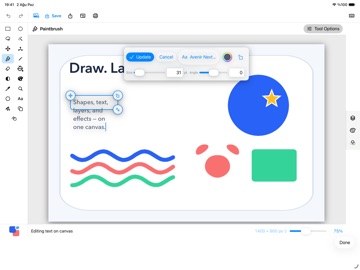
Miyu Paint Canvas is a focused, layered image editor. Its adaptive workspace keeps the canvas central while tools, colors, layers, and processing controls remain within reach. Create a new canvas or import from Files or Photos. Draw, select, fill, resize, add editable text and shapes, and keep every part of your work organized. WHAT YOU CAN DO • Build with pixel, text, shape, group, mask, and adjustment layers. • Draw and refine with brush, pencil, eraser, fill, recolor, gradient, clone stamp, and color picker tools. • Make rectangle, ellipse, freeform, and magic-wand selections, then combine or feather them. • Reopen editable text and shapes to update their content, appearance, size, and position. • Preview and apply a broad catalog of adjustments and effects, or keep adjustments non-destructive. • Resize the image or canvas using pixels, inches, or centimeters with configurable DPI. • Crop, flip, rotate, zoom, and move pixels with precise numeric controls. • Save layered work as a Miyu Paint .mpaint document in Files. Export a flattened copy to common image formats such as PNG, JPEG, and TIFF. • Preview page layout before opening the system print flow. • Import from Files or Photos, or choose the camera or document scanner when you need them. • Use undo, redo, and hardware-keyboard shortcuts. PRIVATE BY DESIGN Miyu Paint Canvas has no account, advertising, analytics, or tracking. Documents and images are processed entirely on device. Files, Photos, camera, scanning, export, and printing are used only when you choose those actions.
Details