
Chart standing · US
What changed · US
Listing changes AppTracker has observed for this app in this storefront — new versions, price moves, rating shifts, and store copy.
Saving and Sharing ▪ Saving from the canvas now adds your finished sticker to both your library and the Photos app at once. ▪ Copy and paste a cutout to keep its background transparent. ▪ Saving individual cutouts to Photos has been removed to prevent other apps from turning transparent backgrounds white. Finished stickers can still be saved to Photos as before. More Accurate Letter Cutouts ▪ Letters with holes, such as O and B, now keep their open spaces when cut out. ▪ If part of a handwritten letter is missing, press and hold that area to add it. ▪ White letters with dark outlines are now detected correctly instead of selecting the background. ▪ Pressing around an existing cutout again no longer turns the result inside out. ▪ Japanese and Chinese characters are saved only after you finish typing the complete character. Easier Refinements ▪ Press and hold an unwanted color or fragment to remove it from your letter. ▪ The eraser now works on both automatically detected letters and areas outlined by hand. ▪ If you erase everything while the eraser is active, the eraser automatically turns off. Other Improvements ▪ Library tab order and the primary language now follow your device language. ▪ When a letter cannot be detected, SNIP tells you what to try next.
Price & rating history · US
Reconstructed from the listing changes AppTracker has observed in this storefront, so each line starts at the first change on record.
Average rating
Screenshots


Keywords this app targets
Search terms AppTracker associates with this app — estimates, not search volume. ❝ = in the app's title; a highlighted number is its current position for that term.
Similar apps
Competitors and close alternatives, as estimated by AppTracker.
 FadeShot
Ryan Richardson
FadeShot
Ryan Richardson
 Snap Markup - Annotation Tool
Raghvendra Bhargava
Snap Markup - Annotation Tool
Raghvendra Bhargava
 Objet - Cut mask collage maker
Hongmin Park
1 shared topic
Objet - Cut mask collage maker
Hongmin Park
1 shared topic
 Exacto
Tinkerworks Apps
Exacto
Tinkerworks Apps
 Snapcut
BO YOUNG PARK
Snapcut
BO YOUNG PARK
 This Time Last Year
Allura LLC
This Time Last Year
Allura LLC
 Fragment - iPhoneography App
Pixite Inc.
Fragment - iPhoneography App
Pixite Inc.
 StickIt - Custom Sticker Maker
PRPL Solutions Inc.
StickIt - Custom Sticker Maker
PRPL Solutions Inc.
About
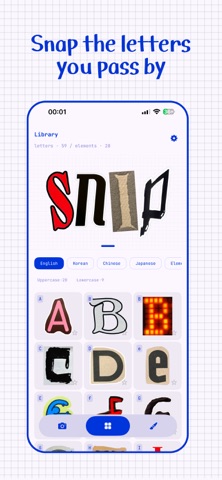
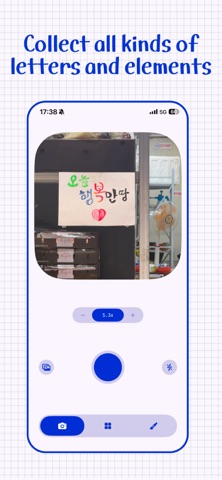
Ever stopped walking because of a letter? You probably took a photo of it. And it's probably still sitting in your camera roll, untouched. You've never actually used it. SNIP takes it one step further. Don't stop at the photo — cut the letter out, collect it, build with it. ■ Touch and hold, and only the letter comes off Photograph a letter you like, then touch and hold it on screen. The letter lifts off its background. No tracing the outline by hand. Korean letters hold together even when the strokes are separate — touch and hold a missing stroke to add it. Prefer to do it by hand? That path is open too. Freehand, rectangle or ellipse, and you can rotate what you cut. Add to or subtract from a cut with a second stroke. A menu, a poster, a tiled floor, a mark left on a wall — if it fits in a photo, it's material. ■ The more you collect, the more useful it gets Letters are sorted into Korean, English and elements. Korean is split by initial consonant, so you can browse from ㄱ to ㅎ. Star the pieces you reach for most and they move to the front. Photos scattered one by one become a drawer you can actually pull from. ■ Build with what you collected Drop pieces on the canvas and move, resize and rotate them into something new. Finished work is saved to your library as a transparent PNG. Export it to Photos, or reuse it as material for the next piece. ■ All on device No account. No sign-in. No server. Your photos and your pieces never leave the device. Even the letter recognition runs entirely on your iPhone.
What's new · 1.2.2
Saving and Sharing ▪ Saving from the canvas now adds your finished sticker to both your library and the Photos app at once. ▪ Copy and paste a cutout to keep its background transparent. ▪ Saving individual cutouts to Photos has been removed to prevent other apps from turning transparent backgrounds white. Finished stickers can still be saved to Photos as before. More Accurate Letter Cutouts ▪ Letters with holes, such as O and B, now keep their open spaces when cut out. ▪ If part of a handwritten letter is missing, press and hold that area to add it. ▪ White letters with dark outlines are now detected correctly instead of selecting the background. ▪ Pressing around an existing cutout again no longer turns the result inside out. ▪ Japanese and Chinese characters are saved only after you finish typing the complete character. Easier Refinements ▪ Press and hold an unwanted color or fragment to remove it from your letter. ▪ The eraser now works on both automatically detected letters and areas outlined by hand. ▪ If you erase everything while the eraser is active, the eraser automatically turns off. Other Improvements ▪ Library tab order and the primary language now follow your device language. ▪ When a letter cannot be detected, SNIP tells you what to try next.
Details