

Clipable
Matthias Hennemeyer · Productivity
Independent analytics for this App Store listing. AppTracker is not affiliated with Matthias Hennemeyer.
Chart standing · US
What changed · US
Listing changes AppTracker has observed for this app in this storefront — new versions, price moves, rating shifts, and store copy.
Version 1.4 — your clips on the Home Screen. • “Recent Clips” and “Favorites” widgets for iPhone and iPad: one tap opens exactly that clip, anything confidential stays hidden. • Folders with a color and an icon, in the order you choose. • Copy as Stack: several clips at once, separated by line break, blank line, comma, tab or space — in the order you collected them. • “Insert Snippet” shortcut: use snippets in Shortcuts and automations; placeholders are asked for. • Fixed: the welcome screen now appears in your language, and confidential clips are masked in the title of the detail view, too.
In-app purchases · US
What this app sells inside itself, grouped by kind and priced for this storefront.
Screenshots



About
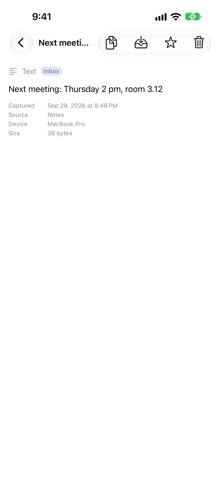
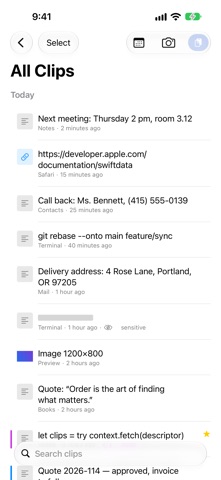
CLIPABLE NEEDS A MAC Recording happens on the Mac: every ⌘C lands in the library automatically — text, links, images, files, each with its source app and time. iPhone and iPad show the same library: search, view, put anything back on the clipboard with one tap. Without a Mac running Clipable, the library stays empty. WHY DOESN'T THE IPHONE RECORD BY ITSELF? iOS lets no app read the clipboard in the background. That is a deliberate safeguard by Apple, and we do not work around it. On iPhone and iPad you add content by hand with the Paste button — the way to the Mac is open, it just takes a tap instead of happening by itself. Better to know that before buying than after. DROP THINGS IN ON THE GO On iPhone and iPad, text from any app lands in the library via the share sheet. And the “Save to Clipable” shortcut makes Clipable a building block for your own flows in the Shortcuts app. And with the camera: scan text, scan documents, take a photo or pick one from your library — scans become searchable through text recognition. WIDGETS ON YOUR HOME SCREEN The “Recent Clips” and “Favorites” widgets put your clips right on the Home Screen of iPhone and iPad. One tap opens exactly that clip; anything confidential stays hidden. ORDER INSTEAD OF AN ENDLESS LIST New clips arrive in the inbox first. From there you file them into folders, mark favorites, or delete them. Anything you use leaves the inbox on its own — the list stays short. Folders get a color and an icon and appear in the order you choose. RULES SORT FOR YOU A rule says where new clips belong — by source app, content type, text, or link host. “Clips from Xcode always go to Code”: filed as they’re captured, without you doing a thing. SNIPPETS WITH PLACEHOLDERS Write templates for replies, addresses, and sign-offs — with placeholders for date, time, and the clipboard, plus custom fields you fill in as you insert. The “Insert Snippet” shortcut brings them into your own flows in the Shortcuts app. PASTE WITHOUT THE DETOUR If you like, quick access on the Mac pastes for you: pick a clip or snippet, press Return — the text lands right in the app you’re writing in. TEXT IN IMAGES GETS FOUND Clipable reads the text in copied images — entirely on your device. The screenshot with the invoice number shows up in search like any note. PASSWORDS STAY OUT Whatever your password manager marks as confidential (the nspasteboard.org convention) is never stored — on any device. You can also exclude entire apps from being recorded. ON ALL YOUR DEVICES The library syncs through your private iCloud database across Mac, iPad and iPhone. Your clips are yours. TRY IT FOR 7 DAYS, THEN BUY OR SUBSCRIBE Buy once and use forever — or subscribe monthly for little money, cancel anytime. After the trial you decide. If you don't buy, Clipable keeps running in read-only mode: everything you already collected stays visible, searchable, copyable and deletable — permanently. Only recording new clips and filing them pauses. The retention period pauses too: if you aren't allowed to collect anything new, you shouldn't have to watch your library shrink. BUILT FOR THE KEYBOARD Menu bar item, global shortcut ⌥⌘V, search, Return to copy. Reaching for the mouse is optional. TERMS OF USE Apple’s standard Terms of Use (EULA) apply: https://www.apple.com/legal/internet-services/itunes/dev/stdeula/ Privacy Policy: https://privid.netlify.app/clipable/privacy.html
What's new · 1.4
Version 1.4 — your clips on the Home Screen. • “Recent Clips” and “Favorites” widgets for iPhone and iPad: one tap opens exactly that clip, anything confidential stays hidden. • Folders with a color and an icon, in the order you choose. • Copy as Stack: several clips at once, separated by line break, blank line, comma, tab or space — in the order you collected them. • “Insert Snippet” shortcut: use snippets in Shortcuts and automations; placeholders are asked for. • Fixed: the welcome screen now appears in your language, and confidential clips are masked in the title of the detail view, too.
Details