

WeldUp Pocket
Lison Robin · Productivity
Independent analytics for this App Store listing. AppTracker is not affiliated with Lison Robin.
Chart standing · US
What changed · US
Listing changes AppTracker has observed for this app in this storefront — new versions, price moves, rating shifts, and store copy.
Fixes and refinements. • Iso sketch: the wireframe 3D view no longer closes the app on iPhone • Iso sketch: the 3D view no longer closes the app on a large drawing • Reducers checked against ASME, EN and SMS; the fitting dimensions tab becomes "Reducers" • Custom reducer: a reducer off the standard's table is flagged • Iso sketch: a reducer's length is suggested from the standard • Tube bending: dimensions are taken to the axis — end to axis, then axis to axis
Screenshots


Keywords this app targets
Search terms AppTracker associates with this app — estimates, not search volume. ❝ = in the app's title; a highlighted number is its current position for that term.
Similar apps
Competitors and close alternatives, as estimated by AppTracker.
 PipeBook Pipefitter Calculator
Aaron Peabody
2 shared topics
PipeBook Pipefitter Calculator
Aaron Peabody
2 shared topics
 XPipe Pro: Pipefitter Calc
Jakub Trytek
XPipe Pro: Pipefitter Calc
Jakub Trytek
 Bedford’s Piping Toolkit
CALLUM JAY BEDFORD
2 shared topics
Bedford’s Piping Toolkit
CALLUM JAY BEDFORD
2 shared topics
 Pipefitter's Mate: Pipe Offset
Florin Chiriac
Pipefitter's Mate: Pipe Offset
Florin Chiriac
 Ironworker Pro
Antonio Pebworth
Ironworker Pro
Antonio Pebworth
 Piping Abacus
Jean-Paul Lanaux
2 shared topics
Piping Abacus
Jean-Paul Lanaux
2 shared topics
 Welding Toolbox Inspector
LAMINE MESSACI
Welding Toolbox Inspector
LAMINE MESSACI
 Pipe Offset Calculator!
NOSHU, llc
1 shared topic
Pipe Offset Calculator!
NOSHU, llc
1 shared topic
About
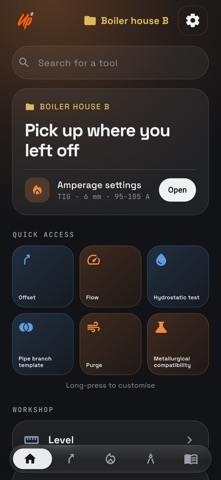
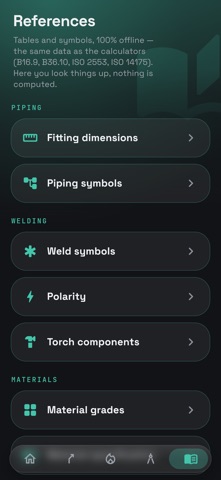
Pipefitting, welding and fabrication calculator. Works fully offline. WeldUp Pocket gathers what a pipefitter, a welder and a fabricator have always worked out in their head or on a scrap of cardboard: the offset, the flat pattern, the saddle, the machine settings. Fifty tools, one entry, one answer. Nothing to look up, nothing to wait for. EVERYTHING WORKS OFFLINE Under a vessel, in a trench, up in the steel: the app never asks for a signal. No account, no ads, no data leaving the phone. PIPEFITTER • Offsets — one menu for every shape: offset, rolling offset (3D), single elbow, cut elbows • Tube bending — where to mark, how much to cut, what the wall takes • Pipe branch template, elbow branch template, swept tee — the saddle wrap, printed at full scale • Iso sketch — draw the run first, dimension it after, get the pipe takeoff and the spool pieces, and export the drawing as a PDF • My ISO plans — save a drawing under a name, reopen it and keep editing • Pipe bank & flag — several lines on one route, the cut list line by line • Custom elbow — the take-out of an elbow cut to an angle the catalog does not carry • Custom reducer — where to cut a stock reducer for the size you are missing • Accessory library — a valve's face-to-face measured once, dropped onto the drawing in one tap • Hydrostatic test, test records — test pressure, the gauge to use, a log of tests with photos • Line weight — pipe, water, insulation • Level — slope and plumb, two full-screen vials, zeroed on the spot WELDER • Amperage settings — process, material, thickness, joint and position: a 10 A window to dial into the machine • Weld shrinkage — shrinkage, angular pull, the gap to build in before you weld instead of fighting it after • Gas selection — mix, ISO 14175 class, cylinder color • Flow and purge — flow rate, time, chamber volume • Weld spacing — intermittent welds laid out ahead • Weld traceability — a record for every weld, filed by job • Metallurgical compatibility and weld defect diagnostics • Torch components — TIG and MIG diagrams, tap any part FABRICATOR • Bend, cone, shell course and hopper development — the profile drawn bend by bend, the drawing as a PDF • Frame drawing, cutting optimisation — sketched with a finger, miter angles, bars and sheets with the least waste • Bump bending, element lines, trigonometry — press, layout, squaring • Neutral axis, joint allowances, weight, check circumference • Drilling and tapping — speed, feed, pilot hole, and the drill to pick for any M size REFERENCES • Material specification — which diameter, which wall, which grade for which job, with the loads to put a number on it • Material traceability — the camera reads the pipe marking (grade, heat number, lot) and files it under the open job • Flange gasket — start from the fluid, not the gasket: first choice, fallbacks, the traps that cost • Flange bolting — how many bolts, what diameter, what length, what wrench: EN 1092-1 and ASME B16.5 • Section weight — square tube, angle, flat, round • Grades, weld and piping symbols, polarity, fitting dimensions, unit converter BUILT AROUND THE JOB Open a job: everything calculated after that hangs off it. History reopens each tool with its values, and a whole job goes out in a single message — text, mail, chat. MADE FOR WORKING HANDS A keypad sized for a gloved finger, with the fraction bar. Light theme readable in full sun, dark in the shop. Imperial or metric: inches to the sixteenth, a dimension types as "3 1/2", the way it reads on the print. IN SIX LANGUAGES English, French, Spanish, German, Italian, Polish. HONEST ABOUT WHAT IT IS The values are indicative. They replace neither the applicable codes (ASME, AWS) nor a qualified WPS — they save the ten minutes between the question and the answer. And every result shows where its number comes from. Made by a welder, for the people who set the steel.
What's new · 0.5.1
Fixes and refinements. • Iso sketch: the wireframe 3D view no longer closes the app on iPhone • Iso sketch: the 3D view no longer closes the app on a large drawing • Reducers checked against ASME, EN and SMS; the fitting dimensions tab becomes "Reducers" • Custom reducer: a reducer off the standard's table is flagged • Iso sketch: a reducer's length is suggested from the standard • Tube bending: dimensions are taken to the axis — end to axis, then axis to axis
Details