

Tide - Contraction Timer
B Gilmore, LLC · Lifestyle
Independent analytics for this App Store listing. AppTracker is not affiliated with B Gilmore, LLC.
Chart standing · US
What changed · US
Listing changes AppTracker has observed for this app in this storefront — new versions, price moves, rating shifts, and store copy.
A breathing guide for contractions. While the timer runs, the button breathes with you — four seconds in, six seconds out — with a light tracing the square so you can follow the rhythm without reading anything. Turn it on or off in Settings, along with its gentle taps. Set your own "time to head in." If your provider told you five minutes apart, or six, or four — you can now enter exactly that. False alarm? You can clear just the contractions now and keep your updates and your shared link exactly as they are. Family can open any contraction on your shared page to see how long it lasted and the gap before it — not just the summary. Name your own family page, so it says what you want it to say. Also: you can enter an invite code any time from the menu, updates can be deleted, and your due date saves the moment you enter it.
Price & rating history · US
Reconstructed from the listing changes AppTracker has observed in this storefront. A field is charted once it has changed more than once, and each line starts at the value it moved from.
Average rating · ★ 4.85 now · 18 changes on record
Ratings breakdown · US
The star breakdown behind this app's rating in this storefront.
In-app purchases · US
What this app sells inside itself, grouped by kind and priced for this storefront.
Screenshots


About
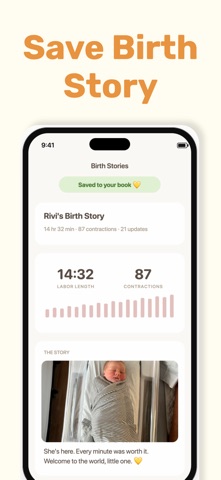
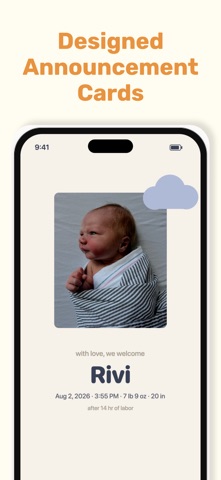
Tide is a beautifully simple contraction timer and labor companion — built to keep you calm and present while everyone you love follows along. When labor starts, the last thing you want is a cluttered app. Tide gives you one big button: tap to start a contraction, tap when it eases. It quietly tracks how long each one lasts and how far apart they are, so you always know where things stand — without squinting at your phone mid-wave. And when everyone keeps asking "any updates?", Tide answers for you. Share one private link with your partner, doula, or whole family, and they can follow your progress in real time — no more juggling a dozen text threads. WHAT YOU CAN DO Time contractions with a single, calming tap — duration and spacing tracked automatically Share a private link so your birth team can follow along live Post updates as you go — notes, photos, and videos in one running feed Add updates hands-free with voice dictation Announce baby's arrival with the details that matter Keep it all as a birth story you can revisit for years to come PRIVATE BY DESIGN No accounts. No ads. No tracking. Everything you log stays on your device unless you choose to share it — and your share link expires on its own once things settle down. ALWAYS A GLANCE AWAY Tide includes an Apple Watch app and a Home Screen widget, so your timer is right where you need it. A ONE-TIME UNLOCK Unlock everything with a single purchase. No subscriptions, ever. Tide is a personal timer and journal to help you record and share your labor. It is not a medical device and does not provide medical advice. Always follow the guidance of your doctor, midwife, or other qualified healthcare provider, and in an emergency call your provider or your local emergency number. ——— Privacy Policy: https://katiep.me/privacy Terms of Use (Apple Standard EULA): https://www.apple.com/legal/internet-services/itunes/dev/stdeula/
What's new · 1.1.1
A breathing guide for contractions. While the timer runs, the button breathes with you — four seconds in, six seconds out — with a light tracing the square so you can follow the rhythm without reading anything. Turn it on or off in Settings, along with its gentle taps. Set your own "time to head in." If your provider told you five minutes apart, or six, or four — you can now enter exactly that. False alarm? You can clear just the contractions now and keep your updates and your shared link exactly as they are. Family can open any contraction on your shared page to see how long it lasted and the gap before it — not just the summary. Name your own family page, so it says what you want it to say. Also: you can enter an invite code any time from the menu, updates can be deleted, and your due date saves the moment you enter it.
Details