

Aloud — Text to Speech Reader
Fotios Avgidis · Productivity
Independent analytics for this App Store listing. AppTracker is not affiliated with Fotios Avgidis.
Chart standing · US
What changed · US
Listing changes AppTracker has observed for this app in this storefront — new versions, price moves, rating shifts, and store copy.
MADE FOR IPHONE DUO • Closed, the cover screen is a player with large controls. • Open, the article fills the large display. With a translation on, the original and the translation sit side by side, one on each side of the fold. • Half open, the page and the playback controls move to opposite sides of the fold. • Folding and unfolding keep your place. BETTER FOR BOOKS • Start from any chapter: in a book, open the ••• menu and tap Chapters. The list shows how long each chapter takes to listen to. • Books show their own cover on the shelf. • Choose how the shelf looks: a grid of covers, a list, or text only. The switch is next to the sort button. • For chapters and a cover on a book you already have, add the book again. FIXED • Searching inside a long book no longer freezes Aloud. • Some books showed or read out codes like " " in their text. • A book's own contents page is no longer read aloud before chapter one. • Resizing Aloud in iPhone Mirroring on a Mac no longer switches it to the closed-phone player.
Ratings breakdown · US
The star breakdown behind this app's rating in this storefront.
In-app purchases · US
What this app sells inside itself, grouped by kind and priced for this storefront.
Screenshots





About
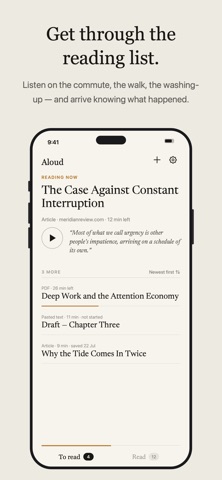
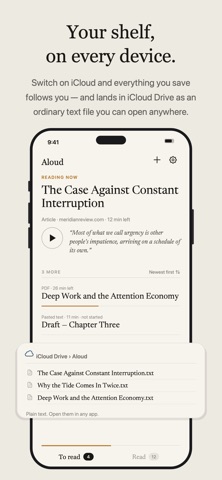
No subscription. No ads. No tracking. Nothing you read ever leaves your iPhone. Aloud turns anything you can read into something you can listen to. Share an article from any browser, open a PDF or an EPUB from Files, or paste any text — Aloud reads it aloud in a natural voice, sentence by sentence, with your place kept perfectly. FOR THE READING LIST YOU NEVER GET TO Saving articles is easy; finding an hour to sit and read them is not. Aloud turns that pile into something you get through on the commute, the walk, the washing-up — so you keep up with the world without giving up an evening. Turn on autoplay and it announces the next piece and keeps going, hands free. AND FASTER, IF YOU WANT IT Read from 0.5× to 3× without the voice turning into a chipmunk, and switch on Shorten Pauses to trim the silence at every full stop. At 2× a thirty-minute article fits a fifteen-minute walk. The voices are generated entirely on your iPhone. There is no server doing the talking, which is why Aloud never needs an account, never meters your listening, and keeps working in airplane mode. Each voice downloads its model once — about 190 MB for the English voices, about 390 MB for the one that reads the other thirty languages — and after that, the internet is optional. LISTEN TO ANYTHING • Web articles — share from any browser or paste a link, Aloud extracts just the story • PDFs — including scanned ones, recognized on-device • Books — open an EPUB without copy protection and start from any chapter • Any text you paste, from notes to your own drafts • Your reading list — import your saves from Pocket or Instapaper TWO LANGUAGES, AND IPHONE DUO • Translate a piece on your iPhone and read the original and the translation together • On iPhone Duo, the cover screen is a large player and the open display shows the page A READER, NOT A MEDIA PLAYER • The sentence being spoken is lit; the rest of the page waits quietly • A margin rail shows the whole document — hold and slide to scrub • Your position is saved the moment it changes, per document • A speed dial from 0.5× to 3×, and time remaining that respects it • A sleep timer that fades out instead of cutting you off mid-word • Reader mode: hide the player, lift the whole page, read with your eyes • Find in article, and your choice of size, font, paper and column width MADE FOR LISTENING ON THE MOVE • Keeps reading with the screen locked • Lock-screen and AirPods controls: play, pause, skip 15 seconds • Optional autoplay: when a piece ends, Aloud announces the next and keeps reading • Two shelves — to read, and read — each sorted your way by date, length, or title, with search across titles and sites • An optional unread count on the app icon • Your place remembered in everything FOURTEEN NATURAL VOICES Ten US and UK English voices with real warmth, and four voices that read thirty more languages — all generated on your iPhone. Anything else falls back to the system voice that speaks it. Audition any voice with a tap. PRIVATE BY ARCHITECTURE Once a voice is on your iPhone, Aloud makes no network requests to read to you. Articles are fetched by your phone the way a browser would, the voice models download once from a public host, and everything after that — extraction, speech, your library, your listening history — stays on the device. The App Privacy label says "Data Not Collected" because there is nowhere to collect it to. ONE PURCHASE, YOURS FOREVER Aloud is free to try: the shelf holds three pieces, with every feature included — the natural voices, PDFs and scans, the lock-screen player, all of it. A single purchase lets the shelf hold as many pieces as you like, forever. No subscription, nothing recurring, and your listening is never metered either way. If you read with your ears — long articles, research papers, contracts, fan fiction, your own writing — Aloud was built for you. And if you rely on spoken text every day, we would especially love to hear what you need next.
What's new · 3.2
MADE FOR IPHONE DUO • Closed, the cover screen is a player with large controls. • Open, the article fills the large display. With a translation on, the original and the translation sit side by side, one on each side of the fold. • Half open, the page and the playback controls move to opposite sides of the fold. • Folding and unfolding keep your place. BETTER FOR BOOKS • Start from any chapter: in a book, open the ••• menu and tap Chapters. The list shows how long each chapter takes to listen to. • Books show their own cover on the shelf. • Choose how the shelf looks: a grid of covers, a list, or text only. The switch is next to the sort button. • For chapters and a cover on a book you already have, add the book again. FIXED • Searching inside a long book no longer freezes Aloud. • Some books showed or read out codes like " " in their text. • A book's own contents page is no longer read aloud before chapter one. • Resizing Aloud in iPhone Mirroring on a Mac no longer switches it to the closed-phone player.
Details