

Usages
Zixi Yang · Developer Tools
Independent analytics for this App Store listing. AppTracker is not affiliated with Zixi Yang.
Chart standing · US
What changed · US
Listing changes AppTracker has observed for this app in this storefront — new versions, price moves, rating shifts, and store copy.
- Usages Pro: connect every provider and turn on every alert. Free keeps two providers and one quota alert, and everything you connected before stays. Yearly or monthly, managed in Settings > Plan. - One Lock Screen card for every quota window close to its limit, tightest first, in light or dark to match your Lock Screen. - Pull down on an account's detail screen to refresh just that provider. - Widgets follow Light and Dark Mode, and the overview widget is editable. - Codex, Claude, Z.ai, Kimi, OpenRouter, Grok and Copilot read their latest usage formats. - Focus sounds play while Usages is open and pause when you leave. - Crash reports and anonymous product analytics help us find problems. They never include your credentials, email, account names or usage figures, and both can be turned off in Settings > Privacy & connections.
Ratings breakdown · US
The star breakdown behind this app's rating in this storefront.
In-app purchases · US
No in-app purchases.
Screenshots


About
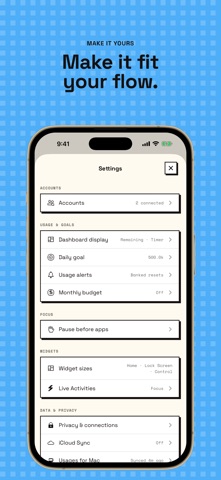
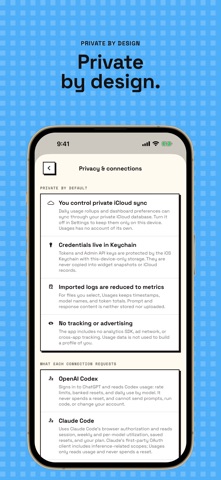
Usages brings AI coding-tool usage into one private dashboard. Connect supported AI coding services and see the usage information each provider makes available, including quota windows, reset times, token activity, cost summaries, and account status. FEATURES • View multiple providers in one dashboard • Track remaining quota and reset times • Review daily token and cost history when the provider supplies it • Set a personal daily token goal • Receive optional, locally scheduled usage alerts • Add Home Screen widgets for quick status checks • Focus with a countdown or Pomodoro timer, focus sounds, focus stats, and a breathing pause before distracting apps • Import supported local usage logs for on-device summaries USAGES PRO The free plan includes two providers and one quota alert. Usages Pro, an auto-renewable subscription, connects every provider and turns on every alert: thresholds you choose, window resets, run-out forecasts, pace, budget and your daily goal. Yearly or monthly; manage or cancel in Settings > Apple Account > Subscriptions. PRIVATE BY DEFAULT Usages has no account or data-collecting backend of its own. OAuth tokens and Admin API keys are stored in the iOS Keychain. Usage history, settings, and imported summaries stay on your device, and can optionally sync through your own private iCloud. Crash reports and anonymous product analytics never include credentials, emails, account names or usage figures, are not used for tracking, and can be turned off in Settings. No advertising. Usages is an independent app and is not affiliated with, endorsed by, or sponsored by any supported service provider. Available metrics vary by provider and account type. Terms of Use: https://www.apple.com/legal/internet-services/itunes/dev/stdeula/ Privacy Policy: https://usages.app/privacy/
What's new · 1.4
- Usages Pro: connect every provider and turn on every alert. Free keeps two providers and one quota alert, and everything you connected before stays. Yearly or monthly, managed in Settings > Plan. - One Lock Screen card for every quota window close to its limit, tightest first, in light or dark to match your Lock Screen. - Pull down on an account's detail screen to refresh just that provider. - Widgets follow Light and Dark Mode, and the overview widget is editable. - Codex, Claude, Z.ai, Kimi, OpenRouter, Grok and Copilot read their latest usage formats. - Focus sounds play while Usages is open and pause when you leave. - Crash reports and anonymous product analytics help us find problems. They never include your credentials, email, account names or usage figures, and both can be turned off in Settings > Privacy & connections.
Details