

Consenthush: Content Blocker
Robert Corbin · Utilities
Independent analytics for this App Store listing. AppTracker is not affiliated with Robert Corbin.
Chart standing · US
What changed · US
Listing changes AppTracker has observed for this app in this storefront — new versions, price moves, rating shifts, and store copy.
Site policies that let consent-management scripts load now work. Before this update, a policy that bypassed CMP scripts (including the default Cookies + CMP choice and Allow all) made Safari reject the updated rule list, so Apply showed an error and the change never reached Safari. Turning every filter off no longer makes Safari report an error. Apply to Safari now retries when Safari interrupts loading the rules (this could show "SFErrorDomain error 3" right after the blocker was switched on), explains any remaining problem in plain words, and no longer says Safari is using the rules while the blocker is still off.
Price & rating history · US
Reconstructed from the listing changes AppTracker has observed in this storefront. A field is charted once it has changed more than once, and each line starts at the value it moved from.
Price · 2.99 USD now · 2 changes on record
In-app purchases · US
No in-app purchases.
Screenshots



About
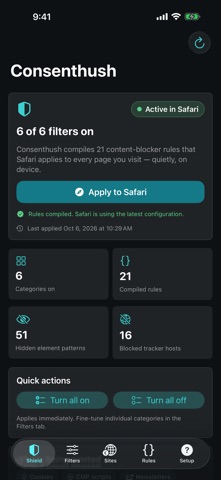
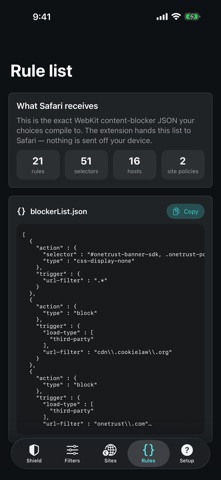
Consenthush is a focused Safari content blocker for cookie banners, consent-management scripts, newsletter overlays, open-in-app prompts, floating chat widgets and notification nags. SELECTIVE SITE POLICIES When a site needs special treatment, you do not have to turn every filter off. Create a policy that bypasses only the troublesome categories on that site while your other protections stay on. A full-site bypass is available when it is genuinely needed, and policies cover the domain and its subdomains. INSPECT BEFORE YOU APPLY Paste a domain or URL into the on-device Policy Inspector to see which protections stay active there and which categories a site policy bypasses. No page is opened and no browsing activity is collected. TRANSPARENT RULES - Six individually controlled categories - Hides page overlays and prompts with Safari's cosmetic rules - Blocks scripts from 16 widely used third-party consent-management hosts at the network level (the list is shown in the app) - Category-level site compatibility policies - Live counts for rules, selectors, hosts and active categories - Exact preview of the JSON rule list Safari receives - Clear extension status and setup guidance GOOD TO KNOW - After installing, turn on Consenthush under Settings > Apps > Safari > Extensions, then tap Apply to Safari in the app. - Consenthush hides banners built with the consent frameworks and common banner markup it lists. A site with its own custom banner may still show it, and hiding a banner does not accept or reject anything on your behalf. - Blocking a consent script can stop a few sites from working properly; a site policy for that site fixes it. PRIVACY Consenthush uses Safari's declarative content-blocker engine. The extension cannot read your browsing history or page contents. Your settings stay on your device in the app's shared container. No account, advertising, analytics, tracking, subscription or developer server.
What's new · 1.1.1
Site policies that let consent-management scripts load now work. Before this update, a policy that bypassed CMP scripts (including the default Cookies + CMP choice and Allow all) made Safari reject the updated rule list, so Apply showed an error and the change never reached Safari. Turning every filter off no longer makes Safari report an error. Apply to Safari now retries when Safari interrupts loading the rules (this could show "SFErrorDomain error 3" right after the blocker was switched on), explains any remaining problem in plain words, and no longer says Safari is using the rules while the blocker is still off.
Details