

Clipquota: Exact Video Size
Robert Corbin · Photo & Video
Independent analytics for this App Store listing. AppTracker is not affiliated with Robert Corbin.
Chart standing · US
What changed · US
Listing changes AppTracker has observed for this app in this storefront — new versions, price moves, rating shifts, and store copy.
Verified Export Choose the moment you need, keep or mute its sound, and verify the exported file’s actual size and duration before sharing. 1. Select a video, choose the size ceiling and set the start and end of the selected moment. 2. Choose Keep sound or Mute, then export. Cancel if you need to change the settings. 3. Review the actual bytes, duration, dimensions and audio result, preview the copy and share it with an export receipt. Budget values are estimates; the completed file is checked against the chosen ceiling. If a verified result cannot be produced, no success is claimed. Encoding can reduce quality and supported source formats depend on the device. The original is not edited.
Price & rating history · US
Reconstructed from the listing changes AppTracker has observed in this storefront. A field is charted once it has changed more than once, and each line starts at the value it moved from.
Price · 2.99 USD now · 2 changes on record
In-app purchases · US
No in-app purchases.
Screenshots


About
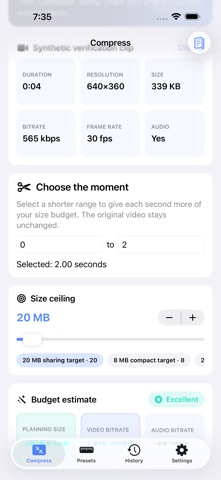
Choose the moment you need, keep or mute its sound, and verify the exported file’s actual size and duration before sharing. HOW IT WORKS 1. Select a video, choose the size ceiling and set the start and end of the selected moment. 2. Choose Keep sound or Mute, then export. Cancel if you need to change the settings. 3. Review the actual bytes, duration, dimensions and audio result, preview the copy and share it with an export receipt. Video size planning remains available with generic size presets. Audio bitrate estimates are not presented as exact encoder controls. WHAT TO KNOW Budget values are estimates; the completed file is checked against the chosen ceiling. If a verified result cannot be produced, no success is claimed. Encoding can reduce quality and supported source formats depend on the device. The original is not edited. iPhone and iPad.
What's new · 2.0
Verified Export Choose the moment you need, keep or mute its sound, and verify the exported file’s actual size and duration before sharing. 1. Select a video, choose the size ceiling and set the start and end of the selected moment. 2. Choose Keep sound or Mute, then export. Cancel if you need to change the settings. 3. Review the actual bytes, duration, dimensions and audio result, preview the copy and share it with an export receipt. Budget values are estimates; the completed file is checked against the chosen ceiling. If a verified result cannot be produced, no success is claimed. Encoding can reduce quality and supported source formats depend on the device. The original is not edited.
Details