

PeerCam Live Monitor
MEET SOFTWARE COMPANY LIMITED · Photo & Video
Independent analytics for this App Store listing. AppTracker is not affiliated with MEET SOFTWARE COMPANY LIMITED.
Chart standing · US
What changed · US
Listing changes AppTracker has observed for this app in this storefront — new versions, price moves, rating shifts, and store copy.
• Night Vision, part of the optional PeerCam Pro subscription: when the camera device is somewhere dark it notices on its own, and the picture it sends can be brightened. • The flip control now says which lens is live — Front or Rear — and the monitor shows it too, so a camera that gets turned around by accident is obvious from either device.
In-app purchases · US
What this app sells inside itself, grouped by kind and priced for this storefront.
Screenshots


Keywords this app targets
Search terms AppTracker associates with this app — estimates, not search volume. ❝ = in the app's title; a highlighted number is its current position for that term.
Similar apps
Competitors and close alternatives, as estimated by AppTracker.
 CamScreen: Photo Monitor
亚奇 陈
CamScreen: Photo Monitor
亚奇 陈
 Baby Monitor Camera
SENSONET BILISIM TEKNOLOJILERI ELEKTRONIK YAZILIM SANAYI VE TICARET LTD STI
Baby Monitor Camera
SENSONET BILISIM TEKNOLOJILERI ELEKTRONIK YAZILIM SANAYI VE TICARET LTD STI
 Bifrost Relay
BIFROST TECH LLC
Bifrost Relay
BIFROST TECH LLC
 LiveCam – Fullscreen Monitor
SoundSpin
LiveCam – Fullscreen Monitor
SoundSpin
 Cribside - Baby Monitor
Matthew Wuenschel
Cribside - Baby Monitor
Matthew Wuenschel
 AirBeam Video Surveillance
Appologics UG (haftungsbeschrankt)
AirBeam Video Surveillance
Appologics UG (haftungsbeschrankt)
 IP Camera Pro
垚 沈
IP Camera Pro
垚 沈
 SentryCam
Stanford Kamau
SentryCam
Stanford Kamau
About
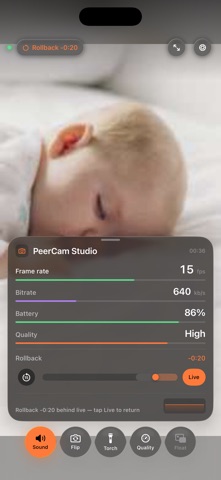
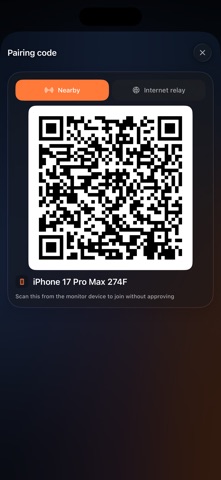
PeerCam turns two iOS devices into a private camera and monitor. Place one device where you want to watch and use the other to see and hear it live. Nearby devices discover each other on the local network or connect directly. No account is required. Included with PeerCam: • Live video and audio over a nearby direct connection • Quick discovery and QR pairing • Remote camera switching, torch, sound, and stream quality controls • Live frame rate, bitrate, battery, uptime, and link indicators • Pinch to zoom and pan the picture on the monitor • Ultra-low-power waiting until a monitor connects • Camera screen dimming, and full blackout • No advertising, analytics SDK, or cloud recording Optional PeerCam Pro subscription: • Night Vision when the camera is in the dark • Picture in Picture on the monitor • Ultra HD quality mode • Extreme Data Saver mode • End-to-end encrypted relay for connecting across different networks Relay servers forward encrypted packets and cannot decrypt or record your video or audio. PeerCam requires two devices running iOS 18 or later. Local Network access is required for nearby connections. Camera and microphone permissions are used only on the device acting as the camera. Terms of Use (EULA): https://www.apple.com/legal/internet-services/itunes/dev/stdeula/
What's new · 1.2
• Night Vision, part of the optional PeerCam Pro subscription: when the camera device is somewhere dark it notices on its own, and the picture it sends can be brightened. • The flip control now says which lens is live — Front or Rear — and the monitor shows it too, so a camera that gets turned around by accident is obvious from either device.
Details